
Mobile Function Blocks
I don't know my version or loader
It happens that sometimes you need to get an item out of the ender chest. First you need to put it down, take an object from it and, preferably, take it with you, and then only with the help of a pickaxe on silk.
The Mobile Function Blocks plugin adds compact functional blocks to the game that can be used by hand only by pressing the PCM.
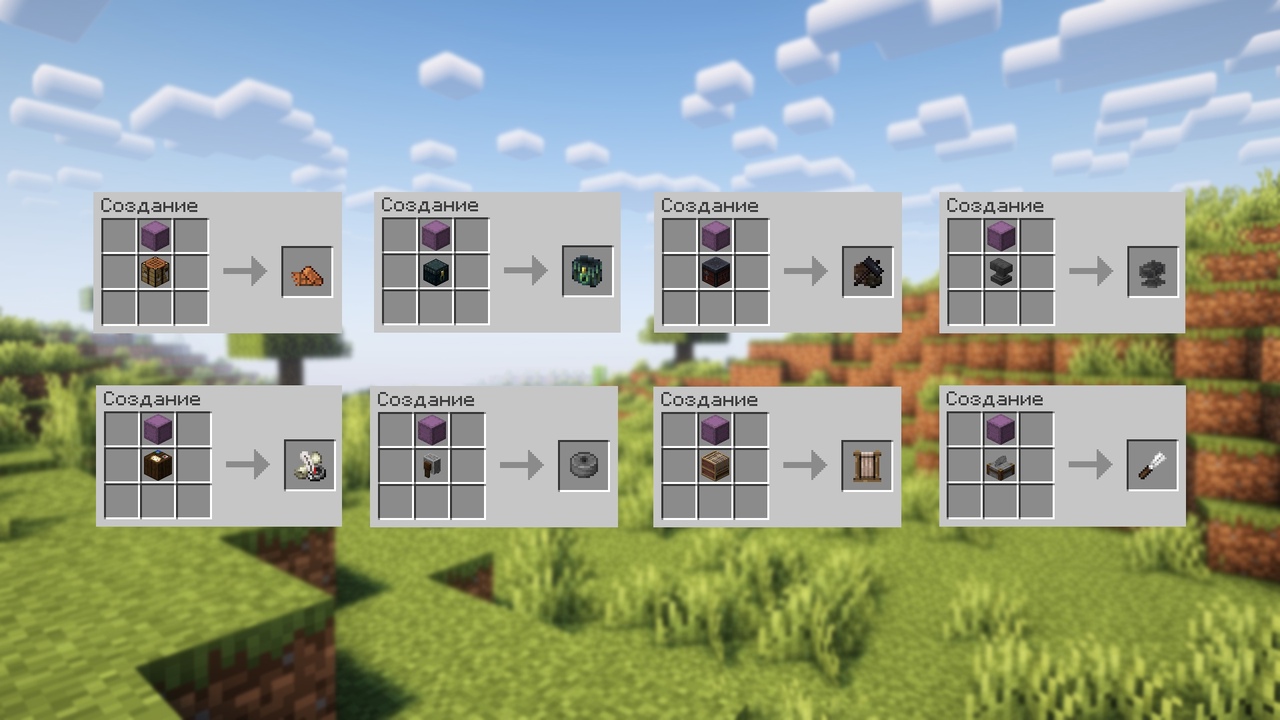
The plugin adds: a compact workbench, an ender chest, a blacksmith's table, an anvil, a cartographer's table, a whetstone, a loom and a stone cutter.
You can get these items using the /givemobilefunctionblocks command, or through crafting (crafting is shown in the picture below)
- Edition: Minecraft Java
- File type: .jar
- Minecraft versions listed: 1.20, 1.20.1, 1.20.2
- How to install: Install the matching mod loader (Forge, Fabric or NeoForge) for your Minecraft version. → Download the .jar. → Put it in the .minecraft/mods folder and launch that loader profile.
- Where to get it: Opens on Modrinth — not every file is mirrored on our own servers.
Install steps are the general flow for this file type — How to install Minecraft Java mods & modpacks walks through it step by step.
- Ships as MobileFunctionBlocks-1.0.jar — drop this file into the mods folder
- Download size: 18 KB
- Download link checked 9 Sept 2026 — working
These come from our own check of the pack file, not from the source page.