
DeathExplosion
Java mod listed for Minecraft 1.20. Downloads from the MC Java Mods app on Android.
⬇ Download on Modrinth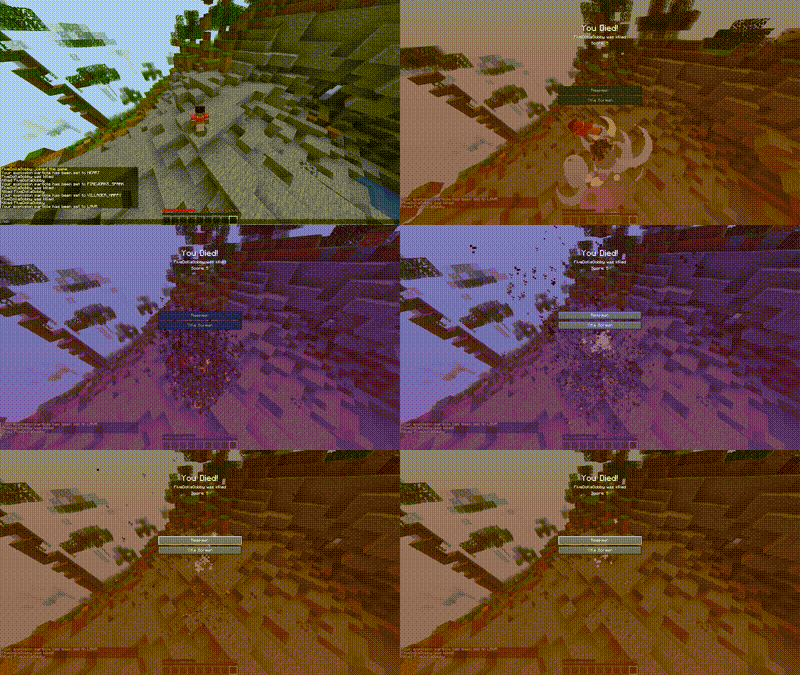

DeathExplosion
Is a highly customizable Spigot plugin designed to enhance the gameplay experience on Minecraft servers by adding dynamic and visually striking effects to player deaths. When a player dies, they explode, creating a visual and physical impact in the game world.

Features:
Configurable Explosions: Control the power of the explosion and whether it breaks blocks around the death site.
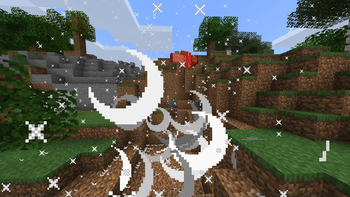
Customizable Particle Effects: Each explosion can trigger a unique particle effect, adding a dramatic flair to player deaths. Server administrators can configure the default particle effect, and players can select their personal preferences if granted permission.
Permission-Based Settings: Integration with server permissions allows fine-grained control over who can trigger explosions and customize their particle effects. This ensures that the feature can be reserved for certain players or events.
GUI for Particle Selection: A user-friendly GUI lets players choose their explosion particle effect from a variety of options, each represented by visually intuitive icons.
Configurable Particle Amounts: The density of the particle effects can be adjusted in the configuration file, allowing server admins to balance aesthetics with performance based on their server's capabilities.
How It Works:
Player Death: When a player with the appropriate permissions dies, an explosion is triggered at their location.
Explosion Effect: The explosion can break blocks and will display a particle effect, both of which are configurable through the config.yml file.
GUI Access: Players with permissions can open a GUI to select their preferred particle effect. This choice is saved to the server, making their selection persistent across sessions.
Permissions Management: Permissions control who can trigger explosions, use specific particle effects, and access the particle selection GUI.
Configuration:
The config.yml file offers several settings:
explosionPower: Specifies the strength of the explosion.
breakBlocks: Determines if the explosion can break blocks.
defaultParticle: Sets the default particle effect used for explosions.
particleAmount: Controls the number of particles used in the effect.
Commands
/detoggleplayerdamage
/deselectparticle
/dereload
/degui
Installation and Setup:
Installation: Drop the plugin JAR file into your server's plugins directory.
Configuration: Adjust the config.yml file as needed.
Permissions: Set up permissions via your server's permission system to control access to various features.
Permissions:
dexplode.gui.access:
    description: Allows access to the particle selection GUI
    default: op
  dexplode.explode:
    description: Allows player to explode on death
    default: false
  dexplode.reload:
    description: Allows reloading the plugin config.yml
    default: op
  dexplode.maingui:
    description: Allows access to the explosion menu GUI
    default: op
  deexplode.toggle.damage:
    description: Allows toggling whether explosions damage players
    default: op
  dexplode.explode.EXPLOSION_HUGE:
    description: Allows using EXPLOSION_HUGE particles
    default: op
  dexplode.explode.FLAME:
    description: Allows using FLAME particles
    default: op
  dexplode.explode.SMOKE_LARGE:
    description: Allows using SMOKE_LARGE particles
    default: op
  dexplode.explode.LAVA:
    description: Allows using LAVA particles
    default: op
  dexplode.explode.HEART:
    description: Allows using HEART particles
    default: op
  dexplode.explode.WATER_DROP:
    description: Allows using WATER_DROP particles
    default: op
  dexplode.explode.VILLAGER_HAPPY:
    description: Allows using VILLAGER_HAPPY particles
    default: op
  dexplode.explode.FIREWORKS_SPARK:
    description: Allows using FIREWORKS_SPARK particles
    default: op
  dexplode.explode.MAGIC_CRIT:
    description: Allows using MAGIC_CRIT particles
    default: op
- Edition: Minecraft Java
- File type: .jar
- Minecraft version listed: 1.20.4
- How to install: Install the matching mod loader (Forge, Fabric or NeoForge) for your Minecraft version. → Download the .jar. → Put it in the .minecraft/mods folder and launch that loader profile.
- Where to get it: Opens on Modrinth — not every file is mirrored on our own servers.
Install steps are the general flow for this file type — How to install Minecraft Java mods & modpacks walks through it step by step.
- Ships as DeathExplosion v1.45.Alpha.jar — drop this file into the mods folder
- Download size: 8 KB
- Download link checked 9 Nov 2026 — working
These come from our own check of the pack file, not from the source page.