
ModsJava
EnterReports
Java mod listed for Minecraft 1.18–26.x. Downloads from the MC Java Mods app on Android.
I don't know my version or loader
Open the Minecraft launcher and look at the profile you play on — it names both, like fabric-loader-1.21.4. The version also shows in the bottom-right corner of the game's main menu.
No loader in the profile name? Then it's plain Minecraft, and these mods won't run — you need Fabric or NeoForge installed first.
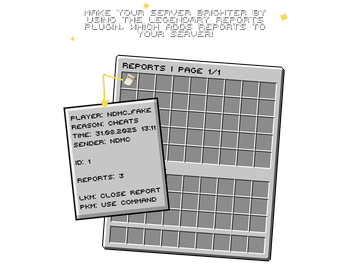

- ⚠️ Combining several reports into one (if they are from the same person).
- 💤 Complete customization of the menu, from the names to custom_model_data!
- 🏝️ Saving the date when the report was created.
- 🍉 The ability to close a report by pressing LMB.
- ⭐ The ability to insert your own command on RMB.
- 💫 The ability to change the maximum number of pages.
- 🔦 The ability to change the slots in which reports may appear.
- 🤩 Admin notifications, during the report.
- ⁉️ Complete modification of all messages (which are written in the chat).
- 📛 Delete a report by ID.
- 📛 Delete all reports from a specific user.
- 📛 Delete multiple reports at once (/r-report <ID or ID'S>).
- ♻️ The ability to use custom_model_data on each of the items.
- 🛡️ Confirmation of deletion via a separate customisable GUI (on/off in config).
- 🔥 Sorting reports by date (new/old) or by count.
- ✏️ Editing the reason for a report without deletion (/edit-report ).
- ⚡ Caching of names for quick tab completion (works instantly even with thousands of reports).
- 📋 White-list of commands for RMB (allow only certain commands).
- 🔑 Separated permissions for each action (view, delete, edit, execute, etc.).
- 🆕 New main command:
/enter-reports(alias:/er). - 💖 Russian and English Config!
📋 Commands
/report <name> <reason>— Send a report./reports [name]— View all reports or reports for a specific player./r-report <id|name>— Delete a report by ID or all reports by player name./edit-report <id> <new reason>— Edit the reason for a report./enter-reports help— Show help./enter-reports reload— Reload the config./enter-reports fake-report <count>— Create fake reports for testing.
🔑 Permissions
entreports.report— Send reports (default: true).entreports.view— View reports.entreports.delete— Delete reports.entreports.edit— Edit report reasons.entreports.execute— Execute RMB command in the menu.entreports.manage— Full management (including deletion).entreports.fake— Create fake reports.entreports.reload— Reload the config.entreports.*— All permissions.

💬 Join our Discord server!
If you have any questions, ideas, or need help with the plugin, feel free to ask. We'll be happy to help you! Since I'm just starting my journey in plugin development, your feedback and support are extremely important to me. Every suggestion helps make the plugin better. Let's improve it together!


🐛 Found a bug? Please report it on Discord — I'll fix it as soon as possible!
⚠️ Latest version of the plugin: 1.5.0
Quick facts
- Edition: Minecraft Java
- File type: .jar
- Minecraft versions listed: 1.18, 1.18.1, 1.18.2
- How to install: Install the matching mod loader (Forge, Fabric or NeoForge) for your Minecraft version. → Download the .jar. → Put it in the .minecraft/mods folder and launch that loader profile.
- Where to get it: Opens on Modrinth — not every file is mirrored on our own servers.
Install steps are the general flow for this file type — How to install Minecraft Java mods & modpacks walks through it step by step.
File checked by MCModsHub
- Ships as EnterReports-1.5.jar — drop this file into the mods folder
- Download size: 44 KB
- Download link checked 19 Oct 2026 — working
These come from our own check of the pack file, not from the source page.