
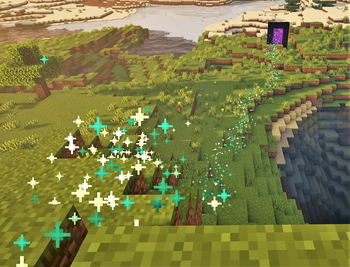
A plugin that connects Journey to BetonQuest.
With all three plugins, you can use a new BetonQuest event in your quests that will trigger navigation to a destination using Journey's navigation system. Also, you allow players to navigate to their own BetonQuest compass locations via the Journey GUI and commands.
In an events file for a Quest Package, you may create a new simple journey event like this:
journeyTo: journey 72;80;-38;world
You may add Journey flags just like in a standard Journey command to do things like change the particle colors, add messages for when the navigation search is complete, or even change the navigation type to use an NPC guide if you also have Citizens and JourneyCitizens:
journeyTo: journey 72;80;-38;world fly=false navigator:type=trail navigator:color=FFD700 navigator:particle=redstone successMessage=(Follow the yellow brick road)
For more information on usage, read the Wiki
- Edition: Minecraft Java
- File type: .jar
- Minecraft versions listed: 1.17, 1.17.1, 1.18
- How to install: Install the matching mod loader (Forge, Fabric or NeoForge) for your Minecraft version. → Download the .jar. → Put it in the .minecraft/mods folder and launch that loader profile.
- Where to get it: Opens on Modrinth — not every file is mirrored on our own servers.
Install steps are the general flow for this file type — How to install Minecraft Java mods & modpacks walks through it step by step.
- Ships as JourneyBetonQuest-1.2.0.jar — drop this file into the mods folder
- Download size: 11 KB
- Download link checked 9 Sept 2026 — working
These come from our own check of the pack file, not from the source page.