
ModsJava
Sponsers
Java mod listed for Minecraft 1.20–26.x. Downloads from the MC Java Mods app on Android.
The plugin is a sponsorship management system for Minecraft that allows players to add, remove, and check sponsorships, view sponsorship history, and…
⬇ Download on ModrinthSponsors
A powerful Minecraft sponsorship management plugin designed for servers, with comprehensive features for managing donations and rewards.
✨ Features
💰 Sponsorship Management
- Add/Remove sponsorship amounts
- Track individual sponsorship totals
- Detailed sponsorship history
- Automatic VIP permissions (with LuckPerms)
📊 Statistics & Analytics
- Real-time sponsorship leaderboard
- Complete sponsors list
- Total sponsorship tracking
- Time-based statistics
- Data export to CSV
💾 Flexible Storage
- MySQL database support
- YAML file storage
- Automatic backup system
- Data import/export
🔌 Integrations
- PlaceholderAPI Support
- Total sponsorship amount
- Player rankings
- Top sponsor stats
- LuckPerms Integration
- Automatic permission management
- VIP status for sponsors
🛠️ Configuration
- Customizable messages
- Flexible backup settings
- Export options
- Permission management
📝 Commands
Basic Commands:
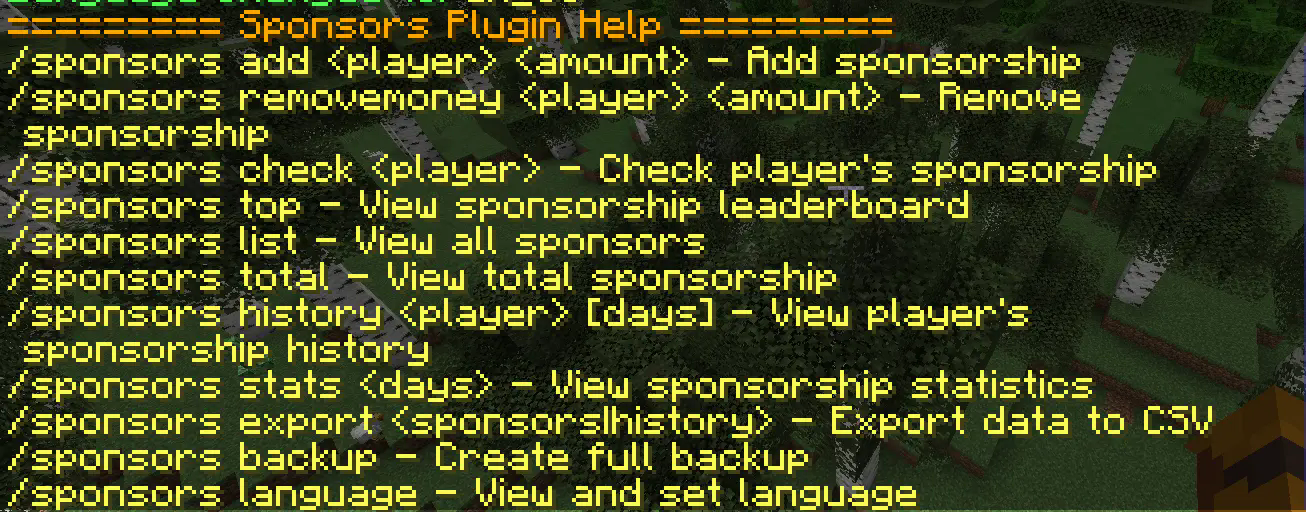
/sponsors add <player> <amount>- Add sponsorship/sponsors check <player>- Check player's amount/sponsors top- View leaderboard/sponsors history <player> [days]- View history
Admin Commands:
/sponsors export <sponsors|history>- Export data/sponsors backup- Create backup/sponsors reload- Reload configuration
⚙️ Installation
- Download the plugin
- Place in your
pluginsfolder - Restart server
- Edit
config.ymlas needed
📋 Requirements
Required:
- Game version 1.20+
Optional:
- PlaceholderAPI
- LuckPerms

Quick facts
- Edition: Minecraft Java
- File type: .jar
- Minecraft versions listed: 1.20, 1.20.1, 1.20.2
- How to install: Install the matching mod loader (Forge, Fabric or NeoForge) for your Minecraft version. → Download the .jar. → Put it in the .minecraft/mods folder and launch that loader profile.
- Where to get it: Opens on Modrinth — not every file is mirrored on our own servers.
Install steps are the general flow for this file type — How to install Minecraft Java mods & modpacks walks through it step by step.
File checked by MCModsHub
- Ships as sponsors-v1.4.jar — drop this file into the mods folder
- Download size: 4.0 MB
- Download link checked 19 Oct 2026 — working
These come from our own check of the pack file, not from the source page.