Simple Server Links
Simple way to add custom links to clients' menu.
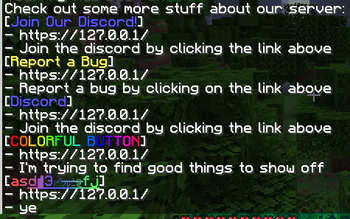
Configuration looks like:
links:
  discord:
    type: none
    url: "https://127.0.0.1/"
    display-name: "<blue>Join Our Discord!</blue>"
    description: "Join the discord by clicking the link above"
  bug-reports:
    type: REPORT_BUG
    url: "https://127.0.0.1/"
    display-name: "<yellow>Report a Bug</yellow>"
    description: "Report a bug by clicking on the link above"
Type:
optional, can write 'none', or leave empty. If type is used, the display name will only show on the command readout, and not the menu buttons.
URL
Must be a valid url, with http:// and stuff before it
Display Name
The display name that will show on the button if a type is not used, and will be used in the command output. Uses MiniMessage formatting, buttons don't parse hover elements though.
Description
Description to show in the chat output.
The chat output can be customized in locale.yml
Commands/Permissions:
/links- Generates the output of the configured links to chat
- Permission:
server-links.links(default:true)
/linkreload- Reloads the link configuration
- Permission:
server-links.reload(default:op)
- Edition: Minecraft Java
- File type: .jar
- Minecraft versions listed: 1.21, 1.21.1, 1.21.2
- How to install: Install the matching mod loader (Forge, Fabric or NeoForge) for your Minecraft version. → Download the .jar. → Put it in the .minecraft/mods folder and launch that loader profile.
- Where to get it: Opens on Modrinth — not every file is mirrored on our own servers.
Install steps are the general flow for this file type — How to install Minecraft Java mods & modpacks walks through it step by step.
- Ships as SimpleServerLinks-1.0.1.jar — drop this file into the mods folder
- Download size: 14 KB
- Download link checked 9 Sept 2026 — working
These come from our own check of the pack file, not from the source page.