
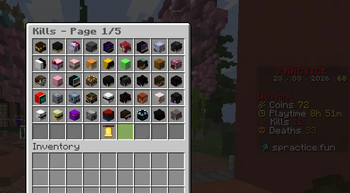

🏆 LBMenu — Leaderboards, Reimagined

Transform your ajLeaderboard / Topper data into a sleek, fully interactive in-game menu. No more boring text lists — give your players a modern, fast, and visually appealing leaderboard experience.
✨ Features
📊 Live Leaderboard Data Display real-time stats directly from ajLeaderboards / Topper
🖥️ Beautiful GUI Menus Clean, customizable menus that players actually enjoy using
⚡ High Performance Smart caching system to reduce lag and improve responsiveness
🔧 Fully Configurable Customize titles, layouts, items, lore, and more via simple config
🔌 Seamless Integration Works perfectly with:
- ajLeaderboards
- Topper
- PlaceholderAPI
🎯 Player-Friendly UX Smooth navigation and instant loading menus
🚀 Why LBMenu?
Most leaderboard plugins show data in plain chat or holograms. LBMenu takes it further by turning that data into a premium GUI system:
💡 Better visibility 💡 Better interaction 💡 Better player engagement
Custom Button Actions
Buttons can execute one or more actions when clicked. Add an actions section to any supported button configuration.
Player Command
Executes a command as the player who clicked the button.
actions:
  - "[playercommand] leaderboards"
Example
back:
  material: RED_STAINED_GLASS_PANE
  name: "&#FF1919Back"
  lore:
    - "&fClick to return"
  slots: 45
  actions:
    - "[playercommand] leaderboards"
Console Command
Executes a command from the server console.
actions:
  - "[consolecommand] give %player% diamond 1"
Example
reward:
material: DIAMOND
name: "7FFFFClaim Reward"
lore:
- "&fClick to claim your reward"
slots: 22
actions:
- "[consolecommand] give %player% diamond 1"
Message
Sends a message to the player.
actions:
  - "[message] &aYou clicked the button!"
Example
info:
  material: BOOK
  name: "&#FFD700Information"
  lore:
    - "&fClick to view information"
  slots: 20
  actions:
    - "[message] &aWelcome to the server!"
Close Menu
Closes the player's currently open inventory.
actions:
  - "[close]"
Example
close:
  material: BARRIER
  name: "&#FF1919Close"
  lore:
    - "&fClick to close this menu"
  slots: 49
  actions:
    - "[close]"
Play Sound
Plays a sound to the player.
actions:
  - "[sound] UI_BUTTON_CLICK"
Example
sound-test:
material: NOTE_BLOCK
name: "7FF55Play Sound"
lore:
- "&fClick to play a sound"
slots: 24
actions:
- "[sound] UI_BUTTON_CLICK"
Multiple Actions
A button can execute multiple actions. Actions are executed in the same order they are defined.
reward:
  material: CHEST
  name: "&#FFD700Claim Reward"
  lore:
    - "&fClick to claim your reward"
  slots: 22
  actions:
    - "[message] &aYou claimed your reward!"
    - "[consolecommand] give %player% diamond 1"
    - "[sound] ENTITY_PLAYER_LEVELUP"
    - "[close]"
When the player clicks this button, it will:
- Send a message to the player.
- Give the player a diamond using a console command.
- Play a level-up sound.
- Close the menu.
Available Actions
| Action | Description |
|---|---|
[playercommand] <command> |
Executes a command as the player |
[consolecommand] <command> |
Executes a command from the console |
[message] <message> |
Sends a message to the player |
[close] |
Closes the currently open menu |
[sound] <sound> |
Plays a sound to the player |
Notes
- Do not include
/before commands. - Multiple actions are executed in configuration order.
- Invalid or unknown action types are ignored safely.
- Use valid Bukkit/Paper sound names with the
[sound]action. %player%can be used where player-name placeholders are supported.
🛠️ Commands
/lbmenu        - Open the leaderboard menu
/lbmenu reload - Reload configuration
🔑 Permissions
lbmenu.open     - اجازه to open the menu
lbmenu.reload   - Reload the plugin
⚙️ Configuration Highlights
- Custom menu layouts
- Configurable refresh & cache timings
- Placeholder-based lore & titles
- Support for multiple leaderboard categories
📦 Requirements
- Paper / Spigot (1.21+)
- PlaceholderAPI
- ajLeaderboards or Topper
💬 Support
Need help or found a bug? Join our support or open an issue we’re happy to help!
- Edition: Minecraft Java
- File type: .jar
- Minecraft versions listed: 1.21, 1.21.1, 1.21.2
- How to install: Install the matching mod loader (Forge, Fabric or NeoForge) for your Minecraft version. → Download the .jar. → Put it in the .minecraft/mods folder and launch that loader profile.
- Where to get it: Opens on Modrinth — not every file is mirrored on our own servers.
Install steps are the general flow for this file type — How to install Minecraft Java mods & modpacks walks through it step by step.
- Ships as lbmenu-1.1.jar — drop this file into the mods folder
- Download size: 114 KB
- Download link checked 9 Sept 2026 — working
These come from our own check of the pack file, not from the source page.