
ServerEasyWeb
 A lightweight Minecraft plugin that serves customizable web pages from a local folder, allowing server owners to create a custom web interface for their Minecraft server. Built for compatibility with Minecraft 1.8–26.1 and Java 8–25, it uses Jetty to serve static files (HTML, CSS, JS) from
 plugins/ServerEasyWeb/web/.
Features
- Customizable Web Interface: Serve static web files (HTML, CSS, JS) from the
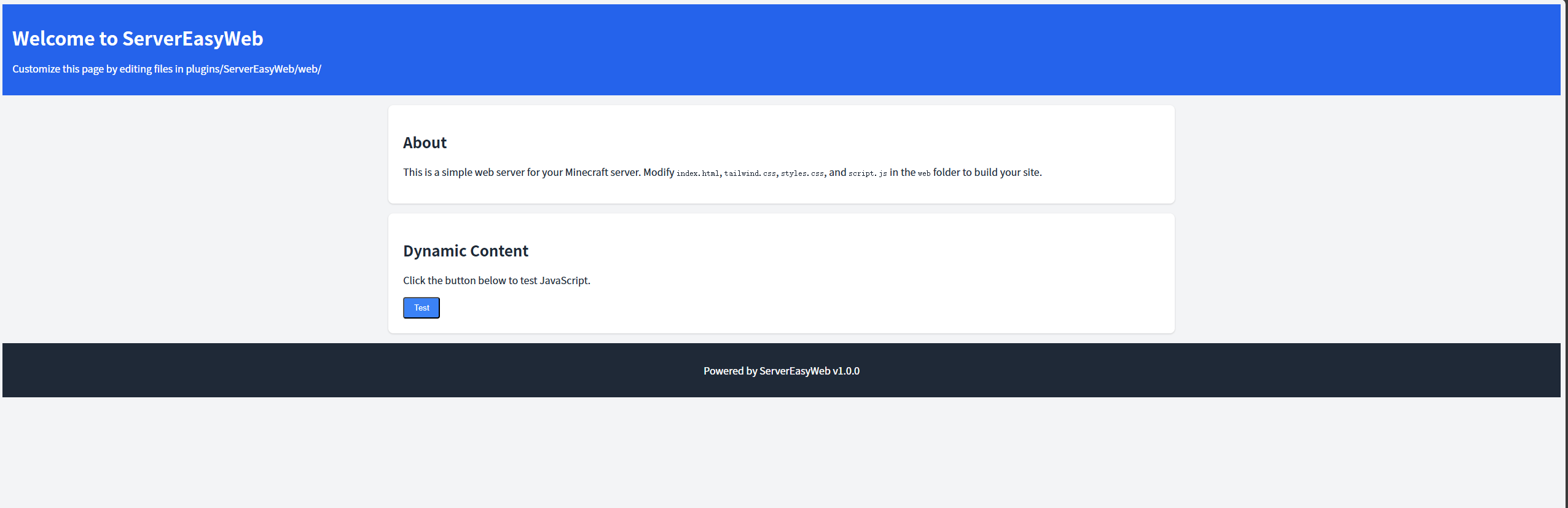
plugins/ServerEasyWeb/web/folder. - Modern Default Design: Includes a responsive default page with Tailwind CSS and basic JavaScript interactivity.
- Reload Command: Use
/servereasyweb reloadto reload the configuration and restart the web server. - Lightweight and Compatible: Works with Minecraft 1.8–1.21 (Spigot/Paper) and avoids legacy material warnings in newer versions.
- No Log Spam: File-serving logs are suppressed to keep the server console clean.
Requirements
- Minecraft Server: Spigot or Paper, versions 1.8–26.1.
- Java: Version 8 or higher.
- Port Access: The configured
web-port(default: 8080) must be open and not used by other applications.
Installation
Download:
- Grab the latest
ServerEasyWeb.jar.
- Grab the latest
Deploy:
- Place the JAR in the
plugins/folder of your Minecraft server. - Delete any existing
plugins/ServerEasyWeb/folder to ensure fresh file extraction.
- Place the JAR in the
Start the Server:
- Run your server to generate the
plugins/ServerEasyWeb/folder, includingconfig.ymland theweb/folder with default files (index.html,styles.css,script.js).
- Run your server to generate the
Verify:
- Check server logs for:
[ServerEasyWeb] Loaded configuration: web-port=8080, check-updates=true [ServerEasyWeb] Extracted web file: .../plugins/ServerEasyWeb/web/index.html [ServerEasyWeb] Web server started on port 8080 - Access
http://<server-ip>:8080/in a browser to see the default web page.
- Check server logs for:
Configuration
The plugin uses plugins/ServerEasyWeb/config.yml for settings:
web-port: 8080
check-updates: true
- web-port: The port for the web server (default: 8080). Ensure it’s open and not in use.
- check-updates: Enable (
true) or disable (false) checking for plugin updates on GitHub.
To apply changes, edit config.yml and run /servereasyweb reload.
Customization
Customize the web interface by editing files in plugins/ServerEasyWeb/web/:
- index.html: The default page, styled with Tailwind CSS (via CDN) and linked to
styles.cssandscript.js. - styles.css: Additional CSS to complement Tailwind.
- script.js: JavaScript for interactivity (e.g., button click events).
- Additional Files: Add images, extra HTML pages, or other assets to the
web/folder. They will be served automatically (e.g.,http://<server-ip>:8080/image.png).
After editing files, refresh the browser to see changes. Use /servereasyweb reload to re-extract default files if needed.
Commands
- /servereasyweb reload:
- Reloads
config.yml, re-extracts web files, and restarts the web server. - Permission:
servereasyweb.admin(default: operators only). - Tab completion: Type
/servereasyweband press Tab to seereload.
- Reloads
Example:
/servereasyweb reload
Permissions
- servereasyweb.admin:
- Allows use of
/servereasyweb reload. - Default: Operators (
op).
- Allows use of
Debugging
If issues occur:
- Web Page Not Loading:
- Check logs for errors like “Failed to start web server.” or “File not found.”
- Verify
plugins/ServerEasyWeb/web/index.htmlexists. - Ensure the
web-port(default: 8080) is open (netstat -tuln | grep 8080on Linux). - Check file permissions (
chmod -R u+rw plugins/ServerEasyWebon Linux).
License
MIT License. See LICENSE for details.
- Edition: Minecraft Java
- File type: .jar
- Minecraft versions listed: 1.8, 1.8.1, 1.8.2
- How to install: Install the matching mod loader (Forge, Fabric or NeoForge) for your Minecraft version. → Download the .jar. → Put it in the .minecraft/mods folder and launch that loader profile.
- Where to get it: Opens on Modrinth — not every file is mirrored on our own servers.
Install steps are the general flow for this file type — How to install Minecraft Java mods & modpacks walks through it step by step.
- Ships as ServerEasyWeb-1.0.0.jar — drop this file into the mods folder
- Download size: 2.0 MB
- Download link checked 10 Sept 2026 — working
These come from our own check of the pack file, not from the source page.