
Admin Item Rename
A lightweight Folia-compatible plugin that lets players rename any item in their hand using full MiniMessage formatting including hex colors, gradients…
I don't know my version or loader

Description
ItemRename is a simple, no-fluff renaming plugin built for Folia and Paper 1.21.1. Give your players the ability to rename any item in their hand with full color and formatting support powered by MiniMessage. Hex codes, gradients, named colors, bold, italic, and every other Adventure tag all work out of the box.
Features
Full MiniMessage formatting support including hex colors, gradients, named colors, bold, italic, underline, and strikethrough. Folia compatible with proper region scheduler usage. Permission based access with a separate admin permission. Optional character limit on rename input configurable in config.yml. Reload command so you never need to restart the server. Clean configurable message prefix.
Commands
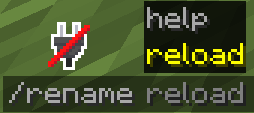
/rename — Renames the item in your main hand using MiniMessage formatting. Requires rename.use. /rename reload — Reloads the plugin config. Requires rename.admin. /rename help — Shows formatting usage and examples. Requires rename.use.
Permissions
rename.use — Allows a player to use /rename and /rename help. Default: op. rename.admin — Allows access to /rename reload and bypasses any restrictions. Default: op.
Formatting Examples
/rename <#FF5500>Flame Sword — Bold orange hex color name.
/rename gradient:#FF0000:#0000FFRainbow Blade — Red to blue gradient.
/rename Golden Crown — Named color with bold.
/rename <#A020F0>Shadow Dagger — Italic purple hex.
Configuration
yaml# Plugin message prefix
prefix: "&8[&7Rename&8]"

# Enable a max character limit on rename input
enable-char-limit: true

# Max characters allowed in rename input (raw text before parsing)
max-chars: 64
- Edition: Minecraft Java
- File type: .jar
- Minecraft versions listed: 1.21, 1.21.1, 1.21.2
- How to install: Install the matching mod loader (Forge, Fabric or NeoForge) for your Minecraft version. → Download the .jar. → Put it in the .minecraft/mods folder and launch that loader profile.
- Where to get it: Opens on Modrinth — not every file is mirrored on our own servers.
Install steps are the general flow for this file type — How to install Minecraft Java mods & modpacks walks through it step by step.
- Ships as Rename-1.0.0.jar — drop this file into the mods folder
- Download size: 6 KB
- Download link checked 9 Sept 2026 — working
These come from our own check of the pack file, not from the source page.