
SimpleCommandsPlus
Java mod listed for Minecraft 1.21. Downloads from the MC Java Mods app on Android.
SimpleCommands lets you create custom Minecraft commands directly in-game. You can add multiple delayed actions, choose who can use them, and use…
⬇ Download on Modrinth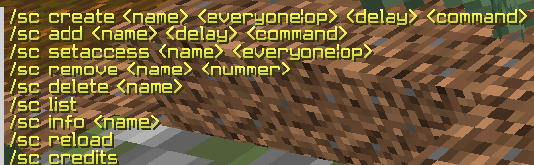
SimpleCommands is a lightweight Paper plugin that lets you create your own custom commands directly in-game.
Create commands like /lobby, /hi, /discord, /rules or anything else you need — without coding and without restarting your server every time.
Features
- Create custom commands in-game
- Add multiple actions to one custom command
- Add delays to actions using milliseconds, seconds, minutes or hours
- Choose who can use a command: everyone or operators only
- Edit command access settings
- Remove single actions from a command
- Delete custom commands
- List and inspect all created commands
- Dynamic command registration, so custom commands can appear as real server commands
- Placeholder support
Commands
/sc create <everyone|op> /sc add /sc setaccess <everyone|op> /sc remove /sc delete /sc list /sc info /sc reload /sc credits
Delay examples
0ms 500ms 1s 10s 2m 1h
Placeholder examples
%player% - Player name %uuid% - Player UUID %world% - Player world %x% - Player X position %y% - Player Y position %z% - Player Z position @s - Replaced with the player name
Example usage
Create a command that sends a message instantly:
/sc create hi everyone 0s msg %player% hey
Now players can use:
/hi
Add more actions to the same command:
/sc add hi 3s say %player% used /hi /sc add hi 10s tp %player% 0 100 0
When /hi is used, the plugin will run multiple commands with the configured delays.
Permissions
simplecommands.admin
Players with this permission can manage SimpleCommands. By default, operators have this permission.
Requirements
- Paper server
- Minecraft 1.21.x
- Java 21
Credits
Created by VoidExeqter Discord: freezy_josef
- Edition: Minecraft Java
- File type: .jar
- Minecraft versions listed: 1.21, 1.21.1, 1.21.2
- How to install: Install the matching mod loader (Forge, Fabric or NeoForge) for your Minecraft version. → Download the .jar. → Put it in the .minecraft/mods folder and launch that loader profile.
- Where to get it: Opens on Modrinth — not every file is mirrored on our own servers.
Install steps are the general flow for this file type — How to install Minecraft Java mods & modpacks walks through it step by step.
- Ships as SimpleCommandsPlus.jar — drop this file into the mods folder
- Download size: 16 KB
- Download link checked 4 Oct 2026 — working
These come from our own check of the pack file, not from the source page.