
Notematic Player
A companion Minecraft audio player plugin and API that plays custom note block music sequences exported from Notematic Studio with offline sync…
⬇ Download on Modrinth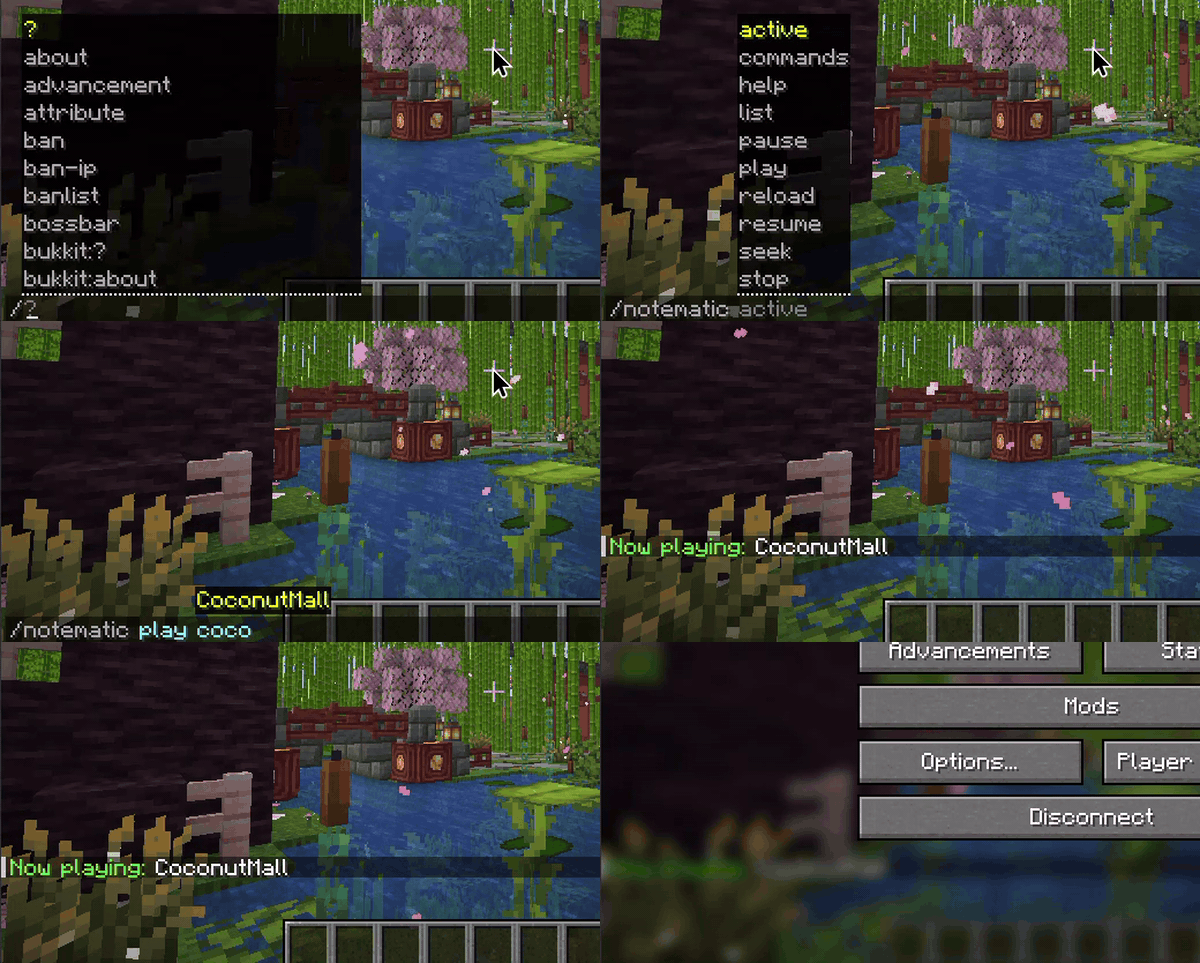
Notematic Player



Notematic Player is a Minecraft Java plugin designed as the companion player for Notematic Studio. It plays custom note block music sequences exported from the studio in .json or .mcfunction formats directly to players or positionally in the world. Beyond standard note block sounds, it can also play any in-game /playsound audio (including custom resource pack sounds) directly.
Features
- Custom Music Playback: Play custom note block arrangements. Supports public and private folders for admin-only access control.
- In-Plugin MIDI Converter: Download and convert MIDI files on the fly directly inside the game using
/notematic create. - Per-Player Personal Volume: Every player can adjust their own personal listening volume via
/notematic volume <val>(saved by UUID). - Offline Sync: If a player disconnects, the playback ticks virtually and resumes in sync when they rejoin.
- Jukebox Persistent Loops: Location-based looping playbacks persist across server restarts and crashes.
- Notematic Studio Companion: Plays files exported directly from the Notematic Studio MIDI converter utility.
Official Addons
Notematic Vocoder
An official sub-addon built on top of Notematic Player's engine. It uses Digital Signal Processing (DSP) to analyze Text-to-Speech audio, extract formant frequencies, and dynamically map them to Minecraft's sound system, allowing note blocks to "talk" in real-time.
- Real-time In-Game Speech: Speak aloud using note blocks via
/<command> <prompt>. - 6-Octave Voice Range: Intelligently maps overlapping frequencies across 5 note block instruments (Bass, Guitar, Harp, Flute, Bell) to bypass Minecraft's default 2-octave limit.
- 100% Server-Side: No mods or resource packs required by players. Fully compatible with vanilla clients.
Commands & Permissions
| Command | Permissions | Short Description |
|---|---|---|
/notematic [help] |
notematic.use |
Displays plugin info, status, and commands menu. |
/notematic play <song> [target] [loop] |
notematic.usenotematic.play.location (for at ...)notematic.play.loop (for loop) |
Plays a song for yourself, a target player, everyone, positionally at a 3D location, or via a moving radio. |
/notematic stop [#ID | song | player] [at <x> <y> <z>] |
notematic.use |
Stops active playbacks (by ID, song, player, or coordinate). |
/notematic seek <#ID | song | player> <value> |
notematic.use |
Seeks forward, backward, or to an absolute time in a playback. |
/notematic pause [#ID | song | player] [at <x> <y> <z>] |
notematic.use |
Pauses active playbacks. |
/notematic resume [#ID | song | player] [at <x> <y> <z>] |
notematic.use |
Resumes paused playbacks. |
/notematic volume <value> |
notematic.use |
Sets your own personal listening comfort volume (0-100%). |
/notematic volume #ID <value> |
notematic.use |
Sets a temporary volume multiplier for a specific active playback instance. |
/notematic volume song <name> <value> |
notematic.admin |
Sets a song's global volume multiplier (Admin only). |
/notematic list |
notematic.use |
Lists all loaded public (and private if admin) songs (names are clickable to play). |
/notematic active |
notematic.use |
Shows all currently playing songs with real-time status. |
/notematic commands [true | false] |
notematic.admin |
Toggles or sets player command usage globally (Admin only). |
/notematic reload |
notematic.admin |
Stops all active songs and reloads the song folder (Admin only). |
/notematic create <name> <url> [opts] |
notematic.create |
Downloads and converts a MIDI file asynchronously. |
/notematic rename <old> <new> |
notematic.admin |
Renames a song file on disk and in the cache (Admin only). |
/notematic admin <action> ... |
notematic.admin |
Manages pseudo-admins (Admin only). |
/notematic blacklist <action> ... |
notematic.admin |
Manages player command blacklist (Admin only). |
Play Command
Starts playing a song. Playback can target yourself, other players, all online players, a physical 3D location, or as a portable radio following you.
- Syntax variations:
/notematic play <song>— Play for yourself./notematic play <song> [player]— Play for a specific player (Admin required)./notematic play <song> <@a | * | all>— Play for all online players (Admin required)./notematic play <song> at <x> <y> <z> [radius] [volume] [loop]— Play at specific coordinates. Sounds play positionally. Supports relative~coordinates./notematic play <song> radio [radius] [volume] [loop]— Plays positional music that tracks the carrier player's coordinates in real-time.
- Examples:
/notematic play test_song/notematic play test_song loop(looping infinitely)/notematic play test_song at ~ ~ ~ 15 50% loop(looping at your position, 15 block hearing radius, 50% volume)/notematic play test_song radio 32(portable boombox following you with a 32-block hearing radius)
Stop Command
Stops active playbacks. Resolved dynamically in search order:
- Unique ID (
#ID): Stops a specific instance (e.g./notematic stop #3). - Song Name: Stops active playbacks of that song.
- Player Name: Stops playbacks listening on that player.
- Examples:
/notematic stop/notematic stop #12/notematic stop test_song/notematic stop at ~ ~ ~(Stop location-based playbacks at current coordinates)
Seek Command
Seeks playbacks forward, backward, or to an absolute time.
- Relative Seek: e.g.,
+10s(forward 10s),-5s(back 5s),+200t(forward 200 ticks). - Absolute Seek: e.g.,
30s(jump to 30s mark),150t(jump to tick 150). - Note: Looping playbacks wrap around using modulo math.
Volume Control
- Personal Volume (
/notematic volume <val>): Sets comfort listening level. Saved by UUID inplayer_volumes.yml. - Instance Volume (
/notematic volume #ID <val>): Sets temporary volume multiplier of a specific playback instance. - Global Volume (
/notematic volume song <name> <val>): Sets base volume level for a song. Stored involumes.yml. - Volume Stacking Formula: The final note volume is calculated as:
baseNoteVolume * songVolumeMultiplier * personalPlayerVolume.
MIDI Creation
Downloads and converts a MIDI file asynchronously. It defaults to the stitching (Makeshift Hack) approach and nolimit (no ticking speed limit), saving files to the public directory.
- Options:
stitching(default): Makeshift Hack approach. Bypasses Minecraft's standard 2-octave limit. When a MIDI note is too high or too low, the plugin automatically switches/stitches instrument sounds (e.g. Bass, Guitar, Harp, Flute, Bell) to cover a full 6-octave range.standard: Standard Minecraft 2-octave limits (notes outside the range are clamped).nolimit(default): Bypasses standard redstone ticking limits. Fast songs tick exactly at their MIDI tempo map speed (up to the 50ms game engine tick limit).limit: Clamps ticking speed to 100ms (standard Redstone tick speed).public(default): Saves the song in the public folder (songs/public/) so anyone on the server can play it.private: Saves the song in the private folder (songs/private/) for admins/Ops only.
- Examples:
/notematic create Pirate_Theme https://example.com/song.mid/notematic create oldschool https://example.com/song.mid standard private
Finding & Hosting MIDI Links:
- BitMidi: Find free MIDI files on BitMidi.com (e.g.,
https://bitmidi.com/scotsong-mid). Right-click the Download MIDI button and copy the link address.- Google Drive: Upload your MIDI file to Google Drive and share it so "Anyone with the link can view". Copy the shareable link (e.g.,
https://drive.google.com/file/d/FILE_ID/view), and use a direct link generator like Lonedev's Google Drive Direct Link Generator to get a direct download link (e.g.,https://drive.google.com/uc?export=view&id=FILE_ID).- GitHub: Upload your MIDI to a public repository. Navigate to the file on GitHub and click the Raw button (or right-click it) and copy the link to get the direct raw URL.
Rename Songs
Renames a song file on disk (both public and private directories) and updates all memory and base volume mappings. (Requires Admin).
- Example:
/notematic rename old_song super_cool_song
Pseudo-Admins Management
Grants administrative privileges for Notematic Player commands to standard players without needing server-level operator status (OP). (Requires true Admin).
- Example:
/notematic admin add Cayde26
Command Blacklist
Blocks specific players from using any Notematic commands. The blacklist persists across server restarts. (Requires Admin).
- Examples:
/notematic blacklist add Steve/notematic blacklist list(Shows all blacklisted players with a clickable GUI to remove them)
Compatibility & Platforms
Notematic Player runs entirely server-sided, meaning vanilla clients do not need to install any mods to hear the music. It is natively compatible with 1.20.6 and 1.21 - 26.2.x on:
- Paper (Recommended)
- Purpur
- Spigot
- Bukkit
Music File Formats & Organization (.json / .mcfunction)
Place your music files in plugins/NotematicPlayer/songs/.
- Public Songs (
/songs/or/songs/public/): Accessible to anyone via/notematic listand play commands. - Private Songs (
/songs/private/): Only accessible to OPs/admins (or players withnotematic.admin).
JSON Format
{
  "tempo": 1.0,
  "notes": [
    {
      "instrument": "harp",
      "note": 1.4142,
      "volume": 0.8,
      "when": 0
    },
    {
      "instrument": "bass",
      "note": 0.7071,
      "volume": 0.6,
      "when": 5
    }
  ]
}
tempo: Speed multiplier (double).1.0plays at normal speed.notes: Array of note events, sorted bywhen.instrument: Instrument name (e.g.harp,piano,bass,bell,flute,guitar,pling,bit,banjo). You can also use any in-game/playsoundidentifier (e.g.,minecraft:entity.cow.ambient,minecraft:block.bell.use, or custom resource pack sounds) by specifying a key containing a.,:, or/.note: Pitch multiplier from0.5to2.0.volume: (Optional) Note-specific volume from0.0to1.0.when: Tick delay relative to the start.
Datapack Format
If you drop an .mcfunction file into the songs folder, the plugin scans for storage modifications to parse the JSON:
data modify storage music sheet set value {"tempo":1,"notes":[{"instrument":"harp","note":1.4142,"when":0}, ...]}
Retrieve the plugin instance from Bukkit's plugin manager:
import me.cayde26.notematicPlayer.NotematicPlayer;
import org.bukkit.Bukkit;

NotematicPlayer api = (NotematicPlayer) Bukkit.getPluginManager().getPlugin("NotematicPlayer");
if (api != null && api.isEnabled()) {
    // Play a song positionally for a player without chat messages
    api.playSong(player, "mysong", false, true);

    // Stop active playbacks for a player
    api.stopSong(player);

    // Get/set a player's personal volume multiplier
    double playerVol = api.getPlayerVolume(player);
    api.setPlayerVolume(player, 0.85);
}
Available API Methods
Playback Control
boolean playSong(Player player, String songName)boolean playSong(Player player, String songName, boolean showChatMessage)boolean playSong(Player player, String songName, boolean showChatMessage, boolean positional)boolean playSong(Player player, String songName, boolean showChatMessage, boolean positional, String initiator)boolean playSongForAll(String songName)boolean playSongForAll(String songName, boolean showChatMessage)boolean playSongForAll(String songName, boolean showChatMessage, boolean positional)boolean playSongForAll(String songName, boolean showChatMessage, boolean positional, String initiator)void stopSong(Player player)void stopSong(Player player, String songName)void stopAllSongs()void pauseSong(Player player)void pauseSong(Player player, String songName)void resumeSong(Player player)void resumeSong(Player player, String songName)void pauseAllSongs()void resumeAllSongs()
Status & Query
boolean isPlaying(Player player)boolean isPaused(Player player)boolean songExists(String songName)List<SongPlayback> getActivePlaybacks()
Volume Adjustments
double getSongVolume(String songName)boolean setSongVolume(String songName, double multiplier)double getPlayerVolume(Player player)void setPlayerVolume(Player player, double volumeMultiplier)
- Ships as notematicplayer-1.0.3.jar — drop this file into the mods folder
- Download size: 69 KB
- Download link checked 23 Aug 2026 — working
These come from our own check of the pack file, not from the source page.