
AdvancedReports
Java mod listed for Minecraft 1.21–26.x. Downloads from the MC Java Mods app on Android.
Reports made simple. AdvancedReports adds a clean native Paper dialog system for player reports, giving staff a fast way to review issues and take action.
I don't know my version or loader
AdvancedReports
For a better Report UI inside Minecraft


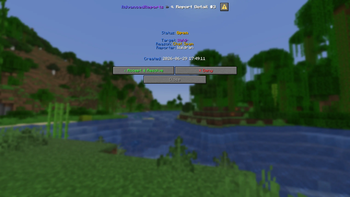
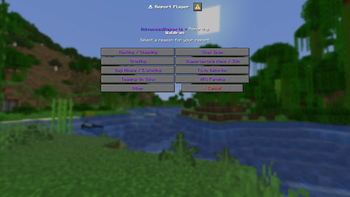
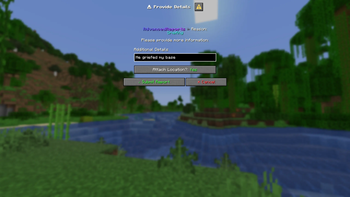
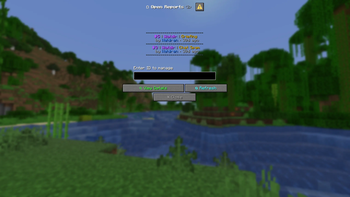
AdvancedReports uses the Paper Dialog Feature to to create a report UI you have never see before. It replaces the chat or sign input with an nice clean looking input ingame:

Features
- Interactive UI without a client side mod
- Optimised with as much async handling as possible
- Works on a Networks using a Velocity plugin or a Redis Databse (optional)
- MySQL / MariaDB Database Support
- Built in optional Bug Reporting with /bugreport
- Discord Webhooks: Everything can be sent to Discord
- Supports many languages, tho translated via AI (English, German, Spanish, and French)
- Clean Design
Requires a 1.21.7+ Paper Server or fork like Purpur or Leaf
If you are using the multi server module, you still have to install the plugin on every backend server.

Commands & Permissions
Player Commands
- /report - Open the dialog to report a player.
- /bugreport - Submit a bug or glitch report.
- /myreports - View the status of your reports.
- /reports - Open the report list. (Staff)
- /bugs - Open the bug report list. (Staff)
- /advancedreports reload - Reload all configurations. (Staff)
Permissions
- advancedreports.report - Allows players to report others. (Default: true)
- advancedreports.bugreport - Allows players to report bugs. (Default: true)
- advancedreports.myreports - Allows players to view their own reports. (Default: true)
- advancedreports.staff - Allows staff to view and manage reports.
- advancedreports.notify - Receive a ping when a new report is created.
- advancedreports.teleport - Allow teleporting to a bug report's location.
- advancedreports.cooldown.bypass - Bypass the report cooldown.
- advancedreports.admin - Access to administrative commands (like reloading the config).
Support
- Edition: Minecraft Java
- File type: .jar
- Minecraft versions listed: 1.21.7, 1.21.8, 1.21.9
- How to install: Install the matching mod loader (Forge, Fabric or NeoForge) for your Minecraft version. → Download the .jar. → Put it in the .minecraft/mods folder and launch that loader profile.
- Where to get it: Opens on Modrinth — not every file is mirrored on our own servers.
Install steps are the general flow for this file type — How to install Minecraft Java mods & modpacks walks through it step by step.
- Ships as AdvancedReports-1.2.0.jar — drop this file into the mods folder
- Download size: 122 KB
- Download link checked 23 Oct 2026 — working
These come from our own check of the pack file, not from the source page.