
Auto Cart System
Java mod listed for Minecraft 26.x. File opened and checked on 16 Oct 2026; downloads from the MC Java Mods app on Android.
New types of carts that can automate digging, laying rails, laying bridges, coupling carts together, train signals, and hopper filters. All so you can…
⬇ Download on Modrinth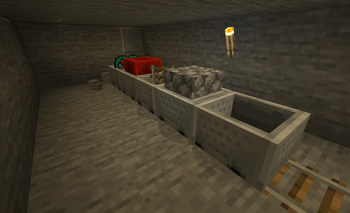
AutoCartSystem
Build rail networks that build themselves. AutoCartSystem turns minecarts into a self-laying, self-mining, self-bridging, driveable train system — so reaching distant places by rail is finally faster than walking there.
Lay track, bore tunnels, span chasms, haul resources, and signal stations, all from carts on the rails. Then couple them into trains and drive them with a real engine.
Requires Minecraft 26.x or newer (Paper)
Why?
The idea of mining with a minecart to send resources back to your base is enticing, but ultimately impractical. The effort required to build the rail network is many times harder than just mining out a mineshaft on foot and walking back.
The preparation needed to bore holes, make bridges, lay the track, and add powered rails is high. Then you start to strip mine near your cart and before you know it you're 1000s of blocks away from your cart in far less time than it took to just get the cart there. This plugin seeks to address those problems and more.
Features
- Coupling carts & trains — couple carts together into recognised trains (up to 20 long). Coupling variants exist for every vanilla and ACS cart type.
- Auto Track Layer — lays rail at the front of the train from its own rail storage, so the track grows as you go.
- Auto Bridge Layer — fills gaps under the rail with blocks from its storage; alternate block types for patterned bridges.
- Drill Cart — mines ahead of the train in a configurable pattern (1x2, 2x1, 2x2 left/right, 3x2, 3x3), consuming pickaxes from its storage.
- Engine Cart — a faster, smarter furnace cart that pulls trains of any size up any hill and can be driven by a player riding a coupled driver cart. Keeps its chunk loaded so the train keeps moving.
- Driver Cart — a dedicated rideable cart that hands the rider control of the train and lets you steer the track/drill left and right.
- Long Hopper — pushes items into any chest up to 20 blocks from the hopper's output end, not just the adjacent block.
- Smart Signs —
[ACS:HOPPER]item filters,[ACS:TRASH]voiding chests, and[ACS:SIGNAL]train signals that slow and stop auto-driven trains until conditions (chest empty/full, timers, clear-track) are met.
Quick start
Drop the AutoCartSystem
.jarinto your server'splugins/folder.Start (or restart) your Paper 26.x+ server. A default
config.ymlis generated on first run.Give yourself some carts and place them on rails:
/acs give engine
/acs give track_layer 64
/acs give drill true
Couple them up, fuel the engine, hop in the cart behind it, and drive forward.
ACS carts are not creative-menu items — there is nothing new to find in the creative inventory. Get them by crafting (see Crafting recipes) or with
/acs give <type>(op by default).
Filling & configuring carts
The functional carts (engine, drill, track layer, bridge layer) each carry their own storage. Sneak + right-click a placed cart to open its storage GUI:
- Engine — drop in fuel (coal, a block of coal, lava buckets, etc.). The engine is a furnace minecart you can't sit in; it's driven from a coupled driver cart. (Right-clicking without sneaking does nothing — it won't accept hand-fed fuel like a vanilla furnace cart.)
- Drill — drop in pickaxes; click the compass button in the GUI to cycle the mining pattern (1x2 → 2x2 right → 2x2 left → 3x2 → 3x3).
- Track layer — drop in rails. Bridge layer — drop in solid blocks rails can sit on.
Each storage only accepts items it can use. Breaking a cart drops whatever it was holding.
Need to tweak a setting? Edit plugins/AutoCartSystem/config.yml, then run /acs reload — no restart required.
Crafting recipes
- Every ACS cart can be crafted in a crafting table and appears in the recipe book (auto-discovered the first time you join). Operators can also use
/acs give. - Recipes are shapeless — drop the listed items anywhere in the grid.
- Crafted carts are fully tagged and behave identically to ones from
/acs give. - Recipes can be disabled server-wide with
recipes.enabled: false(see Configuration); carts then remain available via/acs giveonly. - Note: because ACS carts are special variants of vanilla minecart items, they cannot be added to the creative-mode item search list (that menu is fixed by the client). In creative, obtain them via the recipe book or
/acs give. - Every recipe includes one Iron Chain — the "coupler" hardware that lets the cart link into a train.
| Cart | Ingredients |
|---|---|
| Minecart | Minecart + Iron Chain |
| Driver Cart | Minecart + Lever + Iron Chain |
| Chest Minecart | Chest Minecart + Iron Chain |
| Hopper Minecart | Hopper Minecart + Iron Chain |
| Furnace Minecart | Furnace Minecart + Iron Chain |
| TNT Minecart | TNT Minecart + Iron Chain |
| Auto Track Layer | Minecart + Dispenser + Rail + Iron Chain |
| Auto Bridge Layer | Minecart + Dispenser + Cobblestone + Iron Chain |
| Drill Cart | Minecart + Diamond Pickaxe + Piston + Iron Chain |
| Engine Cart | Furnace Minecart + Block of Redstone + Iron Chain |
| Long Hopper | Hopper + Iron Chain |
- The Long Hopper is the one recipe that produces a block, not a cart — its Iron Chain is a thematic upgrade rather than a train coupler (a long hopper does not couple). See Long Hopper below.
Carts & trains in detail
Coupling carts
- Carts couple only at placement time: place an ACS cart on a rail next to an existing ACS cart and the two link together. Carts that merely run into each other never connect.
- While holding an ACS cart and looking at a rail, any existing cart you would couple to glows, so you can see the connection before you place; the glow clears as soon as you look away.
- Coupled carts create a "train" which is recognized by other ACS systems, and the train is held rigidly in formation (bumping it will not knock carts loose).
- Every ACS cart can couple — there are no separate "coupling" and "non-coupling" variants. A cart links to at most two neighbours (one toward each end), so trains stay in a single line.
- Placing a cart between two separate trains joins them into one (subject to the length limit).
- Breaking a cart decouples it and splits the train cleanly around the gap.
- Trains are limited to 20 carts; once a train reaches that length, no new carts will couple to it.
Auto track layer
- Cart type that lays a track at the front of the train if there is a legal block to place tracks on
- Cart will only look up to 1 block away from the front of the train to lay tracks
- Cart acts as a storage chest that can only hold tracks, and consumes the tracks from its storage to lay track
- If there is more than one track layer in a train they just act as extra storage for tracks
Auto bridge layer
- Cart type that lays bridging blocks at the front of the train if there is a blank spot at the height the train is sitting on
- Cart will only look up to 1 block away from the front of the train to lay tracks
- Cart acts as a storage chest that can only hold blocks and consumes the blocks from its storage to lay bridges
- Can only store blocks that tracks can have tracks on them
- It will take 1 block from each stack in the storage in sequence so patterns can be made by alternating block types
- If there is more than one bridge layer in a train they just act as extra storage
Drill cart
- Cart type that drills directly in front of it in a configurable pattern (2x1, 2x2 right, 2x2 left, 3x2, 3x3)
- Cart acts as a storage chest that can only hold pickaxes which are consumed while mining
- Drill carts can only connect to the front of a train (a lone engine accepts a drill on either side, which then becomes the front), there can only be 1 on a train
- Speed is dependent on the pickaxe being used
- Pickaxes are consumed 2x faster than normal while being used in a drill cart
Engine cart
- Acts like a coal furnace cart but is faster, and is steered by a coupled driver cart (see Driver cart)
- One engine cart can pull a train of any size up any hill
- Engine carts act as a storage chest that can only hold fuel
- Engine carts max speed is the same as a vanilla carts max speed
- Speed is dependent on the fuel being used similar to furnace efficiency for fuel except that a block of coal will provide max speed same as a lava bucket
- Fuel burns at half the rate it does for furnaces (lasts twice as long)
- Engine carts only use fuel while moving
- With no driver cart on the train, the engine is auto-driven: as long as it has fuel it drives the train forward on its own (this is the mode train signals control)
- Engine carts will cause the chunk they are in to stay loaded so the chunk always processes ticks
- The engine cart is always the front of the train (cart #1) — unless there is a drill cart, in which case the drill is #1 and the engine is #2
- A lone engine has a default heading until you couple something to it. The side you place a cart on decides the direction (not the way you are facing): coupling a drill to one side makes that side the front (the engine drives toward the drill); coupling any other cart to one side makes that side the back (the engine drives the other way)
- Once a train has more than just the engine, a drill only couples at the front and nothing couples ahead of the engine or the drill — placements that would break this are not allowed and do not highlight
Driver cart
- A dedicated rideable cart that lets the player riding it control the train — regular rideable minecarts never grant control
- Crafted from a regular minecart, a lever and an iron chain (or
/acs give driver) - Whenever a driver cart is coupled to a train, the engine stops auto-driving even with fuel loaded: the train moves only under the rider's control. An empty driver cart therefore holds the train still
- Ride the driver cart and:
- Press forward or backward to move the train (forward heads toward the front of the train, backward reverses it)
- Press left or right to steer/turn the train: this makes the track layer, bridge layer and drill act to the left or right of the front of the train instead of straight ahead — exactly as if the track bent that way — so the freshly laid/drilled path curves and the train follows it around
- The driver cart can be coupled anywhere behind the engine (it couples onto the back of the train like any non-drill cart)
- Train signals only govern auto-driven (engine, no driver cart) trains — a train with a driver cart ignores signals, since the rider is in control
Long Hopper
- Acts exactly like a regular hopper except that it will push items into chests up to 20 blocks away from the end of the hopper instead of only the chest right next to the end of the hopper
- Obtain one by crafting (Hopper + Iron Chain) or with
/acs give long_hopper— it is a hopper block item, not a cart - Placing it (with the
acs.placepermission) creates a long hopper; breaking it returns the long hopper item so the upgrade is not lost - Disabling
longHopper.enabledmakes placement fail with a message; existing long hoppers stop their long-range push
Sign commands
- All ACS sign commands must start with
[ACS:<TYPE>]on the first line of the sign then followed by the specific command parameters - All signs will have the text transformed to something else to hide the command afterwards
Hopper signs
- You can cause all hoppers (including vanilla hoppers) to only put certain items in a chest by labelling the chest with an ACS sign
- List one item id per line — up to 3 ids (lines 2-4, since the first line is the
[ACS:HOPPER]tag). The chest then accepts any of the listed items - Blank lines between ids are ignored; duplicate ids are collapsed; at least one valid id is required
- Double chests count as one chest: a sign on either half applies to the whole chest, and if both halves are labelled their filters combine (so a double chest can accept up to 6 item types)
- Format:
[ACS:HOPPER]
<ITEM_ID>
<ITEM_ID>
<ITEM_ID>
- Example — a single item:
[ACS:HOPPER]
diamond
- Example — up to three items in one chest (accepts coal, charcoal, or a coal block):
[ACS:HOPPER]
coal
charcoal
coal_block
- The sign will just display the names of the blocks associated with the ITEM_IDs if it works
Trash signs
- A chest labelled with an ACS Trash sign will delete all items inserted into it
- Format:
[ACS:TRASH]
Train signal signs
- Train signals can stop trains until certain conditions are met
- Train signals only work on trains being automatically driven by an engine cart (it does not affect trains being driven by a player)
- Signals that don't meet the condition are considered "red", otherwise they are "green"
- Slows trains down as they approach a red signal until they fully stop or the signal goes green
- Signal signs affect trains as they approach from the direction the sign is facing and must be placed directly beside the track (on the ground or on an block on the ground beside the track)
- Conditions:
ALL_EMPTY- All regular chests on carts (not track layer, bridger layer, drill cart, engine cart) are emptyALL_FULL- All regular chests on carts (not track layer, bridger layer, drill cart, engine cart) are fullALL_FULL_P- All carts that can carry passengers (rideable minecarts) have a player aboard — i.e. there are no empty passenger seats left. Green only when the train has at least one passenger cart and every one is occupied (useful to hold a train at a station until everyone has boarded)WAIT <SECONDS>- Specified amount of seconds has passed, (maximum 600s)NO_TRAIN <TRACKS_FROM_HERE>- If there is no train on the tracks in the specified amount of tracks beyond this sign (checks all connected branches and crossing tracks) (maximum 20 tracks)
- Operators:
- Condition operators work essentially like this
(<CONDITION 1> <OPERATOR> <CONDITION 2>) <OPERATOR> <CONDITION 3>AND <CONDITION>- This condition AND the combined result of the conditions before must be trueOR <CONDITION>- This condition OR the combined result of the conditions before must be true
- Format:
[ACS:SIGNAL]
<CONDITION 1>
<OPERATOR> <CONDITION 2>
<OPERATOR> <CONDITION 3>
- Example 1: This signal will be green when any of the conditions are true, either all the chests are empty, or 30s has passed or there are no trains 10 tracks beyond this point (only one of these needs to be true)
[ACS:SIGNAL]
ALL_EMPTY
OR WAIT 30
OR NO_TRAIN 10
- Example 2: This signal will be green when both of the conditions are true, all the chests are full, and 80s has passed (both conditions must be true)
[ACS:SIGNAL]
ALL_FULL
AND WAIT 80
Examples
Loading and unloading cart systems have always been possible, but now you can keep multiple trains running reliably and use signals to prevent them from crashing into each other. The examples below combine the carts above, the [ACS:SIGNAL] signs, and the long hopper into complete, working setups.
Signals only affect engine-driven trains (not trains a player is driving), so every loop below relies on at least one engine cart per train. See Train signal signs for the full condition/operator reference.
1. Auto-drilling strip mine with a two-train haul loop
The headline setup: a self-digging strip mine that lays its own track, plus a pair of hauler trains that shuttle the ore back to base — all without crashing.
The digging train
Couple a drill cart to the front, an engine cart behind it, and one or more track layer carts loaded with rail. (Add a bridge layer with cobblestone if you expect to cross gaps.) Because a drill is present, the drill is cart #1 and the engine is #2 — it pulls the whole train forward into the rock.
- Fill the drill cart with pickaxes and the track layer with rails.
- As it drives forward it mines the configured pattern (e.g.
THREE_BY_THREE) and lays track behind itself, extending the mine automatically. - A driver can tap left/right to swing the drill/track layer to the side and steer the strip.
Doubling the track into a loop
Lay a second, parallel track alongside the freshly-dug main line and join the ends so it forms a loop: trains run out to the mine face on one rail and back to base on the other. Run two hauler trains on the loop, each an engine cart + chest carts, spaced apart so one is loading at the mine while the other is unloading at base.
Keeping them from colliding
Place signal signs beside the track (on the ground or a block beside it), facing the direction trains approach from.
At the mine face — hold the front train for 5 minutes so you can load it by hand:
[ACS:SIGNAL]
WAIT 300
While it sits there, dump everything you strip-mined — diamonds, coal, emeralds, ores — into its chest carts. When the 5 minutes elapse the signal goes green and it heads home.
Just behind it — keep the second train from rear-ending the first:
[ACS:SIGNAL]
NO_TRAIN 10
This signal stays red while the first train is still within 10 tracks ahead, then goes green once that train has pulled away — so the trailing train only advances into the loading zone after the leader leaves.
At the base drop-off — hold each train until its chests are empty:
[ACS:SIGNAL]
ALL_EMPTY
The train parks over the unload point and won't leave until every regular chest cart has been drained (by hoppers underneath — see the next example), then rolls back out to the mine. Combined, the three signs give you a continuous out-and-back loop where loaded and empty trains never meet.
2. Sorting the haul with long hoppers
The drop-off chest from Example 1 fills with a jumble of materials. Use the long hopper to fan it out into a sorting wall.
- Feed the unload chest into a long hopper, which can push into any chest up to 20 blocks away (configurable via
longHopper.range) instead of only the adjacent block. - Label each destination chest with a [ACS:HOPPER] filter sign so only the matching item lands there:
[ACS:HOPPER]
diamond
[ACS:HOPPER]
coal
[ACS:HOPPER]
emerald
- Point the long hopper at the bank of labelled chests and each material routes itself into its own chest — one diamond chest, one coal chest, one emerald chest, and so on. The long hopper offers each item to the chests in line order (nearest first) and drops it into the first one that accepts it and has room, skipping full chests.
- A filter sign can list up to 3 item ids (one per line), so a single chest can collect a group of related materials:
[ACS:HOPPER]
coal
charcoal
coal_block
- An unlabelled chest acts as a catch-all (accepts everything), so place it — or a chest labelled [ACS:TRASH], which deletes everything inserted into it — at the end of the line to mop up whatever the filtered chests ahead of it didn't claim.
3. Auto-refuelling your engines from sorted coal
Engines burn fuel, and the coal you just sorted in Example 2 can refuel them for free.
- Build a refuelling stop on the loop where the track passes under a chest with a hopper feeding down into it — engine carts act as a fuel-only storage, so a hopper above the track tops them off.
- Fill that chest from the coal chest your long-hopper sorter produced, so strip-mined coal cycles straight back into running the trains.
- Hold the train at the stop just long enough to load fuel. A timed signal works well:
[ACS:SIGNAL]
WAIT 5
- For a smarter version, gate it on the haul cycle — e.g. refuel only on the empty leg by pairing it with the unload stop. Remember engines only consume fuel while moving and burn at half the furnace rate (
engine.fuelBurnRateMultiplier: 0.5), so a short top-up each lap keeps them running indefinitely.
4. Passenger stations with checkpoint stops
The same signals make a passenger line that waits for riders and pauses at each station.
- Build trains of an engine cart + rideable/passenger carts. A station is just a stretch of track beside a platform.
- At each platform, hold the train briefly so passengers can board or hop off:
[ACS:SIGNAL]
WAIT 10
- To run a train only once it is full of riders, gate departure on
ALL_FULL_P— it stays red until every rideable cart has a player aboard, then goes green. Pair it with aWAITso a partly-full train still leaves eventually instead of stranding riders:
[ACS:SIGNAL]
ALL_FULL_P
OR WAIT 60
- Lay the line as a loop with several stations, and run multiple engine trains around it spaced out by
NO_TRAINsignals (as in Example 1) so they never bunch up or collide. - The result: each train pulls in, waits a few seconds for passengers at every checkpoint, then continues around the loop — a hands-free metro line.
Tip: because a driver cart overrides signals (and stops the engine from auto-driving), coupling a driver cart to a train and riding it lets you take manual control and drive it off the automated loop. Leave the driver cart off any train you want to keep running the loop on its own.
Mixing it all together
These build on each other: the strip-mine loop (1) feeds the long-hopper sorter (2), the sorted coal refuels the engines (3), and the same signal patterns drive a passenger network (4). Tune every limit — train length, hopper range, signal distances, wait times — in Configuration, and apply changes live with /acs reload.
Commands
AutoCartSystem provides a single base command.
/acs <subcommand> [args...]
- Aliases:
/autocart,/autocartsystem - Base permission:
acs.command(default: all players)
Running /acs with no arguments (or /acs help) shows the in-game command list. See Permissions for the permission nodes.
/acs reload
Reloads the plugin: re-reads config.yml from disk and re-applies every setting at runtime. No server restart is needed for config changes to take effect.
| Syntax | /acs reload |
| Permission | acs.command.reload (default: op) |
| Example | /acs reload |
/acs give
Gives an ACS item (a cart, or the long hopper block) to a player.
| Syntax | /acs give <type> [amount] [player] |
| Permission | acs.command.give (default: op) |
Arguments
| Arg | Required | Description |
|---|---|---|
type |
yes | The item type (see table below). |
amount |
no | How many items to give (minimum 1). Defaults to 1. |
player |
no | Target player. Defaults to the sender; required when run from console. |
The optional arguments are positional but each is detected by its shape (integer, then a name), so they must appear in the order shown above. Every ACS cart can couple — there is no longer a coupling/non-coupling variant to choose.
Types (case-insensitive)
| Type | Item given |
|---|---|
rideable |
Minecart |
driver |
Driver Cart |
chest |
Chest Minecart |
hopper |
Hopper Minecart |
furnace |
Furnace Minecart |
tnt |
TNT Minecart |
track_layer |
Auto Track Layer |
bridge_layer |
Auto Bridge Layer |
drill |
Drill Cart |
engine |
Engine Cart |
long_hopper |
Long Hopper (a hopper block item, not a cart) |
Examples
/acs give engine            # 1 engine cart to yourself
/acs give drill             # 1 drill cart to yourself
/acs give track_layer 16    # 16 track layers
/acs give chest 4 Steve     # 4 chest minecarts to Steve
/acs give long_hopper 2     # 2 long hoppers to yourself
/acs info
Shows AutoCartSystem details for the cart you are riding, or — if you are not riding one — the cart you are looking at (within 6 blocks). Player-only.
Reported details include cart type, how many carts it is coupled to, drill pattern (drill carts only), and, when the cart belongs to a tracked train: train size, position in train, heading, whether the train has an engine or drill, regular chest count, functional cart count, and the current driver.
| Syntax | /acs info |
| Permission | acs.command.info (default: all players) |
| Example | /acs info |
/acs help
Lists the subcommands above with their usage. Requires only the base acs.command permission.
| Syntax | /acs help |
| Permission | acs.command |
| Example | /acs help |
Configuration
All numbers and most features can be enabled or disabled in the config file (plugins/AutoCartSystem/config.yml).
Most features have a enabled master toggle. Numeric limits are tunable. After editing the file, apply changes at runtime with /acs reload — no server restart required.
Coupling carts (coupling)
Controls placement-time coupling (and its placement highlight) that joins carts into a recognised "train".
| Key | Purpose | Type | Default |
|---|---|---|---|
coupling.enabled |
Master toggle for coupling. When off, placed carts never couple, the placement highlight is hidden, and coupled trains lose their collision immunity. | boolean | true |
coupling.maxTrainLength |
Maximum number of carts in a single coupled train. No new carts couple once this length is reached. | integer | 20 |
Auto Track Layer (trackLayer)
The track layer cart lays rail at the front of the train.
| Key | Purpose | Type | Default |
|---|---|---|---|
trackLayer.enabled |
Master toggle for the track layer cart. | boolean | true |
trackLayer.lookAhead |
How many blocks ahead of the train front the layer looks to place rail. | integer | 1 |
Auto Bridge Layer (bridgeLayer)
The bridge layer cart lays bridging blocks ahead of the train when crossing a gap.
| Key | Purpose | Type | Default |
|---|---|---|---|
bridgeLayer.enabled |
Master toggle for the bridge layer cart. | boolean | true |
bridgeLayer.lookAhead |
How many blocks ahead of the train front the bridger looks to place a block. | integer | 1 |
Drill Cart (drill)
The drill cart mines blocks directly ahead of the train in a configurable pattern.
| Key | Purpose | Type | Default |
|---|---|---|---|
drill.enabled |
Master toggle for the drill cart. | boolean | true |
drill.defaultPattern |
Default mining pattern for newly created drill carts. One of: ONE_BY_TWO, TWO_BY_ONE, TWO_BY_TWO_RIGHT, TWO_BY_TWO_LEFT, THREE_BY_TWO, THREE_BY_THREE. |
string (enum) | ONE_BY_TWO |
drill.pickaxeConsumptionMultiplier |
Pickaxes are consumed this many times faster than normal durability loss. | decimal | 2.0 |
Engine Cart (engine)
The engine cart powers the train and can be driven by a player.
| Key | Purpose | Type | Default |
|---|---|---|---|
engine.enabled |
Master toggle for the engine cart. | boolean | true |
engine.fuelBurnRateMultiplier |
Fuel burns at this fraction of the furnace rate (0.5 => fuel lasts twice as long). |
decimal | 0.5 |
engine.maxSpeed |
Maximum engine speed in blocks/tick. Vanilla minecart max speed is 0.4. |
decimal | 0.4 |
Long Hopper (longHopper)
The long hopper pushes items into chests far beyond the block directly adjacent to it.
| Key | Purpose | Type | Default |
|---|---|---|---|
longHopper.enabled |
Master toggle for the long hopper. | boolean | true |
longHopper.range |
Maximum distance (in blocks) from the hopper output end to a target chest. | integer | 20 |
longHopper.reach |
How far the long hopper reaches per tick when searching for a target. | integer | 20 |
Recipes (recipes)
Controls the crafting recipes that produce ACS cart items (see Crafting recipes).
| Key | Purpose | Type | Default |
|---|---|---|---|
recipes.enabled |
Master toggle for ACS cart crafting recipes. When false, carts are only obtainable via /acs give. |
boolean | true |
Signs (signs)
Controls all ACS sign command handling.
| Key | Purpose | Type | Default |
|---|---|---|---|
signs.enabled |
Master toggle for all ACS sign command handling (HOPPER, TRASH, SIGNAL). |
boolean | true |
Signals (signals)
Controls engine train signal signs ([ACS:SIGNAL]).
| Key | Purpose | Type | Default |
|---|---|---|---|
signals.enabled |
Master toggle for engine train signal signs. | boolean | true |
signals.noTrainMaxTracks |
Maximum tracks a NO_TRAIN condition may scan ahead. |
integer | 20 |
signals.waitMaxSeconds |
Maximum seconds a WAIT condition may specify. |
integer | 600 |
signals.scanAhead |
How many rail blocks ahead of the train front to scan for signal signs each tick. | integer | 8 |
signals.stopDistance |
Distance (in blocks) over which an auto-driven train ramps down to a stop as it approaches a red signal. | decimal | 6.0 |
Debug (debug)
| Key | Purpose | Type | Default |
|---|---|---|---|
debug |
Enables verbose console logging (e.g. train front/heading changes) for troubleshooting. | boolean | false |
Permissions
AutoCartSystem declares the permission nodes below in plugin.yml. The default column shows who has the node out of the box:
true— granted to all players by default.op— granted only to server operators by default.
Any node can be overridden per-group or per-player with your permissions plugin.
Placement and use
These control who can place ACS items to create the special carts (and the long hopper block).
| Node | Grants | Default |
|---|---|---|
acs.place |
Placing ACS items: cart items to create special carts, and the long hopper item to create a long hopper. | true |
Signs
These control which ACS sign types a player may create.
| Node | Grants | Default |
|---|---|---|
acs.sign.hopper |
Creating [ACS:HOPPER] item-filter signs. |
true |
acs.sign.trash |
Creating [ACS:TRASH] signs. |
true |
acs.sign.signal |
Creating [ACS:SIGNAL] train signal signs. |
true |
Commands and admin
These control access to the /acs command and its subcommands.
| Node | Grants | Default |
|---|---|---|
acs.command |
Base access to the /acs command. |
true |
acs.command.info |
Using /acs info. |
true |
acs.command.reload |
Using /acs reload to reload configuration. |
op |
acs.command.give |
Using /acs give to spawn ACS cart items. |
op |
- Edition: Minecraft Java
- File type: .jar
- Minecraft versions listed: 26.1, 26.1.1, 26.1.2
- How to install: Install the matching mod loader (Forge, Fabric or NeoForge) for your Minecraft version. → Download the .jar. → Put it in the .minecraft/mods folder and launch that loader profile.
- Where to get it: Opens on Modrinth — not every file is mirrored on our own servers.
Install steps are the general flow for this file type — How to install Minecraft Java mods & modpacks walks through it step by step.
- Ships as AutoCartSystem-1.11.1.jar — drop this file into the mods folder
- Download size: 158 KB
- Download link checked 24 Oct 2026 — working
These come from our own check of the pack file, not from the source page.