
🌍 EcoSystems: The Balance of the World in Your Hands
Take survival in Minecraft to a whole new level! EcoSystems introduces a living, interconnected mechanic based on three core pillars: Fauna, Flora, and Pollution. Every single action you take has a direct impact on the ecosystem of the chunk you are in. Will you be a protector of nature, or the architect of an environmental apocalypse?
⚙️ Core Features
🌿 Flora & 🦌 Fauna in Peril
The world reacts dynamically to how you treat its resources and inhabitants.
- Deforestation: If you chop down too many trees without replanting, the Flora level will drop drastically.
- Overhunting: Killing too many animals causes the Fauna level to plummet. When fauna is critically low, wolves will become aggressive, attacking players and other animals alike in a desperate struggle to survive.
🏭 The Threat of Pollution
Running too many active furnaces at once will rapidly increase Pollution levels. If you don't plant trees to purify the air, the environment will quickly spiral out of control:
- 🌧️ Ash & Acid Rain: The sky will darken, dropping ash from above. If pollution reaches extreme levels, the rain turns into acid, damaging anyone exposed to it.
- 🌾 Stunted Agriculture: Crops will grow significantly slower due to the lack of nutrients and clean sunlight.
- ☣️ Toxic Air: Breathing becomes a nightmare. Staying too long in a polluted chunk inflicts constant damage. If you ignore the warnings and remain exposed, you will eventually face a fatal lung failure.
- 🐄 Mutations: Extreme toxicity and radiation can cause terrifying mutant cows to spawn in the area.
🌐 Chunk-Based Propagation (Dynamic Expansion)
The system is fully localized and realistic. Pollution is calculated per chunk. However, toxicity doesn't stay trapped: if a specific chunk reaches critical pollution levels, it will gradually contaminate its adjacent chunks, spreading the environmental disaster across your world.
✨ Commands & Permissions
| Command | Description | Permission |
|---|---|---|
/es info |
It displays information about the ecosystem of the chunk where you are standing... | op |
🛠️ Survival Tools
To thrive in this unforgiving environment, you have access to essential tools:
- 🕰️ Eco-Meter (Condition Tracker): Right-click the air while holding a Clock to display the exact Fauna, Flora, and Pollution levels of the chunk you are currently standing in.
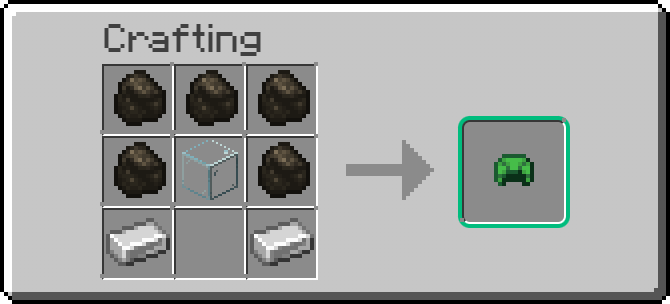
- 🎭 Gas Mask: Craft a custom gas mask to protect yourself from toxic air and prevent the deadly side effects of pollution while working in industrial areas.
🚀 Installation
Getting started is simple and seamless, with no extra setup required:
- Download the EcoSystems
.jarfile. - Drop it into your server's
pluginsfolder. - Start (or restart) your server, and the ecosystem simulation will begin immediately!
💡 Developer's Tip: Don't forget to plant trees! They are your best defense against the spread of pollution. Good luck trying to maintain the balance of your world!
💬 Support & Community
If you run into any issues, have questions, or want to suggest new features, feel free to reach out!
- Join the community: Join our Discord Server
- Contact via Email:
renkucraftgames@gmail.com
☕ Support the Project
If you enjoy EcoSystems and want to support its development, consider buying me a coffee! Your donations help keep the project alive and moving forward.
- Donate via PayPal: Buy Me a Coffee / Donate
- Edition: Minecraft Java
- File type: .jar
- Minecraft version listed: 26.1.2
- How to install: Install the matching mod loader (Forge, Fabric or NeoForge) for your Minecraft version. → Download the .jar. → Put it in the .minecraft/mods folder and launch that loader profile.
- Where to get it: Opens on Modrinth — not every file is mirrored on our own servers.
Install steps are the general flow for this file type — How to install Minecraft Java mods & modpacks walks through it step by step.
- Ships as EcoSystems-0.0.1-PREVIEW.jar — drop this file into the mods folder
- Download size: 19 KB
- Download link checked 14 Sept 2026 — working
These come from our own check of the pack file, not from the source page.