
Wireless Hopper
A Paper Plugin that adds Wireless Hoppers to your server. Replace your old long and laggy hopper chains with a single Wireless Hopper.
⬇ Download on Modrinth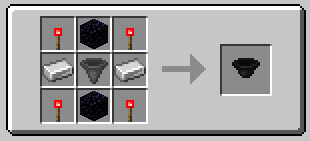
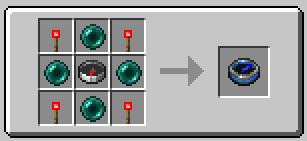
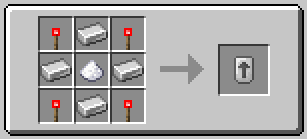
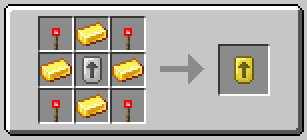
WirelessHopper
A Paper Plugin that adds a new way to transfer items wirelessly between containers.
Inspired by the idea of improving Minecraft's storage systems, WirelessHopper allows you to craft special hoppers that can move items without needing physical hopper lines.
Butwhatdoesitdo?
After installing the plugin, players can craft Wireless Hoppers that work like normal hoppers but with a wireless item transfer system.
Instead of connecting hoppers with long chains, you can link a Wireless Hopper to any container and transfer items directly over distance.
Each Wireless Hopper has its own settings and upgrades to customize how it works.
You can configure:
- where items should go
- which items are allowed or blocked
- whether redstone should control the hopper
To connect a Wireless Hopper to a container, you use the Linker Tool. The Linker allows you to select a target container:
- Right click a container with the Linker
- The container gets saved as the destination
- Put the Linker into the Wireless Hopper
- The hopper now knows where to send items
The connection stays saved, even after server restarts.
(The Wireless Hopper is a Bamboo Mosaic Slab with custom Texture and custom functions. Placing Bamboo Mosaic Slabs manually gets blocked with this Plugin.)
Upgrades
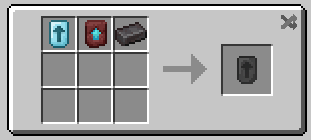
Wireless Hoppers can be upgraded to improve their performance. Without upgrades it moves 1 Item every 8 Ticks.
Available upgrades:
- Iron Upgrade - 2 Items every 6 Ticks
- Gold Upgrade - 4 Items every 4 Ticks
- Diamond Upgrade - 8 Items every 2 Ticks
- Netherite Upgrade - 16 Items every Tick
More upgrades can be added in the future.
Features
- Controlled with Redstone.
You can enable or disable redstone dependency:
- Always active
- Only active with Redstone signal
- Only active without Redstone signal
This allows creating automated systems with levers, clocks, and other Redstone machines.
- Filter Items
You can use Blacklist and Whitelist There are 27 slots that you can fill with items you want to filter. If all slots are empty, the filter is inactive
- Performance Optimized
Because it does not use normal hoppers and prevents long hopper chains, it also improves performance
Installation
Just put the Jar file into the Plugin folder of your Paper server.
No additional plugins are required.
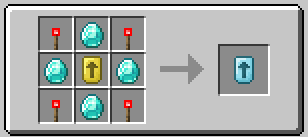
After starting the server, the crafting recipe and commands will automatically be available.
Feedback
Development of this plugin is still ongoing.
Bug reports, suggestions and ideas are welcome.
Feel free to use the Issue tab on GitHub for feedback.
- Edition: Minecraft Java
- File type: .jar
- Minecraft version listed: 1.21.5
- How to install: Install the matching mod loader (Forge, Fabric or NeoForge) for your Minecraft version. → Download the .jar. → Put it in the .minecraft/mods folder and launch that loader profile.
- Where to get it: Opens on Modrinth — not every file is mirrored on our own servers.
Install steps are the general flow for this file type — How to install Minecraft Java mods & modpacks walks through it step by step.
- Ships as Wireless Hoppers v2.1 mc1.21.5.jar — drop this file into the mods folder
- Download size: 82 KB
- Download link checked 14 Sept 2026 — working
These come from our own check of the pack file, not from the source page.