
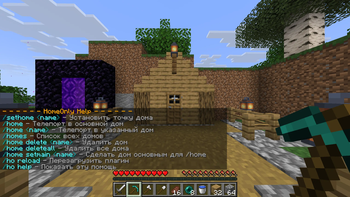
🏠 HomeOnly
This is a simple plugin for managing teleportation points (homes). It was created and tested on Paper 1.21.11, but it is very likely to work on Purpur, Spigot, and Bukkit of the same version.
✨ Features
- Multiple Homes: Create multiple homes and give them names.
- Main Home: The
/homecommand without a name teleports you to the home marked as the main one. - Multilingual: Two standard languages: Russian and English. Easy to add your own.
- Permissions: LuckPerms support.
- Effects: Ender pearl sound upon teleportation.
🔑 Commands and Permissions
| Command | Description | Permissions |
|---|---|---|
/sethome <name> |
Set a home (default name is "home") | homeonly.player |
/home |
Teleport to the main home | homeonly.player |
/home <name> |
Teleport to the specified home | homeonly.player |
/homes |
Show the list of all your homes | homeonly.player |
/home setmain <name> |
Make the specified home the main one. Typing /home without a name teleports you to the home marked as your main home |
homeonly.player |
/home delete <name> |
Delete the specified home | homeonly.player |
/home deleteall |
Delete ALL homes (requires confirmation) | homeonly.player |
/ho help |
Show help | homeonly.player |
/ho reload |
Reload the config and language files | homeonly.reload |
| - | Ignore the /home cooldown |
homeonly.bypass.cooldown |
| - | Instant teleportation (no delay) | homeonly.bypass.delay |
| - | Teleport is not cancelled by movement | homeonly.bypass.movement |
| - | Limit the maximum number of homes (any number) | homeonly.maxhomes.5 |
| - | Unlimited number of homes | homeonly.maxhomes.* |
⚙️ Configuration
config.yml
settings:
  language: en
  teleport-delay: 3
  teleport-cooldown: 10
  default-home-limit: 2
  teleport-sound: ENTITY_ENDERMAN_TELEPORT
  teleport-sound-volume: 1.0
  teleport-sound-pitch: 1.0
  sound-enabled: true
  movement-check: true
  cooldown-enabled: true
  delay-enabled: true
Quick facts
- Edition: Minecraft Java
- File type: .jar
- Minecraft version listed: 1.21.11
- How to install: Install the matching mod loader (Forge, Fabric or NeoForge) for your Minecraft version. → Download the .jar. → Put it in the .minecraft/mods folder and launch that loader profile.
- Where to get it: Opens on Modrinth — not every file is mirrored on our own servers.
Install steps are the general flow for this file type — How to install Minecraft Java mods & modpacks walks through it step by step.
Verified by MCModsHub
- Ships as HomeOnly-1.0.0.jar — drop this file into the mods folder
- Download size: 16 KB
- Download link checked 24 Aug 2026 — working
These come from our own check of the pack file, not from the source page.