
VortexSellChests
Java mod listed for Minecraft 1.18–26.x. Downloads from the MC Java Mods app on Android.
Automated sell chests with item collection, filtering, upgrades, fuel support, and economy integration along with infinite storage chests
⬇ Download on Modrinth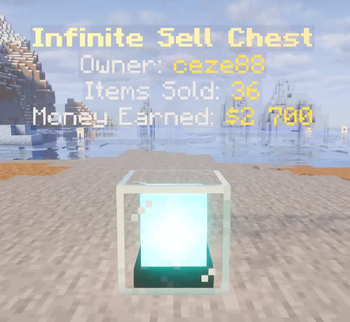


VortexSellChest
VortexSellChest is a server-side container automation plugin for Spigot/Paper Minecraft servers (1.18.2+). It allows server administrators to create custom containers (using any block type) that automatically collect items dropped in the surrounding area, store items in high-capacity stack limits, and sell contents using configurable price multipliers.
Why Choose VortexSellChest?
Managing large-scale economies on Skyblock, Factions, or Survival servers often results in performance bottlenecks due to massive hopper networks and large amounts of item entities floating in chunks. VortexSellChest replaces separate plugins for hopper performance, item vacuuming, auto-selling, and storage chests by providing:
- Reduced Server Lag: The vacuum collection engine pulls dropped items directly from the chunk into the chest inventory, preventing entity buildup and hopper-checking overhead.
- Automation Modes: Replaces separate plugins for auto-selling, item collection, and high-capacity storage by combining all three into a single tiered-progression container.
- Balanced Resource Sinks: Features configurable fuel requirements (using items or in-game money) and upgrade paths to keep server economies balanced.
Key Features
Multiple Container Modes
- Sell Chests: Automatically sell collected items at set intervals using a configurable price multiplier.
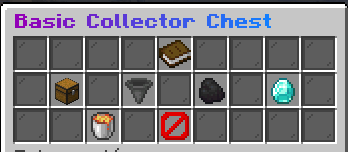
- Collector Chests: Vacuum items from surrounding chunks but do not sell them, acting purely as high-speed collection hubs.
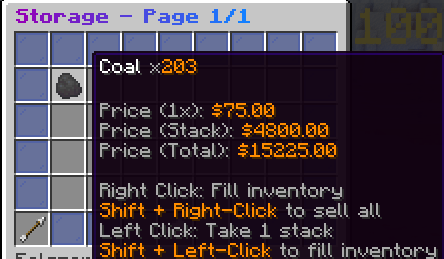
- Storage Chests: Provide high-capacity, fixed-slot storage with custom stack limits (up to 5,000+ items per type) with manual deposit and withdrawal.
Collection & Filtering
- Smart Area Vacuuming: Pulls dropped items within a configurable chunk radius directly into the chest, bypasses hoppers, and supports instant collection upon entity spawn.
- Granular Item Filtering: A built-in GUI filter menu allows players to whitelist, blacklist, ignore, or automatically destroy specific item types.
Boosters & Progression
- Global & Personal Boosters: Activate multipliers for sell prices (e.g., Double Sell, Triple Sell) or collection rates server-wide or per-player. Active boosters display visual countdowns via boss bars.
- Tiered Upgrades: Players can upgrade containers using in-game currency to expand storage capacity, increase collection radius, and reduce selling intervals.
- Fuel Economy: Require container power using fuel items (like Coal Blocks) or direct monetary purchases.
Interface & Analytics
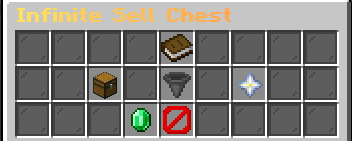
- Customizable GUIs: Fully customize GUI titles, item placements, and action items in configuration files.
- High-Limit Storage GUI: Storage chest inventories support custom stack counts beyond normal vanilla limits, showing item prices and total values in the lore.
- Dynamic Holograms: Displays real-time status updates above each chest (such as owner name, fuel, items sold, and money earned) using native armor stands.
- Live GUI Analytics: Tracks and displays statistics in the chest GUI, including items sold per minute and hourly profits.
Storage Database
- Database Options: Saves placed container locations and contents to H2 (local file-based storage) or external MySQL/MariaDB databases.
How It Works
For Players
- Placement: Place a SellChest block. The chest material can be configured to use any block type (such as Chests, Ender Chests, Barrels, or Beacons).
- Access: Right-click the block to open the main GUI. Inspect your collection stats, configure item filters, or buy fuel.
- Storage Interaction: In the storage menu, click to retrieve or deposit items, or use actions like Shift+Right-Click to sell all stored items instantly.
For Administrators
- Chest Setup: Define container tiers, multipliers, materials, and holograms in
plugins/VortexSellChest/chests/default.yml. - Booster Setup: Define sell and collection multipliers, duration, and boss bar styles in
plugins/VortexSellChest/boosters/default.yml. - Fuel Setup: Define fuel item materials and cost per hour in
plugins/VortexSellChest/fuels/.
System Requirements & Dependencies
Compatibility
- Server Platforms: Spigot, Paper, or compatible forks.
- Minecraft Versions: 1.18.2 and above.
Dependencies
- Vault & a compatible economy plugin (Optional - required for money-based upgrades, fuel purchases, and item selling).
- Edition: Minecraft Java
- File type: .jar
- Minecraft versions listed: 1.18, 1.18.1, 1.18.2
- How to install: Install the matching mod loader (Forge, Fabric or NeoForge) for your Minecraft version. → Download the .jar. → Put it in the .minecraft/mods folder and launch that loader profile.
- Where to get it: Opens on Modrinth — not every file is mirrored on our own servers.
Install steps are the general flow for this file type — How to install Minecraft Java mods & modpacks walks through it step by step.
- Ships as VortexSellChests-2.0.0.jar — drop this file into the mods folder
- Download size: 3.8 MB
- Download link checked 25 Oct 2026 — working
These come from our own check of the pack file, not from the source page.