
PlugLoad
⚡ PlugLoad is a clean, live plugin management tool for Bukkit, Spigot, Paper, and Purpur servers which allows you to load, unload and reload plugins while…
I don't know my version or loader

⚡PlugLoad⚡
⚡ PlugLoad is a clean, command-only live plugin management tool for Bukkit, Spigot, Paper, and Purpur servers which allows you to load, unload and reload plugins while the server is running
It helps server administrators detect, load, unload, and reload plugins from the plugins folder
⚠️ Important safety notice
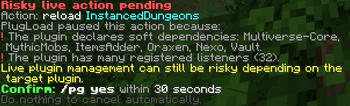
Live plugin loading, unloading, and reloading is never guaranteed to be fully safe on Bukkit-based servers. Some plugins keep background tasks, static state, services, hooks, classloader references, database connections, or dependencies that cannot always be cleaned perfectly while the server is running.
PlugLoad includes risk detection, warnings, confirmation prompts, cleanup attempts, and error logging, but the final safety of an action depends on the target plugin. The server administrator takes full responsibility for using this plugin.
✨ Features
- Command-only workflow with
/plugloadand/pg - Detects enabled plugins, disabled plugins, and unloaded plugin
.jarfiles - Lightweight plugin cache refresh
- Dynamic tab completion based on current plugin state
- Load plugins from the server
pluginsfolder - Unload plugins with careful Bukkit cleanup steps
- Reload plugins through unload + load where possible
- Safety confirmation system for risky actions
- Console logging for important actions
- Error log file at
plugins/PlugLoad/logs/errors.log - MiniMessage formatting when available, with graceful legacy fallback
🧭 Commands
| Command | Description |
|---|---|
/pg help |
Shows the command list |
/pg list |
Lists enabled, disabled, and unloaded plugin jars |
/pg load <plugin> |
Loads a plugin from the plugins folder |
/pg unload <plugin> |
Unloads a currently loaded plugin |
/pg reload <plugin> |
Reloads a currently loaded plugin |
/pg yes |
Confirms a pending risky action |
/plugload can be used instead of /pg.
🔐 Permissions
| Permission | Default | Description |
|---|---|---|
plugload.admin |
OP | Allows use of all PlugLoad commands |
🛡️ Risk Detection
PlugLoad asks for confirmation before actions that appear risky, including cases such as:
- The plugin has dependencies or soft dependencies
- Other plugins depend on the target plugin
- The plugin jar is large
- The plugin looks like a core, API, hook, or library plugin
- The plugin registers many commands, listeners, or scheduled tasks
When a risk is detected, PlugLoad will ask you to run:
/pg yes
within the configured timeout.
✅ Supported Platforms
- Bukkit
- Spigot
- Paper
- Purpur
📦 Installation
- Download the PlugLoad jar.
- Place it in your server's
pluginsfolder. - Restart the server.
- Configure
plugins/PlugLoad/config.ymlif needed. - Use
/pg help.
- Edition: Minecraft Java
- File type: .jar
- Minecraft versions listed: 1.21, 1.21.1, 1.21.2
- How to install: Install the matching mod loader (Forge, Fabric or NeoForge) for your Minecraft version. → Download the .jar. → Put it in the .minecraft/mods folder and launch that loader profile.
- Where to get it: Opens on Modrinth — not every file is mirrored on our own servers.
Install steps are the general flow for this file type — How to install Minecraft Java mods & modpacks walks through it step by step.
- Ships as PlugLoad-1.0.jar — drop this file into the mods folder
- Download size: 407 KB
- Download link checked 14 Sept 2026 — working
These come from our own check of the pack file, not from the source page.