
Community Board
Java mod listed for Minecraft 1.21–26.x. Downloads from the MC Java Mods app on Android.
I don't know my version or loader
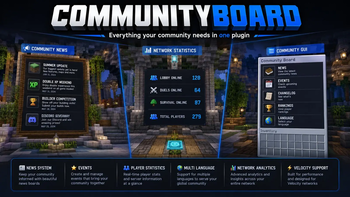
📊 CommunityBoard – The Ultimate Community Display System
Transform your server lobby into a dynamic information hub with CommunityBoard.
CommunityBoard is a modern, highly customizable display system that allows you to create animated information boards for your players. Showcase live server statistics, announcements, events, leaderboards, and much more directly inside your Minecraft world.
Whether you're running a small SMP or a large network, CommunityBoard helps keep your community informed and engaged.
✨ Features
🎞️ Animated Board Pages
Create multiple pages that automatically rotate between different information displays.
Perfect for:
- Server information
- Announcements
- Events
- Statistics
- Community updates
🔄 Automatic Page Rotation
Boards automatically cycle through pages at configurable intervals.
No manual interaction required.
👥 Online Player Counter
Display the current number of players online in real time.
Example:
Players Online: 127
Perfect for lobbies and community hubs.
🗳️ Vote Statistics
Show voting activity directly on your boards.
Examples:
- Total Votes
- Monthly Votes
- Daily Votes
- Top Voters
Encourage players to support your server.
⏱️ Playtime Statistics
Display player activity and engagement metrics.
Examples:
- Total Playtime
- Most Active Players
- Weekly Playtime
- Monthly Playtime
🏆 Leaderboards
Create competitive and engaging displays with live rankings.
Examples:
- Top Playtime
- Top Voters
- Top Kills
- Top Balance
- Custom Statistics
📢 Server Announcements
Broadcast important server information directly through CommunityBoard.
Examples:
- Server Updates
- Maintenance Notices
- Rule Changes
- Community News
🎉 Event Notifications
Promote upcoming events and activities.
Examples:
- PvP Tournaments
- Seasonal Events
- Giveaways
- Community Challenges
🔧 Custom Placeholders
Supports custom placeholders for maximum flexibility.
Display exactly the information your community needs.
⚙️ Fully Configurable
Customize everything through the configuration files:
- Board layouts
- Page designs
- Rotation speed
- Text formatting
- Statistics
- Placeholder content
- Announcement displays
No coding required.
🚀 Lightweight & Optimized
CommunityBoard is built with performance in mind.
- Minimal resource usage
- Optimized updates
- Network-friendly
- Suitable for large communities
💡 Use Cases
CommunityBoard is perfect for:
🏙️ Lobby Information Screens
Display useful information when players join your server.
📊 Community Statistics
Showcase server growth and player activity.
🗳️ Vote Reminders
Encourage players to vote regularly.
🎉 Event Announcements
Promote upcoming server events.
🏆 Leaderboards
Create competition and engagement.
📰 Server News
Keep your community informed about updates and changes.
💻 Commands
| Command | Description |
|---|---|
/communityboard create |
Creates a new CommunityBoard |
/communityboard reload |
Reloads all plugin configurations |
/communityboard announce <message> |
Sends an announcement to CommunityBoards |
🔑 Permissions
| Permission | Description |
|---|---|
communityboard.admin |
Access to all CommunityBoard administrative commands |
📦 Supported Versions
| Software | Versions |
|---|---|
| Paper | 1.21+ |
⚡ Performance
CommunityBoard is designed to be lightweight, scalable, and efficient.
Features include:
- Optimized update handling
- Low memory usage
- Minimal CPU impact
- Network-friendly design
- Suitable for small and large servers
Whether you're running a:
- SMP Server
- Survival Network
- PvP Server
- Minigame Network
- Community Hub
CommunityBoard scales effortlessly with your player base.
❤️ Why CommunityBoard?
Players shouldn't have to visit websites or Discord servers to stay informed.
CommunityBoard brings important information directly into Minecraft through beautiful animated displays.
Features at a Glance
- ✔ Animated Information Boards
- ✔ Live Server Statistics
- ✔ Player Counters
- ✔ Vote Tracking
- ✔ Playtime Statistics
- ✔ Leaderboards
- ✔ Event Notifications
- ✔ Custom Placeholders
- ✔ Fully Configurable
- ✔ Lightweight Performance
Keep your players informed, engaged, and connected.
**Made with ❤️ for Minecraft Communities by the SiuuuHD Tea
- Edition: Minecraft Java
- File type: .jar
- Minecraft versions listed: 1.21, 1.21.1, 1.21.2
- How to install: Install the matching mod loader (Forge, Fabric or NeoForge) for your Minecraft version. → Download the .jar. → Put it in the .minecraft/mods folder and launch that loader profile.
- Where to get it: Opens on Modrinth — not every file is mirrored on our own servers.
Install steps are the general flow for this file type — How to install Minecraft Java mods & modpacks walks through it step by step.
- Ships as CommunityBoard-1.1.3.jar — drop this file into the mods folder
- Download size: 18.2 MB
- Download link checked 4 Oct 2026 — working
These come from our own check of the pack file, not from the source page.