🛡️ ItemLimiter
Fully optimized for Paper 1.21.1
A lightweight, high-performance item restriction plugin designed to maintain game balance, combat exploits, and block unwanted items on your Minecraft server. It gives server administrators full control over ANY item with absolute ease.
✨ Features
- Total Restriction: Blacklist any item ID from the official Spigot/Bukkit Material list seamlessly.
- Date Tracking: Keep track of when items were restricted directly inside the configuration.
- Paper Optimized: Built specifically for Paper 1.21.1 to ensure zero lag and high efficiency.
- Customizable Messages: Fully supports legacy color codes (
&) and dynamic placeholders for all server notifications. - Instant Apply: Update your restriction lists on the fly without restarting your server.
⌨️ Commands & Permissions
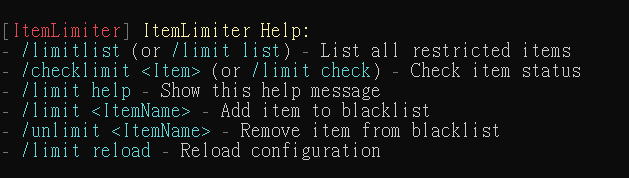
/limit list(or/limitlist)- Description: Lists all restricted items on the server.
- Permission:
itemlimiter.admin
/limit check <item>(or/checklimit <item>)- Description: Checks if an item is restricted (shows restriction date if blacklisted).
- Permission:
itemlimiter.admin
/unlimit <itemName>- Description: Removes a specified item from the blacklist.
- Permission:
itemlimiter.admin
/limit reload- Description: Reloads the configuration files instantly.
- Permission:
itemlimiter.admin
/limit help- Description: Displays the help menu with all available commands.
- Permission:
itemlimiter.admin
💡 Admin Tip: After modifying your settings, always run
/limit reloadto safely apply changes without interrupting your active players.
📦 Installation & Configuration
- Download the plugin
.jarfile. - Drop it into your server's
plugins/folder. - Restart or start your Paper 1.21.1 server to generate the configuration.
- Navigate to
plugins/ItemLimiter/limit.ymlto customize your restricted items and translation messages.
Quick facts
- Edition: Minecraft Java
- File type: .jar
- Minecraft version listed: 1.21.11
- How to install: Install the matching mod loader (Forge, Fabric or NeoForge) for your Minecraft version. → Download the .jar. → Put it in the .minecraft/mods folder and launch that loader profile.
- Where to get it: Opens on Modrinth — not every file is mirrored on our own servers.
Install steps are the general flow for this file type — How to install Minecraft Java mods & modpacks walks through it step by step.
Verified by MCModsHub
- Ships as ItemLimiter.jar — drop this file into the mods folder
- Download size: 15 KB
- Download link checked 14 Sept 2026 — working
These come from our own check of the pack file, not from the source page.