
Ip Logging
How it works
when a player first join your server the plugin will save their public ip in a file and will ask the player to register, if the ip of this player change the server will ask him to login again, that way the player can play for multiple days without having to do the tedious /login for a bunch of days, and if someone else try to join this player's account the plugin will see that this player's ip is diferent and will ask him to use the /login!, this turn's out to be more pratical for both, server and players!
How the players see it
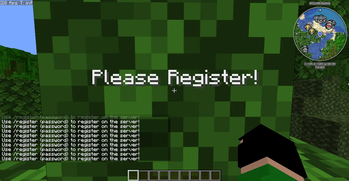
when the player joins the server and have to register a message will apear in his screen saying "Please Register!", and in his chat will apear "Use /register {password} to register on the server!", and if they need todo the login it will apear on their screen "Please login!" and on Theyr chat "Use /login {password} to login on the server" the server owner can change every single message on the "Config.yml"!
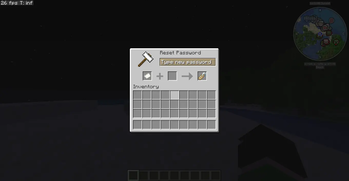
Also there's a command called "/password reset" that will allow the player to reset his password if they want, this command can not be used while in the register or the login screen!
- Edition: Minecraft Java
- File type: .jar
- Minecraft version listed: 1.21.11
- How to install: Install the matching mod loader (Forge, Fabric or NeoForge) for your Minecraft version. → Download the .jar. → Put it in the .minecraft/mods folder and launch that loader profile.
- Where to get it: Opens on Modrinth — not every file is mirrored on our own servers.
Install steps are the general flow for this file type — How to install Minecraft Java mods & modpacks walks through it step by step.
- Ships as DreamyIpLogging-1.0.2.jar — drop this file into the mods folder
- Download size: 52 KB
- Download link checked 24 Aug 2026 — working
These come from our own check of the pack file, not from the source page.