
ModsJava
CozyHub
Java mod listed for Minecraft 1.21. Downloads from the MC Java Mods app on Android.
⬇ Download on Modrinth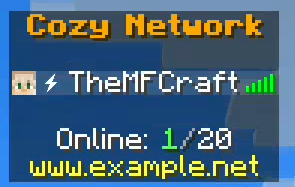





CozyHub
The all-in-one hub plugin your server deserves. Clean, lightweight, and fully configurable — CozyHub handles everything your lobby needs without the bloat.
Features
- 🏠 Spawn System — Per-world spawns, teleport warmup, teleport on join
- 🌍 Multi-World Support — Individual spawn points for every world
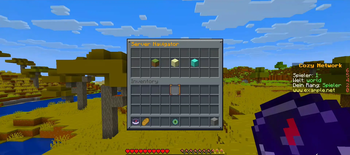
- 🖥️ Server Selector — Fully configurable GUI navigator with BungeeCord & Velocity support
- 📢 Join & Quit Messages — Custom messages with MiniMessage support
- 🎬 Join Title & Actionbar — Welcome players with a custom title screen
- 🌟 First Join Handling — Special message, starter kit and effects for new players
- 🛡️ Hub Protection — Disable PvP, damage, block breaking, hunger and item dropping
- ✈️ Hub Fly — Let players fly freely in your lobby
- 🎮 Hotbar Manager — Assign actions to hotbar items (open GUI, toggle visibility, connect server)
- 📋 GUI Navigator — Fully configurable chest GUI for server selection
- 📊 Sidebar / Scoreboard — Animated sidebar with PlaceholderAPI support
- 👥 Tab List — Custom header & footer with placeholders
- 🎆 Join Firework & Sound — Configurable join effects
- ⬆️ Double Jump — Let players double jump with particles and sounds
- 👁️ Visibility Toggle — Hide/show other players with one click
Requirements
| Dependency | Required |
|---|---|
| Paper / Folia 1.21+ | ✅ Yes |
| PlaceholderAPI | ❌ Optional |
Commands
| Command | Description | Permission |
|---|---|---|
/hub |
Teleport to spawn | cozyhub.use |
/hub setspawn |
Set the spawn | cozyhub.setspawn |
/hub reload |
Reload config | cozyhub.admin |
/vis |
Toggle player visibility | cozyhub.visibility |
Configuration
CozyHub is fully configurable via config.yml and messages.yml. Every feature can be individually toggled.
Support & Links



Quick facts
- Edition: Minecraft Java
- File type: .jar
- Minecraft versions listed: 1.21, 1.21.1, 1.21.2
- How to install: Install the matching mod loader (Forge, Fabric or NeoForge) for your Minecraft version. → Download the .jar. → Put it in the .minecraft/mods folder and launch that loader profile.
- Where to get it: Opens on Modrinth — not every file is mirrored on our own servers.
Install steps are the general flow for this file type — How to install Minecraft Java mods & modpacks walks through it step by step.
File checked by MCModsHub
- Ships as cozy-hub-1.0.0-SNAPSHOT.jar — drop this file into the mods folder
- Download size: 60 KB
- Download link checked 4 Oct 2026 — working
These come from our own check of the pack file, not from the source page.