
Recommended Companion Plugin
For the best replay NPC experience, it is recommended to install GlobalReplay together with PacketEvents. PacketEvents enables client-side fake-player replay NPCs with UUID/name/skin restoration. Without PacketEvents, GlobalReplay still runs, but replay NPCs use ArmorStand fallback markers.
GlobalReplay
Introduction
GlobalReplay is a Paper API Minecraft server plugin that silently records real player activity in the background and lets administrators replay historical moments inside isolated parallel worlds.
- Plugin name:
GlobalReplay - Author:
bentianjia - Command prefix:
/replay - Java version: Java 21
- Target server: Paper
1.20-1.21.11 - Required time format:
yyyy-MM-dd_HH:mm
Example time-based commands:
/replay enter overworld 2024-01-15_23:00
/replay goto 2024-01-15_23:47
Features
Continuous Background Recording
GlobalReplay continuously records all real players without requiring administrators to start a manual session.
- Player position and rotation with dynamic sampling:
- Idle players: one frame every 10 seconds
- Moving players: one frame every second
- Players in combat: one frame every tick
- Block changes, including breaking, placing, and explosions
- Player interaction actions, including left-click swings, right-click interactions, food consumption, item pickup/drop, hotbar switching, inventory clicks, and container open/close actions
- Container and inventory changes, stored as item snapshots when changes happen
- Player death and respawn events
- Dimension transfer events, including source dimension, target dimension, and before/after locations
- Player join and quit events
- Server start and stop timestamps, used as offline breakpoints during replay
Automatic Message Language
Player-facing messages follow the player's Minecraft client language when possible.
Supported languages:
- Arabic
- Chinese
- English
- French
- Russian
- Spanish
Other client languages fall back to English. Console messages use English.
LZ4 Storage and Automatic Cleanup
Replay data is split by world or dimension, then stored as hourly .replay.lz4 shards:
plugins/GlobalReplay/recordings/
  overworld/
    2024-01-15_22.replay.lz4
    2024-01-15_23.replay.lz4
  nether/
  the_end/
  <custom-world-name>/
- Replay data is written to an in-memory buffer first.
- Buffered data is batch-compressed with LZ4 and flushed to disk every configurable interval.
- Remaining buffered data is force-flushed during server shutdown.
- Old recordings are managed by a configurable automatic cleanup policy.
- Each
.replay.lz4shard covers one hour, or 60 minutes, of replay data. - When a replay is opened, decompressed cache files may be written under
plugins/GlobalReplay/temp/. - The original
.replay.lz4recording file is kept; only the temporary decompressed cache is deleted after it has been unused for 5 minutes after replay exit.
Smart Fake Player and NPC Exclusion
GlobalReplay is designed to record real players only. It scans loaded plugins on startup and enables supported exclusion modules automatically.
Excluded entities and accounts include:
- Citizens2 NPCs detected by
NPCmetadata - Shopkeepers entities detected through Shopkeepers API markers
- MythicMobs entities detected by MythicMobs entity tags
- Carpet fake players detected by special entity name prefixes
- NPCLib entities detected by plugin metadata
- Accounts with the
globalreplay.exemptpermission - Replay NPCs marked with
globalreplay_npc=true - Manual exclusions from
recording.excluded-entity-names - Manual exclusions from
recording.excluded-entity-uuids
Newly spawned entities are checked through EntitySpawnEvent so runtime-generated NPCs and fake entities are skipped as well.
Isolated Parallel Worlds
Administrators can enter replay sessions without affecting the live server world.
- Each administrator receives a separate temporary parallel world instance.
- Multiple administrators can replay the same recording at the same time with independent timelines.
- Decompression and replay loading run asynchronously.
- Player teleportation and game-state changes are performed back on the main server thread.
- The administrator enters the parallel world at the same coordinates and rotation they had in the original world instead of being sent to world spawn.
- The administrator's original location, game mode, and inventory are saved on entry and restored on exit.
- Playback starts automatically after entering the replay world.
Read-Only Replay Protection
Parallel worlds are read-only by design.
BlockBreakEventis cancelled.BlockPlaceEventis cancelled.InventoryClickEventis cancelled.InventoryDragEventis cancelled.EntityDamageEventis cancelled.- Other world-changing actions are blocked.
- Containers may be opened for inspection, but their contents cannot be modified.
NPC-Based Playback
GlobalReplay restores recorded players as replay NPCs.
- PacketEvents is used to create cross-version fake player entities when installed.
- Player UUIDs are preserved.
- Mojang skin textures are requested by UUID and injected into replay NPCs.
- Display names are restored, including LuckPerms prefixes, colors, and formatting.
- Replay NPCs keep the recorded player's real visible name while using a separate client-side entity UUID, so a live player and their replay NPC can exist at the same time.
- Replay NPCs move frame by frame using recorded coordinates and rotation.
- Replay NPCs mimic recorded movement, camera rotation, left-clicks, right-clicks, eating, item pickup/drop, held-item changes, inventory clicks, and container open/close actions.
- Replay NPCs are tagged with
globalreplay_npc=trueso the recorder ignores them. - Spectator mode can be used to enter an NPC body and watch from that player's first-person perspective.
Offline Breakpoints
When the server was offline during a replay timeline, GlobalReplay shows a gray breakpoint and notifies the administrator with a message such as:
[GlobalReplay] Server was offline for X minutes
Installation
- Install Java 21.
- Run a Paper server compatible with
1.20-1.21.11. - Install PacketEvents into the server
pluginsfolder for full fake-player replay NPCs with skins. Without PacketEvents, GlobalReplay still starts and uses ArmorStand fallback markers. - Install the GlobalReplay plugin jar into the server
pluginsfolder. - Make sure the server can download plugin libraries, because GlobalReplay declares
org.lz4:lz4-javathroughplugin.yml. - Start the server once to generate
plugins/GlobalReplay/config.yml. - Review the configuration, then restart the server or run
/replay reload.
Commands
All command time arguments must use yyyy-MM-dd_HH:mm.
| Command | Description |
|---|---|
/replay enter <dimension> <time> [player|uuid|me] |
Enter an isolated parallel world at your current coordinates and start replaying from the specified time. If a target is provided, teleport near that recorded player as soon as their replay NPC appears. Use me/self/@s or a UUID to avoid name conflicts. Example: /replay enter overworld 2024-01-15_23:00 me. |
/replay pause |
Pause or resume the current replay session. |
/replay speed <0.5/1/2/4> |
Change playback speed. |
/replay goto <time> |
Jump to a specific full timestamp in the current replay. Example: /replay goto 2024-01-15_23:47. |
/replay focus <player|uuid|me> |
Follow a recorded player by teleporting near their replay NPC. Names target replay NPCs, so /replay focus bentianjia teleports to the replay NPC even if the live player is online; use me/self/@s or a UUID when needed. |
/replay exit |
Leave the parallel world, destroy the temporary instance, and restore the administrator's previous state. |
/replay list [dimension] |
List available replay files, optionally filtered by dimension. |
/replay reload |
Reload config.yml, rescan fake-player exclusions, and keep active recording and current replay sessions running. |
Commands that require expensive work send immediate progress feedback first, then send the final result after the asynchronous task completes.
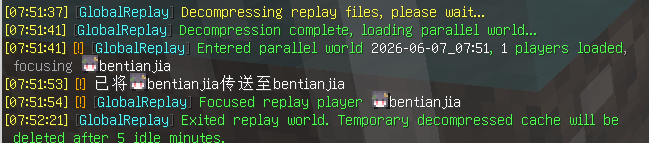
Replay entry progress messages:
[GlobalReplay] Decompressing replay files, please wait...
[GlobalReplay] Decompression complete, loading parallel world...
[GlobalReplay] Entered parallel world <time>, <X> players loaded
Configuration reload result:
[GlobalReplay] Configuration reloaded
Permissions
| Permission | Description |
|---|---|
globalreplay.enter |
Allows entering replay worlds and using replay session controls. |
globalreplay.enter.others |
Allows viewing replay data for other players when player-scoped access is enforced. |
globalreplay.admin |
Grants all GlobalReplay administrative permissions. |
globalreplay.exempt |
Prevents the account from being recorded. Intended for fake-player or automation accounts. |
GlobalReplay is compatible with LuckPerms permission checks.
Configuration
Default config.yml structure:
storage:
  flush-interval-seconds: 30
  compression: lz4

auto-delete:
  enabled: true
  keep-full-quality-hours: 24
  keep-low-quality-days: 7
  delete-after-days: 30

recording:
  excluded-entity-names:
    - "shopkeeper"
  excluded-entity-uuids: []

prefix: "&8[&bGlobalReplay&8]&r "
Configuration reference:
| Key | Description |
|---|---|
storage.flush-interval-seconds |
How often buffered recording data is compressed and flushed to disk. |
storage.compression |
Compression algorithm for replay files. Currently only lz4 is supported. |
auto-delete.enabled |
Enables or disables automatic recording cleanup. |
auto-delete.keep-full-quality-hours |
Keeps recent recordings at full quality for this many hours. |
auto-delete.keep-low-quality-days |
Keeps lower-quality retained recordings for this many days. |
auto-delete.delete-after-days |
Deletes recordings older than this many days. |
recording.excluded-entity-names |
Manually excluded entity names. Matching entities are not recorded. |
recording.excluded-entity-uuids |
Manually excluded entity UUIDs. Matching entities are not recorded. |
prefix |
Chat message prefix. Supports Minecraft color codes with &. |
Running /replay reload reloads all configuration values, rescans fake-player exclusion modules, does not interrupt active recording, and does not affect administrators already inside replay worlds.
Author
GlobalReplay is authored by bentianjia.
License
GlobalReplay is licensed under the MIT License. You may use, modify, and distribute it as long as the copyright notice identifying bentianjia as the author is retained.
- Edition: Minecraft Java
- File type: .jar
- Minecraft versions listed: 1.20, 1.20.1, 1.20.2
- How to install: Install the matching mod loader (Forge, Fabric or NeoForge) for your Minecraft version. → Download the .jar. → Put it in the .minecraft/mods folder and launch that loader profile.
- Where to get it: Opens on Modrinth — not every file is mirrored on our own servers.
Install steps are the general flow for this file type — How to install Minecraft Java mods & modpacks walks through it step by step.
- Ships as globalreplay-0.1.0.jar — drop this file into the mods folder
- Download size: 98 KB
- Download link checked 23 Aug 2026 — working
These come from our own check of the pack file, not from the source page.