
zNxPiglinRush
Java mod listed for Minecraft 26.x. Downloads from the MC Java Mods app on Android.
⬇ Download on Modrinth🔥 zNxPiglinRush
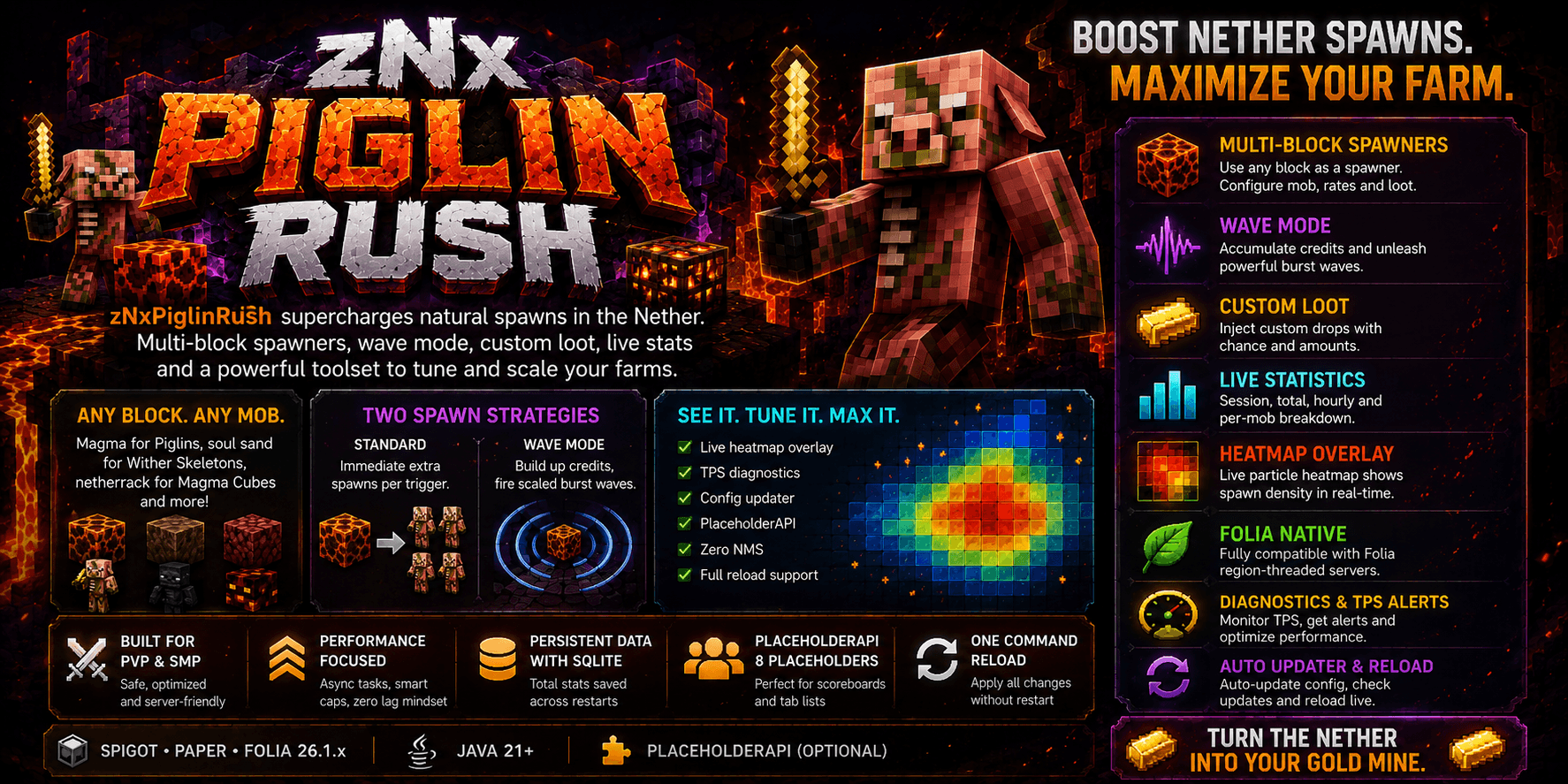
A multi-block Nether spawner framework — boost mob spawns on any block type, with wave mode, live statistics, spawn heatmap, custom loot and full Folia support.
Vanilla already spawns Zombified Piglins above magma blocks in the Nether, but the rate is painfully slow. zNxPiglinRush hooks into every natural spawn, fires multiple extra spawns in the surrounding area, and gives you a complete toolset to monitor, tune and maximise your farms.
✨ Features
- Multi-block spawner framework — configure any block type as a spawner with its own mob, rates and loot. Magma block for gold, soul sand for Wither Skeletons, netherrack for Magma Cubes — all at once
- Two spawn strategies — Standard: immediate extra spawns per trigger. Wave mode: accumulate credits and fire scaled burst waves with progressive scaling
- Custom loot injection — per-spawner drop rules with configurable chance and amounts, injected directly into vanilla death drops
- Spawn statistics — session, total (SQLite-persisted across restarts), hourly ring buffer and per-mob breakdown via
/pr stats - Spawn heatmap —
/pr heatmap [radius]toggles a live particle overlay above tracked blocks, coloured blue → yellow → red by spawn density - TPS diagnostics — async TPS monitor with configurable alert threshold, in-game op warnings and a
/pr diagnosticsperformance report - Config updater — automatically migrates old config files to the current schema on startup, preserving all your values and creating a timestamped backup
- PlaceholderAPI — 8 placeholders for scoreboards and tab lists
- Folia-native — two scheduler implementations (
FoliaSchedulerService/BukkitSchedulerService) selected at runtime, zero issues on region-threaded servers - Async update checker — Modrinth API v2, clickable in-game notification for ops on join
- Zero NMS — pure Bukkit/Spigot/Paper API, no reflection in hot paths
- Live reload —
/pr reloadapplies all config and registry changes with no restart
🚀 Quick Start
- Drop the
.jarinto yourplugins/folder - Restart the server
- Edit
plugins/zNxPiglinRush/config.yml - Run
/pr reload— done
⚙️ Configuration
enabled: true
active-worlds: []   # leave empty = all worlds
debug: false

spawners:

  # Each block gets its own section — add as many as you like
  magma_block:
    mob: ZOMBIFIED_PIGLIN
    spawn-count: 3          # total mobs per trigger (vanilla = 1)
    spawn-cooldown: 20      # ticks between spawns on the same block
    max-nearby-entities: 12 # entity cap within scan-radius
    scan-radius: 10
    extra-attempts: 1       # random bonus attempts per trigger

    wave-mode: false        # true = burst waves instead of immediate spawns
    wave-size: 5
    wave-cooldown: 100      # ticks between wave fires

    custom-drops:
      - material: GOLD_NUGGET
        min: 1
        max: 3
        chance: 0.3
      - material: GOLDEN_SWORD
        min: 1
        max: 1
        chance: 0.05

  # soul_sand:
  #   mob: WITHER_SKELETON
  #   spawn-count: 2
  #   ...

diagnostics:
  tps-alert-threshold: 18.0
  alert-cooldown-seconds: 300

update-checker: true
Tuning guide
| Server type | spawn-count |
spawn-cooldown |
max-nearby-entities |
|---|---|---|---|
| Low-TPS / small | 2 |
40 |
8 |
| Standard | 3 |
20 |
12 |
| Dedicated farm server | 5 |
10 |
20 |
📉 If TPS drops, lower
spawn-countor raisespawn-cooldownfirst.
💬 Commands & Permissions
| Command | Alias | Description |
|---|---|---|
/piglinrush reload |
/pr reload |
Reload config & spawner registry |
/piglinrush info |
/pr info |
Runtime, registered blocks, update status |
/piglinrush stats |
/pr stats |
Session / total / hourly spawn stats |
/piglinrush heatmap [r] |
/pr heatmap |
Toggle particle heatmap (player only) |
/piglinrush diagnostics |
/pr diag |
TPS report and performance suggestions |
/piglinrush toggle |
/pr toggle |
Toggle hint |
Permission node: piglinrush.admin (default: op)
📊 PlaceholderAPI
| Placeholder | Returns |
|---|---|
%piglinrush_total% |
Total spawns since server start |
%piglinrush_session% |
Spawns since last /pr reload |
%piglinrush_last_hour% |
Spawns in the last hour |
%piglinrush_last_24h% |
Spawns in the last 24 hours |
%piglinrush_status% |
ENABLED / DISABLED |
%piglinrush_tps% |
Current average TPS |
%piglinrush_spawners% |
Number of registered spawner blocks |
%piglinrush_version% |
Plugin version |
❓ FAQ
Does this affect overworld magma blocks? No. The plugin fires only when vanilla already triggers a spawn — in the Nether on magma blocks. Overworld magma blocks don't trigger natural piglin spawns, so the plugin has no effect there.
Does it break vanilla spawn rules?
The initial vanilla spawn check (light level, mob caps) still runs normally. Extra spawns respect the max-nearby-entities cap configured per block. Global server mob caps in paper.yml / spigot.yml / bukkit.yml still apply.
What is wave mode?
When enabled on a block, each vanilla trigger adds a credit to that block's counter. Every wave-cooldown ticks the engine fires a burst: credits × spawn-count mobs (capped at wave-size), with a progressive bonus for consecutive waves. Good for dramatic bursts rather than a constant stream.
Compatible with other spawn plugins? Generally yes — zNxPiglinRush only reacts to events that already passed vanilla's own checks, with no NMS or spawner modifications.
What happens when I update from an old version? The built-in Config Updater detects your old config, creates a timestamped backup, migrates your values to the new schema and fills any new keys with sensible defaults. You don't need to touch anything manually.
📋 Requirements
- Spigot, Paper or Folia 26.1.x
- Java 21+
- PlaceholderAPI (optional)
📄 License
This project is licensed under the Apache License 2.0 — see the LICENSE file for details.
- Edition: Minecraft Java
- File type: .jar
- Minecraft version listed: 26.1.2
- How to install: Install the matching mod loader (Forge, Fabric or NeoForge) for your Minecraft version. → Download the .jar. → Put it in the .minecraft/mods folder and launch that loader profile.
- Where to get it: Opens on Modrinth — not every file is mirrored on our own servers.
Install steps are the general flow for this file type — How to install Minecraft Java mods & modpacks walks through it step by step.
- Ships as zNxPiglinRush-2.1.0.jar — drop this file into the mods folder
- Download size: 2.7 MB
- Download link checked 24 Oct 2026 — working
These come from our own check of the pack file, not from the source page.