
MiniBoardX
I don't know my version or loader
MiniBoardX
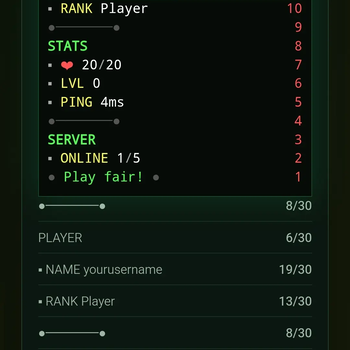
MiniBoardX is a compact, modern, animated scoreboard plugin built for Minecraft servers that want a clean sidebar without giant, messy layouts. It is designed to stay small, readable, and easy to customize while still showing important server and player information like rank, health, level, ping, online players, and server website.
MiniBoardX includes a built-in web browser editor, so server owners can edit the scoreboard without manually touching YAML files. The panel lets you customize titles, lines, colors, animations, presets, placeholders, and settings from your browser.
Features
- Compact animated scoreboard
- Clean green/yellow default theme
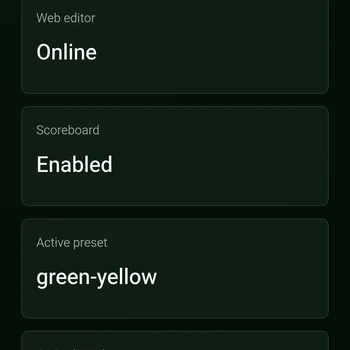
- Built-in web editor
- Live scoreboard preview
- Visual line editor
- Raw YAML editor
- Scoreboard presets/themes
- PlaceholderAPI support
- LuckPerms/Vault rank support
- Built-in fallback placeholders
- Player toggle system
- Database support
- Config backup system
- Compact line-length protection
- Debug/status commands
- Designed for Bukkit, Spigot, Paper, Purpur, and Folia-compatible servers
- Java 17+ compatible
Built-in Web Editor
MiniBoardX comes with a web panel for easier scoreboard editing.
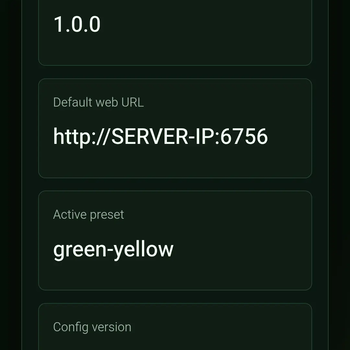
Default web panel:
Default bind:
0.0.0.0:6756
Default login:
Username: admin Password: 123456
The web editor includes:
- Dashboard
- Visual scoreboard editor
- Live preview
- Preset/theme manager
- Raw config editor
- Player preferences
- Database status
- Backup manager
- Compatibility/status page
Important: The default web panel binds to "0.0.0.0", which means it may be reachable from other devices on your network. Change the default password before exposing the server publicly.
Default Scoreboard
The default layout is designed to be small and clean:
- Player name
- Rank
- Health
- Level
- Ping
- Online players
- Website/footer
Normal players show as "Player" by default. Operators show as "OP". If LuckPerms or Vault is installed, MiniBoardX can use your actual rank/group system.
Commands
Main command:
/miniboardx
Aliases:
/mbx /miniboard /boardx
Available commands:
/mbx help /mbx reload /mbx toggle /mbx on /mbx off /mbx preview /mbx debug /mbx debug /mbx status /mbx web /mbx web url /mbx web start /mbx web stop /mbx web restart /mbx version /mbx database status /mbx backup create
Permissions
miniboardx.use miniboardx.toggle miniboardx.preview miniboardx.admin miniboardx.reload miniboardx.debug miniboardx.web miniboardx.status miniboardx.database miniboardx.backup miniboardx.bypass
Built-in Placeholders
MiniBoardX includes built-in placeholders, so it can work even without PlaceholderAPI:
%player_name% %player_displayname% %player_uuid% %rank% %health% %max_health% %level% %exp% %ping% %world% %gamemode% %online% %max_players% %server_name% %server_version% %java_version% %platform% %date% %time% %x% %y% %z%
PlaceholderAPI is supported for extra placeholders if installed.
Compatibility
MiniBoardX is built using stable Bukkit APIs and Java 17 bytecode to support the widest practical range of Bukkit-compatible servers that can run Java 17 or newer.
Supported server types include:
- Bukkit
- Spigot
- Paper
- Purpur
- Folia-compatible servers
MiniBoardX does not require NMS, CraftBukkit internals, or ProtocolLib.
Installation
- Download the MiniBoardX jar.
- Put it inside your server’s "plugins" folder.
- Restart the server.
- Open the web editor at:
- Login with:
admin / 123456
- Change the password after first login.
- Customize your scoreboard from the web panel or config.
Why MiniBoardX?
Most scoreboard plugins can become too large, too cluttered, or annoying to configure. MiniBoardX focuses on keeping the scoreboard compact, polished, animated, and easy to edit from a browser.
If you want a clean sidebar with modern customization, MiniBoardX is built for that.
- Edition: Minecraft Java
- File type: .jar
- Minecraft versions listed: 1.21, 1.21.1, 1.21.2
- How to install: Install the matching mod loader (Forge, Fabric or NeoForge) for your Minecraft version. → Download the .jar. → Put it in the .minecraft/mods folder and launch that loader profile.
- Where to get it: Opens on Modrinth — not every file is mirrored on our own servers.
Install steps are the general flow for this file type — How to install Minecraft Java mods & modpacks walks through it step by step.
- Ships as MiniBoardX-Bukkit-1.0.0.jar — drop this file into the mods folder
- Download size: 13.1 MB
- Download link checked 22 Aug 2026 — working
These come from our own check of the pack file, not from the source page.