
BorderAchieve / BorderAchieve
- Version: 0.3.0-SNAPSHOT and higher
- Data packs все работает/all works
 |
 |
 |
 |
|---|
Плагин для Paper 1.21+, связывающий достижения (advancements) с динамическим расширением границ миров, глобальной блокировкой измерений и персональной блокировкой миров для отдельных игроков.
A Paper 1.21+ plugin that links advancements to dynamic world border expansion, global dimension locking, and per-player world locking.
РУССКАЯ ВЕРСИЯ
📖 Описание
BorderAchieve превращает получение достижений в механику, влияющую на мир сервера, и даёт гибкие инструменты контроля доступа к мирам:
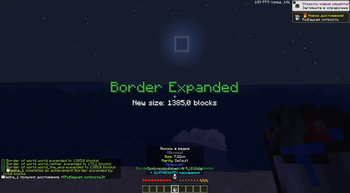
- Расширение границ — за каждое новое достижение граница в выбранных мирах увеличивается на заданное количество блоков. В Незере расширение автоматически делится на 8.
- Глобальная блокировка миров — телепортация в определённые миры (например, Ад, Энд) запрещена, пока общее количество выполненных достижений на сервере не достигнет порога. После разблокировки мир открывается навсегда с общим оповещением.
- Персональная блокировка — администратор может запретить конкретному игроку доступ в любой мир. При попытке входа игрок получит отказ, а при респавне в запрещённом мире будет автоматически перенаправлен в первый доступный мир согласно настраиваемому порядку.
- Топ игроков — интерактивное GUI-меню со списком лучших игроков по числу достижений.
- Визуальные и звуковые эффекты — настраиваемые Title, Subtitle и звук при расширении границы.
- PlaceholderAPI — поддержка плейсхолдеров для интеграции с другими плагинами (табло, голограммы и т.п.).
- Гибкая настройка — режимы расширения (плавный/отложенный), время, выбор миров, индивидуальные пороги глобальной блокировки для каждого измерения, порядок респавна.
📦 Установка
- Скачайте файл плагина.
- Поместите
BorderAchieve.jarв папкуplugins/. - Перезапустите сервер.
- Настройте конфигурационный файл
plugins/BorderAchieve/config.yml. - Настройте языковые файлы в
plugins/BorderAchieve/language/(ru.yml / en.yml). - (Опционально) Установите PlaceholderAPI для использования плейсхолдеров.
🛠 Команды
Основная команда: /border
| Команда | Право | Описание |
|---|---|---|
/border top |
borderachieve.player |
Открыть GUI топ достижений |
/border reload |
borderachieve.admin |
Перезагрузить конфиг и языковые файлы |
/border lock <world> [player] |
borderachieve.admin |
Персонально запретить мир для игрока |
/border unlock <world> [player] |
borderachieve.admin |
Разблокировать мир глобально или для игрока |
/border list <игрок> |
borderachieve.admin |
Показать список персонально запрещённых миров игрока |
/border lockstatus |
borderachieve.admin |
Показать статус всех глобальных и персональных блокировок |
/border debug |
borderachieve.admin |
Вывести отладочную информацию |
/border help |
borderachieve.player |
Справка по командам |
Ярлыки (алиасы): /bordertop, /topborder, /borderreload, /borderunlock, /borderlock, /borderlockstatus, /borderdebug, /borderachieve
📊 PlaceholderAPI
Если PlaceholderAPI установлен, доступны следующие плейсхолдеры:
%borderachieve_count%— количество достижений игрока%borderachieve_rank%— место в топе%borderachieve_total%— общее количество выполненных достижений на сервере%borderachieve_lock_player%— список всех персонально запрещённых миров игрока%borderachieve_lock_<world>%—true, если мир персонально запрещён для игрока%borderachieve_locked_display_<world>%— строка видамир: true/false%borderachieve_global_locked_<world>%—true, если мир глобально заблокирован по достижениям%borderachieve_global_locked_display_<world>%— строка видамир: true/falseдля глобальной блокировки
Info:
Info:3⚙ Конфигурация
Основные настройки в config.yml:
language: ru
settings:
  enable_border_expansion: true
  expand_amount: 15.0
  border_change_mode: "smooth"
  border_move_speed: "200t"
  set_initial_border_on_first_start: true
  initial_border_size: 35.0
  apply_to_all_worlds: false
  allowed_worlds:
    - world
    - world_nether
    - world_the_end
  notify_only_player: true
  effects:
    sound: "entity.ender_dragon.growl"
    sound_volume: 0.8
    sound_pitch: 1.0
    title: true
    subtitle: true
gui:
  slots: [10,11,12,13,14,15,16,19,20,21,22,23,24,25,28,29,30,31,32,33,34,37,38,39,40,41,42,43]
world_locking:
  enabled: true
  apply_to_all_worlds_for_locking: false
  default_required: 73
  worlds:
    world_nether:
      required_achievements: 150
    world_the_end:
      required_achievements: 650
  show_deny_title: true
  respawn_worlds:
    - "world"
    - "world_nether"
    - "world_the_end"
debug: false
Подробное описание всех параметров находится в documentation.yml (создаётся автоматически).
🔒 Рекомендации по блокировке миров
Глобальная блокировка (по достижениям):
- Ад:
150–200(откроется не сразу, после накопления стартовых достижений) - Энд:
400–650(серьёзное испытание, откроется позже)
Проверяйте прогресс командой /border lockstatus.
🌐 Языки
Поддерживаются русский (ru) и английский (en). Выберите нужный в config.yml параметром language. Языковые файлы находятся в папке plugins/BorderAchieve/language/.
🧪 Отладка
Включите debug: true в конфигурации, чтобы получать подробные логи в консоль.
🔄 Сброс настроек
Удалите файл config.yml и перезапустите сервер — плагин создаст новый с настройками по умолчанию.
ENGLISH VERSION
📖 Description
BorderAchieve turns earning advancements into a world‑affecting mechanic and provides flexible world access control:
- Border expansion – every new achievement expands the border in selected worlds by a configurable amount. In the Nether the expansion is automatically divided by 8.
- Global world locking – teleportation to specific worlds (e.g. Nether, End) is blocked until the server‑wide total of completed achievements reaches a threshold. Once unlocked, the world stays open forever with a broadcast.
- Personal locking – admins can forbid specific players from accessing any world. Attempted teleportation is blocked, and respawning in a forbidden world redirects the player to the first available world according to a configurable order.
- Leaderboard – an interactive GUI ranking players by their completed achievements.
- Visual & sound effects – customizable Title, Subtitle, and sound when the border expands.
- PlaceholderAPI – placeholders for integration with other plugins (scoreboards, holograms, etc.).
- Flexible configuration – expansion mode (smooth/delayed), time, world selection, per‑world locking thresholds, respawn order.
📦 Installation
- Download the plugin file.
- Place
BorderAchieve.jarinto theplugins/folder. - Restart the server.
- Configure
plugins/BorderAchieve/config.yml. - Adjust language files in
plugins/BorderAchieve/language/(ru.yml / en.yml). - (Optional) Install PlaceholderAPI to use placeholders.
🛠 Commands
Main command: /border
| Command | Permission | Description |
|---|---|---|
/border top |
borderachieve.player |
Open achievement leaderboard GUI |
/border reload |
borderachieve.admin |
Reload config & language files |
/border lock <world> [player] |
borderachieve.admin |
Personally lock a world for a player |
/border unlock <world> [player] |
borderachieve.admin |
Unlock world globally or for a player |
/border list <player> |
borderachieve.admin |
List player's personally locked worlds |
/border lockstatus |
borderachieve.admin |
View all global and personal lock statuses |
/border debug |
borderachieve.admin |
Show debug info |
/border help |
borderachieve.player |
Show command help |
Aliases: /bordertop, /topborder, /borderreload, /borderunlock, /borderlock, /borderlockstatus, /borderdebug, /borderachieve
📊 PlaceholderAPI
If PlaceholderAPI is installed, the following placeholders are available:
%borderachieve_count%– player's achievement count%borderachieve_rank%– player's rank in leaderboard%borderachieve_total%– total completed achievements on server%borderachieve_lock_player%– list of worlds personally locked for the player%borderachieve_lock_<world>%–trueif world is personally locked for the player%borderachieve_locked_display_<world>%– string likeworld: true/false%borderachieve_global_locked_<world>%–trueif world is globally locked by achievements%borderachieve_global_locked_display_<world>%– string likeworld: true/falsefor global locking
Info:
Info:3⚙ Configuration
Main settings in config.yml:
language: en
settings:
  enable_border_expansion: true
  expand_amount: 15.0
  border_change_mode: "smooth"
  border_move_speed: "200t"
  set_initial_border_on_first_start: true
  initial_border_size: 35.0
  apply_to_all_worlds: false
  allowed_worlds:
    - world
    - world_nether
    - world_the_end
  notify_only_player: true
  effects:
    sound: "entity.ender_dragon.growl"
    sound_volume: 0.8
    sound_pitch: 1.0
    title: true
    subtitle: true
gui:
  slots: [10,11,12,13,14,15,16,19,20,21,22,23,24,25,28,29,30,31,32,33,34,37,38,39,40,41,42,43]
world_locking:
  enabled: true
  apply_to_all_worlds_for_locking: false
  default_required: 73
  worlds:
    world_nether:
      required_achievements: 150
    world_the_end:
      required_achievements: 650
  show_deny_title: true
  respawn_worlds:
    - "world"
    - "world_nether"
    - "world_the_end"
debug: false
For a full description of every parameter, see the automatically created documentation.yml.
🔒 Locking Recommendations
Global locking (by achievements):
- Nether:
150–200(won't unlock instantly, after initial advancements accumulate) - End:
400–650(a real challenge, unlocks much later)
Check progress with /border lockstatus.
🌐 Languages
Russian (ru) and English (en) are supported. Set the language option in config.yml. Language files are located in plugins/BorderAchieve/language/.
🧪 Debugging
Enable debug: true in the config to receive detailed console logs.
🔄 Resetting to Defaults
Delete config.yml and restart the server — the plugin will generate a fresh default configuration.
📝 Автор | Author
📃 Лицензия | License
MIT License. See the LICENSE file for details.
0.1.8/0.2.0-SNAPSHOTBorderAchieve / BorderAchieve
|
|
|
|
|---|
Плагин для Paper 1.21+, связывающий достижения (advancements) с динамическим расширением границ миров и блокировкой измерений.
A Paper 1.21+ plugin that links advancements to dynamic world border expansion and dimension locking.
РУССКАЯ ВЕРСИЯ
📖 Описание
BorderAchieve превращает получение достижений в механику, влияющую на мир сервера:
- Расширение границ — за каждое новое достижение граница в выбранных мирах увеличивается на заданное количество блоков. В Незере расширение автоматически делится на 8.
- Блокировка миров — телепортация в определённые миры (например, Ад, Энд) запрещена, пока общее количество выполненных достижений на сервере не достигнет порога. После разблокировки мир открывается навсегда с общим оповещением.
- Топ игроков — интерактивное GUI-меню со списком лучших игроков по числу достижений.
- Визуальные и звуковые эффекты — настраиваемые Title, Subtitle и звук при расширении границы.
- PlaceholderAPI — поддержка плейсхолдеров для интеграции с другими плагинами (табло, голограммы и т.п.).
- Гибкая настройка — режимы расширения (плавный/отложенный), время, выбор миров, индивидуальные пороги блокировки для каждого измерения.
📦 Установка
- Скачайте файл плагина.
- Поместите
BorderAchieve.jarв папкуplugins/. - Перезапустите сервер.
- Настройте конфигурационный файл
plugins/BorderAchieve/config.yml. - Настройте языковые файлы в
plugins/BorderAchieve/language/(ru.yml / en.yml). - (Опционально) Установите PlaceholderAPI для использования плейсхолдеров.
🛠 Команды
| Команда | Право | Описание |
|---|---|---|
/topborder (или /bordertop) |
– | Открыть GUI топ достижений |
/borderreload |
borderachieve.admin |
Перезагрузить конфиг и языковые файлы |
/borderunlock <мир> [игрок] |
borderachieve.admin |
Разблокировать мир навсегда или выдать временный пропуск игроку |
/borderlock <мир> |
borderachieve.admin |
Повторно заблокировать ранее разблокированный мир |
/borderlockstatus |
borderachieve.admin |
Посмотреть статус блокировки миров |
/borderdebug |
borderachieve.admin |
Показать отладочную информацию |
/borderachieve |
– | Справка по плагину |
📊 PlaceholderAPI
Если PlaceholderAPI установлен, доступны следующие плейсхолдеры:
%borderachieve_count%— количество достижений игрока%borderachieve_rank%— место в топе%borderachieve_total%— общее количество выполненных достижений на сервере%borderachieve_locked_<мир>%—true, если мир заблокирован для игрока;false, если открыт%borderachieve_locked_display_<мир>%— отображает строку видамир: true/false(например,world_nether: true)
Info:
Info:3⚙ Конфигурация
Основные настройки в config.yml:
language: ru
settings:
  enable_border_expansion: true
  expand_amount: 15.0
  border_change_mode: "smooth"
  border_move_speed: "200t"
  set_initial_border_on_first_start: true
  initial_border_size: 35.0
  apply_to_all_worlds: false
  allowed_worlds:
    - world
    - world_nether
    - world_the_end
  notify_only_player: true
  effects:
    sound: "entity.ender_dragon.growl"
    sound_volume: 0.8
    sound_pitch: 1.0
    title: true
    subtitle: true
gui:
  slots: [10,11,12,13,14,15,16,19,20,21,22,23,24,25,28,29,30,31,32,33,34,37,38,39,40,41,42,43]
world_locking:
  enabled: true
  default_required: 150
  worlds:
    world_nether:
      required_achievements: 150
    world_the_end:
      required_achievements: 400
  show_deny_title: true
debug: false
Подробное описание всех параметров находится в documentation.yml (создаётся автоматически).
🔒 Рекомендации по блокировке миров
Для 10–15 активных игроков рекомендуемые пороги:
- Ад:
150–200(откроется не сразу, после накопления стартовых достижений) - Энд:
400–500(серьёзное испытание, откроется позже)
Проверяйте прогресс командой /borderlockstatus.
🌐 Языки
Поддерживаются русский (ru) и английский (en). Выберите нужный в config.yml параметром language. Языковые файлы находятся в папке plugins/BorderAchieve/language/.
🧪 Отладка
Включите debug: true в конфигурации, чтобы получать подробные логи в консоль.
🔄 Сброс настроек
Удалите файл config.yml и перезапустите сервер — плагин создаст новый с настройками по умолчанию.
ENGLISH VERSION
📖 Description
BorderAchieve turns earning advancements into a world‑affecting mechanic:
- Border expansion – every new achievement expands the border in selected worlds by a configurable amount. In the Nether the expansion is automatically divided by 8.
- World locking – teleportation to specific worlds (e.g. Nether, End) is blocked until the server‑wide total of completed achievements reaches a threshold. Once unlocked, the world stays open forever with a broadcast.
- Leaderboard – an interactive GUI ranking players by their completed achievements.
- Visual & sound effects – customizable Title, Subtitle, and sound when the border expands.
- PlaceholderAPI – placeholders for integration with other plugins (scoreboards, holograms, etc.).
- Flexible configuration – expansion mode (smooth/delayed), time, world selection, per‑world locking thresholds.
📦 Installation
- Download the plugin file.
- Place
BorderAchieve.jarinto theplugins/folder. - Restart the server.
- Configure
plugins/BorderAchieve/config.yml. - Adjust language files in
plugins/BorderAchieve/language/(ru.yml / en.yml). - (Optional) Install PlaceholderAPI to use placeholders.
🛠 Commands
| Command | Permission | Description |
|---|---|---|
/topborder (or /bordertop) |
– | Open achievement leaderboard GUI |
/borderreload |
borderachieve.admin |
Reload config & language files |
/borderunlock <world> [player] |
borderachieve.admin |
Unlock world permanently or grant temp access to a player |
/borderlock <world> |
borderachieve.admin |
Re-lock a previously unlocked world |
/borderlockstatus |
borderachieve.admin |
View world locking status |
/borderdebug |
borderachieve.admin |
Show debug info |
/borderachieve |
– | Plugin help |
📊 PlaceholderAPI
If PlaceholderAPI is installed, the following placeholders are available:
%borderachieve_count%– player’s achievement count%borderachieve_rank%– player’s rank%borderachieve_total%– total completed advancements on the server%borderachieve_locked_<world>%–trueif world is locked for the player,falseif open%borderachieve_locked_display_<world>%– returns a string likeworld_nether: true/false
Info:
Info:3⚙ Configuration
Main settings in config.yml:
language: en
settings:
  enable_border_expansion: true
  expand_amount: 15.0
  border_change_mode: "smooth"
  border_move_speed: "200t"
  set_initial_border_on_first_start: true
  initial_border_size: 35.0
  apply_to_all_worlds: false
  allowed_worlds:
    - world
    - world_nether
    - world_the_end
  notify_only_player: true
  effects:
    sound: "entity.ender_dragon.growl"
    sound_volume: 0.8
    sound_pitch: 1.0
    title: true
    subtitle: true
gui:
  slots: [10,11,12,13,14,15,16,19,20,21,22,23,24,25,28,29,30,31,32,33,34,37,38,39,40,41,42,43]
world_locking:
  enabled: true
  default_required: 150
  worlds:
    world_nether:
      required_achievements: 150
    world_the_end:
      required_achievements: 400
  show_deny_title: true
debug: false
For a full description of every parameter, see the automatically created documentation.yml.
🔒 Locking Recommendations
For 10–15 active players, recommended thresholds:
- Nether:
150–200(won't unlock instantly, after initial advancements accumulate) - End:
400–500(a real challenge, unlocks much later)
Check progress with /borderlockstatus.
🌐 Languages
Russian (ru) and English (en) are supported. Set the language option in config.yml. Language files are located in plugins/BorderAchieve/language/.
🧪 Debugging
Enable debug: true in the config to receive detailed console logs.
🔄 Resetting to Defaults
Delete config.yml and restart the server — the plugin will generate a fresh default configuration.
📝 Автор | Author
📃 Лицензия | License
MIT License. See the LICENSE file for details.
- Edition: Minecraft Java
- File type: .jar
- Minecraft versions listed: 1.21, 1.21.1, 1.21.2
- How to install: Install the matching mod loader (Forge, Fabric or NeoForge) for your Minecraft version. → Download the .jar. → Put it in the .minecraft/mods folder and launch that loader profile.
- Where to get it: Opens on Modrinth — not every file is mirrored on our own servers.
Install steps are the general flow for this file type — How to install Minecraft Java mods & modpacks walks through it step by step.
- Ships as BorderAchieve-0.3.0-SNAPSHOT.jar — drop this file into the mods folder
- Download size: 50 KB
- Download link checked 13 Sept 2026 — working
These come from our own check of the pack file, not from the source page.