
DivinexisMace
Java mod listed for Minecraft 1.21. Downloads from the MC Java Mods app on Android.
⬇ Download on Modrinth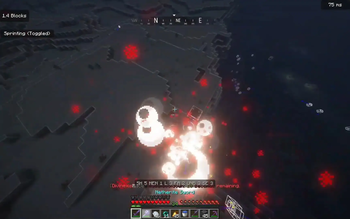
DivinexisMace
Advanced mace cooldowns and customizable particle effects for Minecraft Paper 1.21+
Features
Real Mace Cooldown System
DivinexisMace uses Paper's native cooldown API to provide a true cooldown system for maces.
- Visual cooldown displayed directly on the mace in the hotbar
- Prevents mace spam and abuse
- Configurable cooldown duration
- Action bar cooldown notifications
- Lightweight and optimized
Custom Particle Effects
Choose your own combat style with five unique particle effects:
- RED – Red critical-hit aura
- BLUE – Magical blue energy burst
- FIRE – Flames and lava sparks
- LIGHTNING – Electric energy effects
- BLOOD – Dark red impact burst
Particle selections are saved automatically and are visible to nearby players.
Modern GUI
- Easy-to-use inventory GUI
- Visual indicator for selected particle
- Sound feedback when selecting effects
- Clean and user-friendly design
Commands
Player Commands
- "/divinexismace-particles"
- "/dmaceparticles"
- "/dmparticles"
Open the particle selection menu.
Admin Commands
- "/divinexismace "
- "/dmace "
- "/dmacecooldown "
Examples:
- "/dmace 10s"
- "/dmace 30s"
- "/dmace 1m"
- "/dmace 2m"
Permissions
- "divinexismace.admin" – Access admin commands
- "divinexismace.use" – Use mace cooldown system
- "divinexismace.particles" – Access particle GUI
Requirements
- Paper 1.21+
- Java 21+
No external dependencies required.
Configuration
Fully configurable through:
- "config.yml"
Adjust cooldown duration, particle density, and messages to fit your server.
Installation
- Download the latest release.
- Place "DivinexisMace.jar" inside your server's "plugins" folder.
- Restart or reload your server.
- Configure the plugin to your liking.
Video Link! https://youtu.be/U8MIq8Nq5QA?si=hy4LTIUQpqCpZgkH
Why DivinexisMace?
Unlike many simple cooldown plugins, DivinexisMace uses Paper's native cooldown system, providing proper visual feedback while keeping performance impact minimal. Combined with customizable combat particles, it creates a more engaging PvP experience for your players.
Made for Divinexis Network
- Edition: Minecraft Java
- File type: .jar
- Minecraft versions listed: 1.21, 1.21.1, 1.21.2
- How to install: Install the matching mod loader (Forge, Fabric or NeoForge) for your Minecraft version. → Download the .jar. → Put it in the .minecraft/mods folder and launch that loader profile.
- Where to get it: Opens on Modrinth — not every file is mirrored on our own servers.
Install steps are the general flow for this file type — How to install Minecraft Java mods & modpacks walks through it step by step.
- Ships as DivinexisMace-1.0.0.jar — drop this file into the mods folder
- Download size: 578 KB
- Download link checked 4 Oct 2026 — working
These come from our own check of the pack file, not from the source page.