
VelocityPunish
Java mod listed for Minecraft 1.21–26.x. Downloads from the MC Java Mods app on Android.
I don't know my version or loader
PunishSystem
A professional, network-wide punishment management plugin for Velocity proxy servers.
by mcaffe13
PunishSystem gives your moderation team everything they need to keep the network clean: permanent bans, temporary bans, IP bans, network bans, kicks, warnings, predefined punishment presets, automatic multi-account detection, VPN/proxy blocking, and Discord webhook notifications — all without touching a single line of code.
✨ Features
Core Punishment Commands
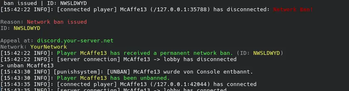
/ban— Permanently ban a player with UUID tracking/tempban— Temporarily ban with flexible duration syntax (30m,7d,1y,2w3d, …)/kick— Disconnect an online player with a configurable message/unpunish//unban— Lift any active ban
Extended Moderation Tools
/punish <player> <preset>— Apply a predefined punishment in one command — configure presets inconfig.jsonwith reason, type, and duration, no recompile needed- IP Bans — Block an IP address from connecting to the network
- Network Bans — Permanent server-wide ban with a dedicated appeal screen
Warn System
/warn <player> <reason>— Issue a formal warning; the player receives an in-game warning screen/warnings <player>— List all active warnings for a player/clearwarnings <player>— Remove all active warnings for a player
Smart Detection
- Multi-account detection — When a player is banned, all accounts that have ever shared the same IP are automatically banned too
- VPN / Proxy blocking — Detects VPNs and proxies via ip-api.com with a configurable per-ISP whitelist and bypass permission
Staff Tools
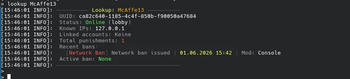
/history <player>— Full punishment history (up to 50 entries)/check <player>— Active punishments at a glance/lookup <player>— Complete player profile: UUID, known IPs, linked accounts, ban history, online status- Staff notifications — Every punishment is broadcast to online staff with the
punishsystem.notifypermission
Integrations
- Discord webhooks — Automatic embeds for ban, tempban, unban, kick, IP ban, warn, and VPN events
- LabyMod — Native LabyMod Protocol support
- bStats — Anonymous usage statistics
- Mojang API fallback — Resolves UUIDs for offline players automatically
- MySQL / MariaDB — Reliable storage with HikariCP connection pooling
- File storage fallback — Works out of the box without a database
Admin Friendly
/punishreload— Hot-reload configuration without a server restart- Fully configurable messages — Every player-facing text, the prefix, and all permission nodes are defined in
config.json - Table prefix support — Share a database with other plugins without conflicts
📋 Requirements
| Velocity | 3.x |
| Java | 21 or newer |
| Database | MySQL 5.7+ or MariaDB 10.4+ (optional) |
⚡ Quick Start
- Drop
punishsystem-x.x.x.jarinto yourplugins/folder - Start Velocity once — a default
config.jsonis generated inplugins/punishsystem/ - (Optional) Configure the
databasesection with your MySQL credentials - Restart or run
/punishreload - Assign permissions to your staff groups
🔧 Commands & Permissions
| Command | Description | Permission |
|---|---|---|
/ban <player> <reason> |
Permanently ban a player | punishsystem.ban |
/tempban <player> <duration> <reason> |
Temporarily ban a player | punishsystem.tempban |
/unban <player> |
Remove an active ban | punishsystem.unban |
/kick <player> <reason> |
Kick an online player | punishsystem.kick |
/punish <player> <preset> |
Apply a preset punishment | punishsystem.punish |
/unpunish <player> |
Remove active punishment | punishsystem.unpunish |
/warn <player> <reason> |
Warn a player | punishsystem.warn |
/warnings <player> |
Show active warnings | punishsystem.check |
/clearwarnings <player> |
Clear all warnings | punishsystem.clearwarnings |
/history <player> |
Show punishment history | punishsystem.history |
/check <player> |
Show active punishments | punishsystem.check |
/lookup <player> |
Full player profile | punishsystem.lookup |
/punishreload |
Reload config | punishsystem.reload |
Special permissions:
| Permission | Effect |
|---|---|
punishsystem.ipban |
Issue IP bans |
punishsystem.notify |
Receive staff notifications for every punishment |
punishsystem.bypass |
Bypass active bans (useful for admins) |
punishsystem.vpn.bypass |
Exempt from VPN / proxy detection |
⏱️ Duration Syntax
30s · 15m · 6h · 7d · 2w · 1y — combinations like 1d12h are supported.
📁 Configuration Overview
Everything is configured in plugins/punishsystem/config.json:
{
  "database":    { "enabled", "host", "port", "database", "username", "password" },
  "network":     { "name", "prefix", "unbanUrl", "discordUrl" },
  "permissions": { all permission nodes — fully overridable },
  "vpn":         { "enabled", "kickOnDetect", "whitelistedISPs" },
  "webhooks":    { "enabled", "ban", "tempban", "unban", "kick", "warn", "vpn" },
  "messages":    { every player-facing string, with {placeholder} support },
  "punishments": { named presets: type, duration, reason }
}
✦ Partner

🎨 Create Custom Minecraft Content with NexoMaker
Create custom items, mobs, blocks, recipes, and more — without coding.
Compatible with Nexo, ItemsAdder, and other modern custom-content systems.
💜 Use code MCAFFE13 to get 15% off!
👉 Get started with NexoMaker
⚠️ ItemsAdder or Nexo required for exported content.
📜 License
PunishSystem is open source under the Mozilla Public License 2.0. You are free to use it on private and public servers. Forks published publicly must use a different name — see TRADEMARKS.md for details.
🐛 Issues & Contributions
Found a bug or have a feature request? Open an issue on GitHub. Pull requests are welcome!
- Edition: Minecraft Java
- File type: .jar
- Minecraft versions listed: 1.21, 1.21.1, 1.21.2
- How to install: Install the matching mod loader (Forge, Fabric or NeoForge) for your Minecraft version. → Download the .jar. → Put it in the .minecraft/mods folder and launch that loader profile.
- Where to get it: Opens on Modrinth — not every file is mirrored on our own servers.
Install steps are the general flow for this file type — How to install Minecraft Java mods & modpacks walks through it step by step.
- Ships as punishsystem-1.0.1.jar — drop this file into the mods folder
- Download size: 5.0 MB
- Download link checked 24 Oct 2026 — working
These come from our own check of the pack file, not from the source page.