
Possum's Glow Ink
Java mod listed for Minecraft 26.x. Downloads from the MC Java Mods app on Android.
I don't know my version or loader
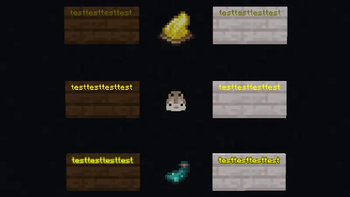


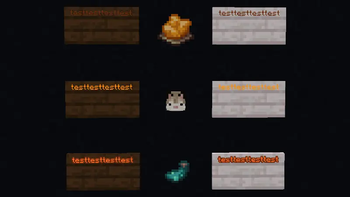
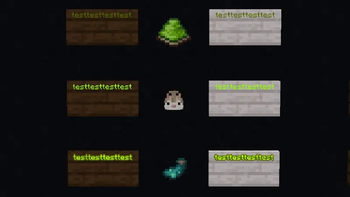
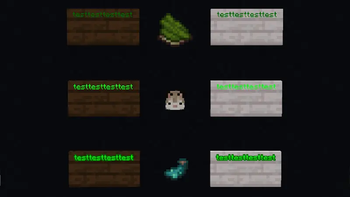


Possum's Glow Ink
Overview
A glow-inked sign causes more lag than a sign without it. This is because of the way that the outline of the text is rendered in vanilla game mechanics.
In areas with lots of glow-inked signs, frames can drop fast for players. This plugin finds a healthy medium - fun, bold colors (configurable by hexadecimal values) without the outline (and without the additional lag).
Features
- Uses the same flow as vanilla Minecraft sign coloring.
- Normal dyes still apply normal vanilla sign colors.
- Glow ink sacs turn on custom hex code coloring for the clicked sign side.
- Clicking a sign with an ink sac removes the glow effect.
- While custom glow mode is active, dye changes use custom hex colors instead of vanilla dye colors.
- Avoids vanilla glowing text entirely (The big lag reducer - removes the text outline).
- Supports normal signs and hanging signs.
- Operator-only global toggling of the plugin.
Commands
/glowink enable
Enable the plugin.
/glowink disable
Disable the plugin.
/glowink status
Display all applicable plugin information to the user.
/glowink reload
Reload the config file.
- Edition: Minecraft Java
- File type: .jar
- Minecraft versions listed: 26.1, 26.1.1, 26.1.2
- How to install: Install the matching mod loader (Forge, Fabric or NeoForge) for your Minecraft version. → Download the .jar. → Put it in the .minecraft/mods folder and launch that loader profile.
- Where to get it: Opens on Modrinth — not every file is mirrored on our own servers.
Install steps are the general flow for this file type — How to install Minecraft Java mods & modpacks walks through it step by step.
- Ships as PossumsGlowInk-26.1.2.jar — drop this file into the mods folder
- Download size: 12 KB
- Download link checked 23 Oct 2026 — working
These come from our own check of the pack file, not from the source page.