


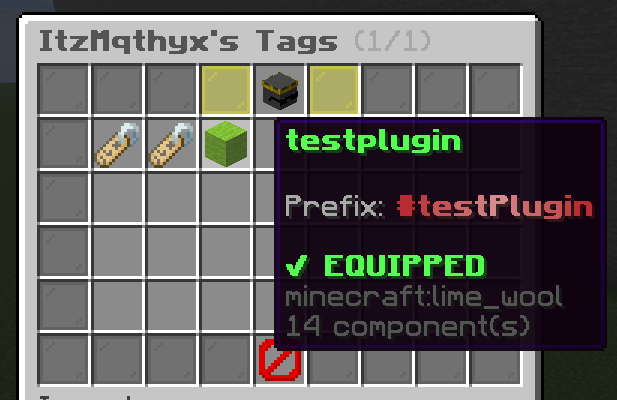
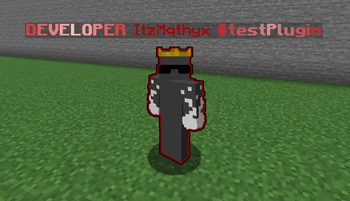
️ItzTags is a lightweight and easy-to-use Minecraft plugin that allows server administrators to create custom player tags and assign them to any player. Whether you want to showcase ranks, achievements, roles, or special statuses, ItzTags provides a flexible way to personalize player identities and make them stand out on your server.
Designed with simplicity and performance in mind, ItzTags makes managing custom tags quick and straightforward while giving players a more unique and engaging experience.
Here is all the info you need to use this plugin. Commands:
- /tags - opens menu with all your avaible tags for use
- /tag create - creates tag with custom prefix that supports colors and gradients
- /tag remove - completely removes the tag from everyone
- /tag give - gives player access to this tag which will be avaible in /tags
- /tag take - removes the tag from player
- /tag reload - reloads all changes made from config
- /tag list - lists all tags on the server
- /tag edit - edits the prefix of the tag
Permissions:
- itztags.give - grants access to /tag give and /tag take (great for lower staff members)
- itztags.admin - grants full access to all commands
Placeholders:
- %itztags_tag% - placeholder that shows players current equipped tag
Features:
- RGB Gradients - supports custom colors with gradients
- Menu with all your owned tags
- Very simple to use and everything can be done in game using commands but you can also use config
- Give each player up to 28 custom tags
Requires:
- PlaceholderAPI
If you want to suggest new ideas, need support or report a bug make sure to join my discord: https://discord.gg/XrBDFYR2aa
I will really appreciate if you leave me a review and give me feedback about the plugin! (please do not use reviews for reporting bugs! if you need help then join my discord for support)
- Edition: Minecraft Java
- File type: .jar
- Minecraft versions listed: 1.21, 1.21.8, 1.21.11
- How to install: Install the matching mod loader (Forge, Fabric or NeoForge) for your Minecraft version. → Download the .jar. → Put it in the .minecraft/mods folder and launch that loader profile.
- Where to get it: Opens on Modrinth — not every file is mirrored on our own servers.
Install steps are the general flow for this file type — How to install Minecraft Java mods & modpacks walks through it step by step.
- Ships as ItzTags-1.0.jar — drop this file into the mods folder
- Download size: 25 KB
- Download link checked 14 Sept 2026 — working
These come from our own check of the pack file, not from the source page.