
Live MOTD
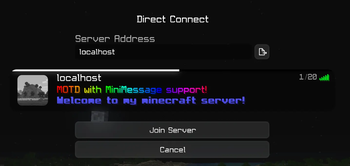
A quick and easy way to display a live, customizable MOTD on your server.
Source Code
Supported platforms & versions
Although live-motd may work on other platforms or versions, I do not guarantee for their stability or functionality.
Configuration:
{
  "richMOTD": "<rainbow>MOTD with MiniMessage support!</rainbow> <newline><blue><bold>Welcome to my minecraft server!"
}

richMOTD A 'rich string' representing the message of the day.
Based on MiniMessage formatting. Supports multiline components using \n or <newline>.
Commands
/live-motd Displays the current MOTD in the chat.
/live-motd <MOTD> Changes the MOTD to the provided string.
/live-motd --reload-config Reloads the configuration file.
Aliases:
/motd/message-of-the-day
Permissions
live-motd.command.use Allows the holder to use the /live-motd command.
- Edition: Minecraft Java
- File type: .jar
- Minecraft versions listed: 1.21.10, 1.21.11, 26.1
- How to install: Install the matching mod loader (Forge, Fabric or NeoForge) for your Minecraft version. → Download the .jar. → Put it in the .minecraft/mods folder and launch that loader profile.
- Where to get it: Opens on Modrinth — not every file is mirrored on our own servers.
Install steps are the general flow for this file type — How to install Minecraft Java mods & modpacks walks through it step by step.
- Ships as live-motd-1.0.1.jar — drop this file into the mods folder
- Download size: 9.6 MB
- Download link checked 12 Sept 2026 — working
These come from our own check of the pack file, not from the source page.