
EliteHolographics
Create interactive, static and animated holograms for your server! EliteHolographics is packed full of commands to create the best and easiest experience…
⬇ Download on Modrinth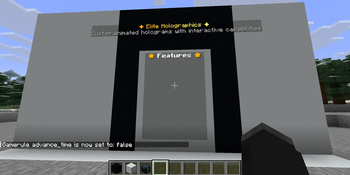
 EliteHolographics is a modern, high-performance Minecraft server plugin built using the Spigot/Paper API. Unlike legacy hologram plugins that rely on invisible armor stands and packet manipulation, this plugin utilizes native
 TextDisplay and Interaction entities (introduced in Minecraft 1.19.4).
Architectural Highlights
- Native Rendering: By leveraging
TextDisplayentities, the plugin shifts the rendering overhead entirely to the client. This dramatically reduces server-side entity ticking and lag. - Modern Text Engine: Fully integrates the Kyori Adventure API and MiniMessage. This allows server administrators to use advanced formatting, including RGB gradients, hex colors, hover events, and clean font styles.
- Smart Chunk & World Management: Listens to chunk and world loading events to dynamically manage entity lifecycles. It automatically cleans up or respawns displays when chunks unload/load, preventing "ghost entities" or duplicated holograms.
- Asynchronous-Friendly Tasks: Animation scaling and placeholder parsing are handled via scheduled Bukkit tasks, preventing main-thread stalling.
Requirements
To run this plugin successfully, your server environment must meet the following criteria:
- Server Platform: Paper (Paper recommended as they natively bundle the Kyori Adventure libraries used in this code).
- Minecraft Version: Minecraft 1.21 or newer (Required for
TextDisplayandInteractionentity support). - Java Version: Java 21 or higher.
Optional Dependencies
- PlaceholderAPI (PAPI): If present, the plugin automatically hooks into it to allow live-updating server placeholders.
⚠️ Technical Note on PAPI: The plugin passes a null player object when parsing placeholders (
PlaceholderAPI.setPlaceholders(null, text)). This means only global placeholders (e.g.,%server_tps%,%server_online%) will display properly. Player-specific placeholders (e.g.,%player_name%) are not supported on the hologram text itself, though{player}is supported inside interactive click actions.
Core Features
1. Advanced Text Formatting (MiniMessage)
No more awkward &c or §e color codes. The plugin natively interprets MiniMessage. For example, setting a line to:
"<gradient:gold:yellow>✦ Welcome to the Server ✦</gradient>" will render a smooth color transition.
2. Live Animations
The plugin includes an AnimationManager that reads custom configurations from the plugins/EliteHolographics/animations/ folder.
- Animations are configured frame-by-frame via YAML files.
- You can define a custom tick interval (e.g.,
interval: 10for twice per second). - The plugin cycles through these frames smoothly in-place without needing to completely recreate the entity.
3. Interactivity & Click Actions
When a hologram is toggled to interactive, the plugin calculates its exact physical boundary box (lines * 0.28f + 0.15f) and overlays an invisible Interaction entity. When a player right-clicks this space, it triggers a chain of actions with a 500ms anti-spam cooldown. Supported actions:
COMMAND: Forces the player to run a command.CONSOLE: Executes a command via the server console.MESSAGE: Sends a private, formatted MiniMessage to the clicking player.BROADCAST: Sends a formatted MiniMessage to everyone on the server.
4. Layout Customization
- Billboard Mode (Default): The hologram automatically rotates to face the player flawlessly from any direction (
Billboard.CENTER). - Static Mode: Locks the panel to a fixed direction (
north,south,east,west) making it look like a flat wall display or sign. - Custom Backgrounds: Background boxes can be toggled on/off completely or tinted using hexadecimal codes (e.g.,
#FF6600).
Command Reference & Permissions
All operations run through the base command /holo.
Management Commands
| Command | Description | Permission |
|---|---|---|
/holo list |
Lists all created holograms on the server. | elite.holo.use |
/holo info <name> |
Previews a hologram's lines and internal data properties. | elite.holo.use |
/holo near [radius] |
Locates all holograms within a specific radius. | elite.holo.use |
/holo create <name> [text] |
Spawns a new hologram at your current coordinates. | elite.holo.create |
/holo delete <name> |
Permanently removes a hologram and its entry from the file. | elite.holo.delete |
/holo reload |
Clears all active tasks, reloads files, and re-spawns entities. | elite.holo.reload |
Modification Commands
| Command | Description | Permission |
|---|---|---|
/holo addline <name> <text> |
Appends a brand new line to the bottom of the hologram. | elite.holo.edit |
/holo edit <name> <line#> <text> |
Replaces the text of an existing line number. | elite.holo.edit |
/holo removeline <name> <line#> |
Removes a line. (Will block removing the last remaining line). | elite.holo.edit |
/holo insertline <name> <line#> <text> |
Inserts text at a specific index, pushing other lines down. | elite.holo.edit |
/holo placeatme <name> |
Teleports a hologram directly to your current location. | elite.holo.move |
/holo move <name> <x> <y> <z> |
Moves a hologram to specific coordinates. Supports relative ~. |
elite.holo.move |
Appearance & Display Options
| Command | Description | Permission |
|---|---|---|
/holo static <north|south|east|west> <name> |
Locks the hologram rotation to a fixed cardinal wall-direction. | elite.holo.edit |
/holo bg <name> <on|off|reset> |
Toggles or resets the native black translucent background box. | elite.holo.edit |
/holo bgc <name> <#RRGGBB> |
Restores background and colors it using a Hex code. | elite.holo.edit |
/holo papi <name> <on|off> |
Dictates whether global PAPI placeholders refresh every second. | elite.holo.edit |
Interactivity Commands
| Command | Description | Permission |
|---|---|---|
/holo interactive <name> |
Toggles right-click capabilities on or off. | elite.holo.edit |
/holo actions <name> |
Displays a numbered configuration list of existing click actions. | elite.holo.use |
/holo addaction <name> <TYPE> <val> |
Binds a COMMAND, CONSOLE, MESSAGE, or BROADCAST execution. |
elite.holo.edit |
/holo removeaction <name> <index> |
Removes a specific action script by its list index number. | elite.holo.edit |
/holo clearactions <name> |
Wipes out all configured click scripts and turns off interactivity. | elite.holo.edit |
Animation Engine Commands
| Command | Description | Permission |
|---|---|---|
/holo listanim |
Lists all parsed animation configurations available on the system. | elite.holo.use |
/holo newanim <name> |
Generates a template animation YAML file in the plugin directory. | elite.holo.create |
/holo createanim <name> <anim> |
Spawns a new hologram bound directly to a file-based loop. | elite.holo.create |
/holo setanim <name> <anim> |
Upgrades a static hologram to run a specific file-based loop. | elite.holo.edit |
/holo removeanim <name> |
Strips an animation off a hologram, reverting it to static text. | elite.holo.edit |
File Structure & Usage Guide
Stored Holograms (holos.yml)
Holograms are flat-saved inside plugins/EliteHolographics/holos.yml. Here is an example layout generated by the plugin's code:
holos:
  spawn_welcome:
    world: world
    x: 100.5
    y: 64.0
    z: -200.5
    lines:
      - "<gradient:gold:yellow>⭐ WELCOME TO ELITE MC ⭐</gradient>"
      - "<gray>Players Online: <aqua>%server_online%</aqua></gray>"
    isStatic: false
    yaw: 0.0
    showBackground: true
    papiRefresh: true
    interactive: true
    actions:
      - "MESSAGE:<green>You clicked the server info board!"
      - "CONSOLE:eco give {player} 10"
Creating Animations
- To build an animation, run /holo newanim pulse. This produces a clean layout template inside plugins/EliteHolographics/animations/pulse.yml. You can open this file and configure frame cycles like this:
interval: 10
frames:
  - - "<red>●</red> <white>Server Feature</white>"
    - "<gray>Click here to learn more!</gray>"
  - - "<gold>●</gold> <white>Server Feature</white>"
    - "<yellow>Click here to learn more!</yellow>"
Once edited, type /holo reload to load it into memory, then attach it to your display via /holo setanim pulse.
- Edition: Minecraft Java
- File type: .jar
- Minecraft versions listed: 1.21, 1.21.1, 1.21.2
- How to install: Install the matching mod loader (Forge, Fabric or NeoForge) for your Minecraft version. → Download the .jar. → Put it in the .minecraft/mods folder and launch that loader profile.
- Where to get it: Opens on Modrinth — not every file is mirrored on our own servers.
Install steps are the general flow for this file type — see the MC Java Mods guides for the full walkthrough.
- Ships as EliteHolographics-1.1.0.jar — drop this file into the mods folder
- Download size: 35 KB
- Download link checked 24 Aug 2026 — working
These come from our own check of the pack file, not from the source page.