
MathTreeChop
This is a Minecraft plugin for chopping down trees, featuring entity-based animations designed to closely simulate the animation style of the “Panda’s…
⬇ Download on Modrinth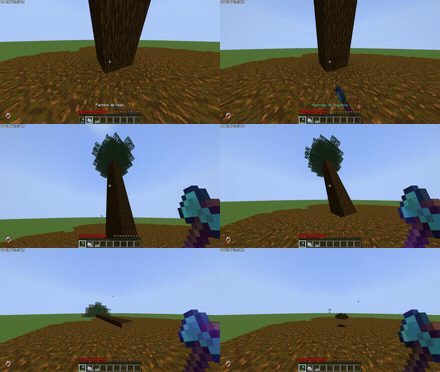

MathTreeChop is a highly optimized tree-chopping plugin inspired by Panda's Falling Tree, bringing smooth animations and a natural cutting experience to Minecraft servers — without requiring any client-side mods.
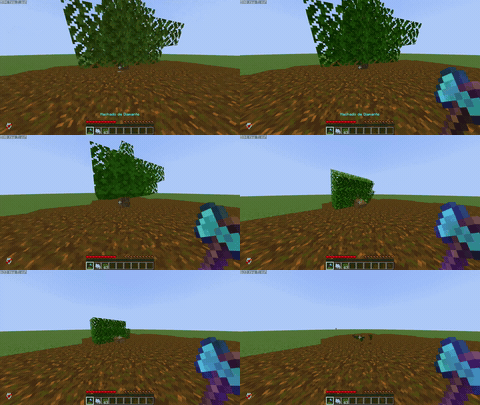
🎬 Showcase

🌳 Overview
Break one log, and the entire tree falls with a smooth, physics-like animation.
The real structure is removed instantly, replaced by a fully animated visual tree using BlockDisplay, with drops generated only on impact.
✨ Features
- 🌲 Full tree cutting (single block → entire tree)
- 🎬 Smooth falling animation with impact effect
- 📍 Fall direction based on player position
- ⚡ Performance-friendly (designed to avoid lag)
- 🧠 Smart tree detection system
- ⛏️ Dynamic mining slowdown for large trees
- 🪓 Optional tool durability usage
- 🌐 Multi-language support
- 🎨 HEX, gradient and legacy color support
- ⚙️ Fully configurable via
config.yml
⚙️ Highly Configurable
Almost every aspect of the plugin can be customized:
- Tree detection rules
- Animation speed and behavior
- Mining slowdown scaling
- Tool requirements and durability
- Drops behavior
- Language and messages
You can fine-tune the plugin to match your server’s gameplay style.
📦 Compatibility
- Paper: 1.21 – 1.21.11
- Spigot: 1.21 – 1.21.11
- Bukkit: 1.21 – 1.21.11
🚀 Installation
- Download the plugin
.jar - Place it in your
/pluginsfolder - Restart the server
🎯 Why MathTreeChop?
- Feels like a mod, works like a plugin
- No client installation required
- Smooth and immersive tree physics
- Designed for real server performance
📜 License
This project is licensed under the MIT License.
See the LICENSE file for more details.
💡 Credits
Inspired by Panda's Falling Tree
- Edition: Minecraft Java
- File type: .jar
- Minecraft versions listed: 1.21, 1.21.1, 1.21.2
- How to install: Install the matching mod loader (Forge, Fabric or NeoForge) for your Minecraft version. → Download the .jar. → Put it in the .minecraft/mods folder and launch that loader profile.
- Where to get it: Opens on Modrinth — not every file is mirrored on our own servers.
Install steps are the general flow for this file type — How to install Minecraft Java mods & modpacks walks through it step by step.
- Ships as MathTreeChop-0.0.2.jar — drop this file into the mods folder
- Download size: 60 KB
- Download link checked 11 Sept 2026 — working
These come from our own check of the pack file, not from the source page.