
NewsFlash(日本対応)
A Minecraft plugin that provides real-time chat notifications for earthquake information, international safety updates, and news, mainly for users in…
⬇ Download on Modrinth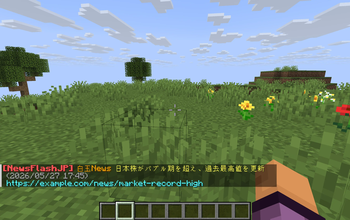
NewsFlash Plugin
NewsFlash brings real-time news and emergency alerts directly into your Minecraft server chat.
※ Please make sure to follow the terms of use and distribution policies of each RSS/Atom feed provider.
Supported Information Sources
Global
- Custom RSS / Atom Feeds (Supports virtually any news or information source available through RSS or Atom.)
Japan
- P2PQuake WebSocket API
- Earthquake Reports
- Tsunami Advisories
- Earthquake Early Warnings (EEW)
- MOFA Overseas Safety Information Open Data
- Latest Overseas Safety Information published by Japan’s Ministry of Foreign Affairs
Discord Integration
NewsFlash can relay messages from selected Discord channels to Minecraft.
- Minecraft chat, action bar, and boss bar support
- Configurable Discord channels
- Message length and rate limiting
- Optional bot, mention, and Markdown filtering
- Requires a Discord bot with Message Content Intent enabled
- Requires the
View Channelpermission
See the Discord Integration Wiki for setup instructions.
Multi-language Support
NewsFlash is designed for both Japanese servers and international communities.
It supports Japanese, English, Chinese Simplified, Chinese Traditional, Korean, German, French, Spanish, Brazilian Portuguese, and Russian.
Server administrators can set a default language for the entire server, while each player can choose their own personal language.
Persistent Player Settings
Player language preferences can be saved using SQLite, allowing settings to remain available even after server restarts.
Disclaimer
NewsFlash supports custom RSS/Atom feeds, but server administrators are responsible for selecting and configuring the feeds they use.
Please make sure to follow the terms of use, redistribution rules, rate limits, and access policies of each RSS/Atom feed provider.
The developer is not responsible for any issues caused by the use of external RSS/Atom feeds, including access restrictions, feed suspension, service interruptions, or violations of provider policies.
- Edition: Minecraft Java
- File type: .jar
- Minecraft versions listed: 1.20, 1.20.1, 1.20.2
- How to install: Install the matching mod loader (Forge, Fabric or NeoForge) for your Minecraft version. → Download the .jar. → Put it in the .minecraft/mods folder and launch that loader profile.
- Where to get it: Opens on Modrinth — not every file is mirrored on our own servers.
Install steps are the general flow for this file type — How to install Minecraft Java mods & modpacks walks through it step by step.
- Ships as NewsFlash-0.1.3.jar — drop this file into the mods folder
- Download size: 10.7 MB
- Download link checked 14 Sept 2026 — working
These come from our own check of the pack file, not from the source page.