ModsJava
PlaytimeLimit
PlaytimeLimit is a Minecraft Paper server plugin that enforces per-day and per-session playtime limits for players. It features configurable daily limits…
⬇ Download on Modrinth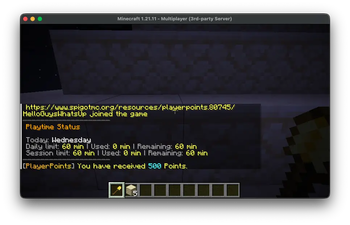
A Minecraft Paper plugin that helps server admins manage and enforce playtime limits for players, with per-day-of-week configuration, session limits, forced breaks, configurable warnings, and a daily first-login reward system.
Features 📅 Per-Day-of-Week Time Limits Configure playtime rules independently for each day of the week. Each day has its own settings:
- Daily Limit (daily-limit-minutes) — Total playtime allowed for that day. Once reached, the player is kicked and cannot rejoin until the next day.
- Session Limit (session-limit-minutes) — Maximum continuous playtime before a forced break. After the break, the player can log back in and continue playing (up to the daily limit).
- Enable/Disable per day — You can completely disable playtime enforcement on specific days. Example defaults: Day Monday – Friday Saturday – Sunday ⏱️ Session Limit & Forced Breaks When a player reaches their session limit, they are kicked with a friendly message and must wait for the configured break duration (default: 10 minutes) before rejoining. After the break, their session timer resets and they can continue playing until they hit the daily limit. This encourages healthy play habits — taking breaks between gaming sessions rather than playing for hours straight. 📊 Daily Limit The daily limit tracks total accumulated playtime across all sessions in a calendar day. Once the player reaches this limit, they are locked out until the next day. The daily timer resets automatically at midnight (configurable timezone, default: Asia/Shanghai).
- 🎁 Daily First-Login Command (Daily Login Reward) On a player's first login each calendar day, the plugin can execute a configurable console command. This is perfect for implementing daily login rewards — e.g., give the player a cookie, some currency, or a special item every day. Configuration: daily-first-login: enabled: true command: "give {player} minecraft:cookie 1" permission: ""
- Use {player} as a placeholder for the player's name.
- Optionally gate the reward behind a permission (leave empty for everyone).
- Each player only receives the reward once per day, tracked per UUID. ⚠️ Configurable Warnings Players receive in-game warnings when their remaining time hits certain thresholds (default: 15, 5, and 1 minute remaining). These warnings are fully customizable: warnings: enabled: true thresholds: [15, 5, 1] 🛡️ Bypass Permission Players with playtimelimit.bypass permission are completely exempt from all time limits and restrictions. 🌐 Configurable Messages All messages are fully customizable with & color codes via config.yml.
- Installation
- Download the PlaytimeLimit-1.0.0.jar file.
- Place it in your server's plugins/ folder.
- Restart your server (or use a plugin manager like PlugMan to load it).
- Edit plugins/PlaytimeLimit/config.yml to customize settings.
- Run /playtimelimit reload to apply changes without restarting.
Quick facts
- Edition: Minecraft Java
- File type: .jar
- Minecraft version listed: 1.21.11
- How to install: Install the matching mod loader (Forge, Fabric or NeoForge) for your Minecraft version. → Download the .jar. → Put it in the .minecraft/mods folder and launch that loader profile.
- Where to get it: Opens on Modrinth — not every file is mirrored on our own servers.
Install steps are the general flow for this file type — How to install Minecraft Java mods & modpacks walks through it step by step.
Verified by MCModsHub
- Ships as PlaytimeLimit-1.0.0.jar — drop this file into the mods folder
- Download size: 20 KB
- Download link checked 14 Sept 2026 — working
These come from our own check of the pack file, not from the source page.