
ModsJava
VeyraLink
Java mod listed for Minecraft 1.18–1.21. Downloads from the MC Java Mods app on Android.
VeyraLink is a Java 17+ Spigot/Paper (1.20+) plugin that connects Minecraft to Discord, featuring player verification (/verify), rewards, MySQL/SQLite…
⬇ Download on Modrinth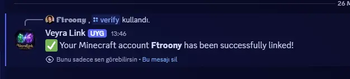

🌟 VeyraLink | The Ultimate Minecraft-Discord Bridge
VeyraLink is a powerful, lightweight, and highly optimized Spigot plugin designed to seamlessly connect your Minecraft server with your Discord community.
🎨 Key Features
- 🤖 Discord Bot Integration — Smooth, real-time connection between your server and Discord guild.
- 🛡️ Player Verification System (
/verify) — Securely link players' Minecraft accounts to their Discord accounts. - 💾 Multi-Database Support — High-performance data management with out-of-the-box SQLite and MySQL support.
- 🎁 Automated Reward System — Boost your Discord engagement by giving custom rewards to verified players.
- 🌐 Fully Configurable Messages — Complete control over every line of text, with pre-configured English (EN) and Turkish (TR) support.
⚙️ Requirements
- ☕ Java:
Java 17or higher - 🎮 Platform:
Spigot/Paper1.20+ - 🔑 API: A valid Discord Bot Token
🛠️ Quick Installation Guide
- Upload: Drop the
VeyraLink.jarfile into your server'splugins/folder. - Initialize: Restart your server to generate the configuration files.
- Configure: Open
plugins/VeyraLink/config.ymland paste your Discord bot token. - Finalize: Restart your server once more and use
/veyralinkto verify it's active!
💬 Need Help?
- Join our official Discord community for instant support, updates, and feature requests!
- 👉 [Click Here to Join Our Discord Support Server]
Quick facts
- Edition: Minecraft Java
- File type: .jar
- Minecraft versions listed: 1.18, 1.18.1, 1.18.2
- How to install: Install the matching mod loader (Forge, Fabric or NeoForge) for your Minecraft version. → Download the .jar. → Put it in the .minecraft/mods folder and launch that loader profile.
- Where to get it: Opens on Modrinth — not every file is mirrored on our own servers.
Install steps are the general flow for this file type — How to install Minecraft Java mods & modpacks walks through it step by step.
File checked by MCModsHub
- Ships as veyralink-1.0.0.jar — drop this file into the mods folder
- Download size: 18.2 MB
- Download link checked 4 Oct 2026 — working
These come from our own check of the pack file, not from the source page.