
🎲 BlockDrop | The Professional TNT-Run Experience



BlockDrop: Don’t stop, just drop! > A highly optimized, feature-rich mini-game plugin for Minecraft servers. Experience smooth block fading, an anti-camp system, and unmatched performance.
🌟 What is BlockDrop?
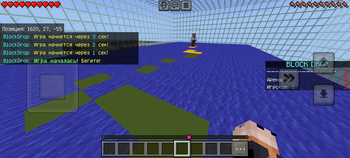
BlockDrop is a modern, professional reimagining of the classic TNT-Run mini-game. Instead of blocks vanishing instantly under a player's feet, they dynamically cycle through warning states (Green ➔ Yellow ➔ Red ➔ Air). This introduces an extra layer of strategy, giving players a visual countdown before they fall.
Built from the ground up for high-performance networks, BlockDrop ensures your server maintains a stable 20 TPS, even with dozens of active arenas.
✨ Key Features
- 🚀 Smart-Batch Restoration Engine: Unlike outdated plugins that clone entire regions (causing heavy lag spikes), BlockDrop tracks only the exact blocks touched during the match and restores them in small, throttled batches (500 blocks per tick) once the game ends.
- 📱 Flawless GeyserMC Cross-play: Fully tested and verified for Bedrock edition players! Scoreboards, custom interactive GUIs, and inventory states sync perfectly across Java and Bedrock.
- 🛑 Advanced Anti-Camp System: Players cannot cheat by standing still. The plugin actively tracks player coordinates every few ticks, dropping blocks even if a player refuses to move.
- 🛡️ Fail-Safe Inventory Backups: Before entering an arena, players' inventories, armor, health, and hunger stats are securely backed up. Everything is perfectly restored when they leave or win, even if the server restarts mid-game.
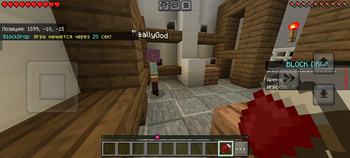
- 🛏️ Seamless Staging & Quit GUI: Players are automatically given a custom "Leave Game" bed in their 9th slot while in the lobby. Right-clicking opens an intuitive GUI to gracefully exit using
/bd leave. - 🌍 100% Configurable: Customize every single message, title, scoreboard line, and countdown duration via
config.ymlandmessages.yml.
🛠️ Setup Guide
- Download the
BlockDrop.jarand drop it into your server's/pluginsfolder. - Restart the server to generate configuration files.
- Build your arena platform, stand at one corner, and type
/bd [ArenaName] pos1. - Go to the opposite diagonal corner of the platform and type
/bd [ArenaName] pos2. - Set up your game waypoints by standing on the desired locations and running:
/bd [ArenaName] setlobby(Staging area for waiting players)/bd [ArenaName] setspawn(Where players spawn when the match starts)/bd [ArenaName] setreturn(Where players are sent after the game ends)/bd [ArenaName] setspectator(Where eliminated players go to watch)
- Give your users the
bd.playerpermission, and you're good to go!
📝 Commands & Permissions
For Players (bd.player - Enabled by default)
/bd join [arena]— Teleport to the designated arena lobby./bd leave— Safely exit the current game and return to the fallback position.
For Admins (bd.admin - Operator only)
/bd help— Display the administrative setup helper./bd create [name]— Register and create a new arena configuration./bd [name] pos1/pos2— Define the block-fading zone boundaries./bd [name] setlobby/setspawn/setreturn/setspectator— Set game world waypoints.- Suppot
- For assistance, register here https://gemini.google.com/gem/10YndAykjWwhBAfeOVsS33h6YGdtAmHn2?usp=sharing And then follow this link again after registration.
⚙️ Configuration Preview
View config.ymlmin-players: 2
countdown-seconds: 30
# Phase durations in seconds
green-duration: 4
yellow-duration: 3
red-duration: 2
# Security settings
pvp-enabled: false
commands-enabled: false
- Edition: Minecraft Java
- File type: .jar
- Minecraft versions listed: 1.13, 1.13.1, 1.13.2
- How to install: Install the matching mod loader (Forge, Fabric or NeoForge) for your Minecraft version. → Download the .jar. → Put it in the .minecraft/mods folder and launch that loader profile.
- Where to get it: Opens on Modrinth — not every file is mirrored on our own servers.
Install steps are the general flow for this file type — How to install Minecraft Java mods & modpacks walks through it step by step.
- Ships as blockdrop-1.0.jar — drop this file into the mods folder
- Download size: 26 KB
- Download link checked 14 Sept 2026 — working
These come from our own check of the pack file, not from the source page.