
AuraJoin - Modern Join Cinematics for Paper
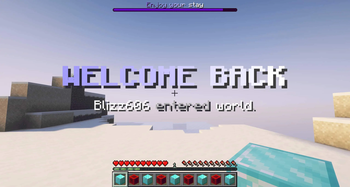
AuraJoin gives your Minecraft server a premium first impression with fully configurable join cinematics. Welcome players with animated titles, actionbars, bossbars, sounds, particles, fireworks, broadcasts, potion effects, and more.

- Configurable join sequences
- First-join welcome sequences
- VIP/Admin sequences with permissions
- Per-world sequence support
- Randomized sequence groups
- Animated bossbars
- Firework effects with HEX colors
- Sounds, particles, titles, actionbars, broadcasts
- Optional PlaceholderAPI support
- Join delay for smoother server loading
- Per-player cooldown to prevent spam
- 5-second invincibility after join and respawn
- Preview command
- Reload command
- Tab completion
- Modern MiniMessage formatting
- Kotlin-based clean plugin structure
- /aurajoin help - Shows command help
- /aurajoin reload - Reloads the configuration
- /aurajoin preview - Previews your assigned sequence
- /aurajoin preview - Previews a specific sequence
- /aurajoin list - Lists loaded sequences
- /aurajoin info - Shows plugin information
Alias:
/aj
Permissions:
- aurajoin.admin
- aurajoin.preview
- aurajoin.cooldown.bypass
- aurajoin.sequence.vip
- aurajoin.sequence.admin
Why AuraJoin?
Most join plugins only send a message or title. AuraJoin is built as a real cinematic system. You can define complete step-based sequences, assign them by permission, restrict them to worlds, randomize them, and preview everything ingame.
Perfect for:
- Lobby servers
- Survival servers
- SMP servers
- Network hubs
- VIP join effects
- First-time player welcomes
- Premium server branding
Requirements:
- Paper 1.21.11
- Java 21
- PlaceholderAPI optional
Disclaimer:
Not an official Minecraft product. Not approved by or associated with Mojang or Microsoft.
Made by Blizz Works.
- Edition: Minecraft Java
- File type: .jar
- Minecraft versions listed: 1.21, 1.21.1, 1.21.2
- How to install: Install the matching mod loader (Forge, Fabric or NeoForge) for your Minecraft version. → Download the .jar. → Put it in the .minecraft/mods folder and launch that loader profile.
- Where to get it: Opens on Modrinth — not every file is mirrored on our own servers.
Install steps are the general flow for this file type — How to install Minecraft Java mods & modpacks walks through it step by step.
- Ships as AuraJoin-1.0.0.jar — drop this file into the mods folder
- Download size: 1.4 MB
- Download link checked 22 Aug 2026 — working
These come from our own check of the pack file, not from the source page.