
SwissKnife
A versatile "all-in-one" utility plugin designed to handle alerts, player guidance and server management notifications.
⬇ Download on Modrinth
SwissKnife - Alerts & Guidance Toolkit 🛠️




SwissKnife is a tailored utility plugin for PaperMC built to solve a specific problem: the lack of flexibility in existing notification tools.
Developed to meet the unique demands of a production server, it combines essential alerts and player guidance tools into a single, highly customizable package.
✨ Features
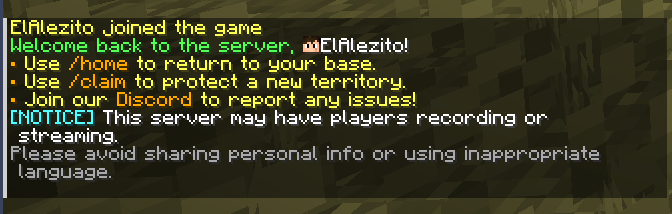
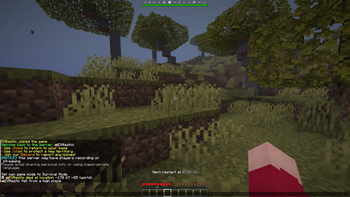
Custom Welcome System: Greet players with fully customizable Titles, Subtitles, and Chat messages upon joining.
Dynamic BossBar & Death Compass:
- Displays a custom BossBar message.
- Features a built-in compass pointing to the player's last 5 death locations.
- Smart Priority: The BossBar automatically hides during Boss fights or Raids to keep the focus on the action.
Scheduled Restart Alerts: Set up automated countdowns and messages for server maintenance, updates, or backups.
- Note: This handles the notifications only; actual restarts should be managed via Cron or Pterodactyl schedules.
- Modern Formatting: Full support for MiniMessage (rich colors/events) and PlaceholderAPI integration for all messages.
🛠️ Requirements
- Server: PaperMC (Recommended version: 26.1.2)
- Dependency: GriefPrevention (Required)
🚀 Installation
- Download the latest
.jarfrom the releases page. - Ensure PlaceholderAPI is installed on your server.
- Drop the
swissknife.jarinto your/pluginsfolder. - Restart or reload the server.
⌨️ Commands
| Command | Description | Permission |
|---|---|---|
/swissknife reload |
Reload config file. | Admin |
⚙️ Configuration
The configuration file will be generated at plugins/SwissKnife/config.yml.
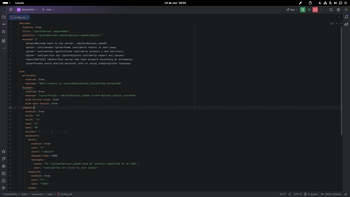
Everything in SwissKnife is designed to be personalized. You can toggle modules on or off and adjust every string to match your server's style using the config.yml
This plugin supports MiniMessage (Adventure) tags for rich text formatting and internal placeholders for dynamic information.
# welcome alerts settings
welcome:
  enabled: true
  title: "<gold>Server <aqua>Name"
  subtitle: "<gray>Welcome <white>%player_name%</white>!"
  message: |
    <green>Welcome back to the server, <white>%player_name%!
    <gold>• <yellow>Use <gold>/home <yellow>to return to your base.
    <gold>• <yellow>Use <gold>/claim <yellow>to protect a new territory.
    <gold>• <yellow>Join our <gold>Discord <yellow>to report any issues!
    <aqua>[NOTICE] <white>This server may have players recording or streaming.
    <gray>Please avoid sharing personal info or using inappropriate language.

# restart alerts settings
restart:
  enabled: true
  schedules:
    - "3:00"
    - "12:00"
    - "18:19"
  alerts: [1800, 600, 60, 30, 10, 3, 2, 1]
  messages:
    minutes: "<yellow>The server will restart in <white># <yellow>minutes!"
    minute: "<yellow>The server will restart in <white># <yellow>minute!"
    seconds: "<yellow>The server will restart in <white># <yellow>seconds!"
    second: "<yellow>The server will restart in <white># <yellow>second!"
    restarting: "<red>Restarting now..."

# hud settings
hud:
  # action bar settings
  actionbar:
    enabled: true
    message: "Next restart at <gray>%swissknife_restarttime_formated%"

  # boss bar settings
  bossbar:
    enabled: true
    message: "<gray>Player: <white>%player_name% <red>❤ %player_health_rounded%"
    hide-during-raids: true
    hide-near-bosses: true
  compass:
    enabled: true
    north:
      icon: 'N'
      color: "<red><bold>"
    south:
      icon: 'S'
      color: "<green>"
    east:
      icon: 'E'
      color: "<blue>"
    west:
      icon: 'W'
      color: "<aqua>"
    divider:
      value: "  -  -  |  -  -  "
      color: "<gray>"
    waypoints:
      death:
        enabled: true
        icon: '☠'
        color: "<white>"
        despawn-time: 1800
        messages:
          death: "#I <yellow>%player_name% died at location <white>#X #Y #Z (#W)."
          near: "<yellow>You are close to your items!"
      waypoint:
        enabled: false
        icon: 'V'
        note: "TODO"
      spawn:
        enabled: false
        icon: '#'
        node: "TODO"
🏗️ Development
Built with Kotlin for the Paper API.
Build from source:
# Clone the repository
git clone [https://github.com/alexribeirodesa/paper-swissknife.git](https://github.com/alexribeirodesa/paper-swissknife.git)

# Build with Gradle
./gradlew build
☕ Support the Project
If this plugin helps your server, consider supporting its development!

Every coffee helps me keep the "Paper Projects" series updated and free.
- Edition: Minecraft Java
- File type: .jar
- Minecraft version listed: 26.1.2
- How to install: Install the matching mod loader (Forge, Fabric or NeoForge) for your Minecraft version. → Download the .jar. → Put it in the .minecraft/mods folder and launch that loader profile.
- Where to get it: Opens on Modrinth — not every file is mirrored on our own servers.
Install steps are the general flow for this file type — How to install Minecraft Java mods & modpacks walks through it step by step.
- Ships as SwissKnife-1.1-SNAPSHOT.jar — drop this file into the mods folder
- Download size: 4.0 MB
- Download link checked 24 Aug 2026 — working
These come from our own check of the pack file, not from the source page.