
DecentDisplays
Java mod listed for Minecraft 1.19–26.x. Downloads from the MC Java Mods app on Android.
This plugin adds a better way to make displays, using Display Entities. Full support for placeholders (+ fallbacks), heads, items, blocks, pages, and…
⬇ Download on Modrinth
DecentDisplays
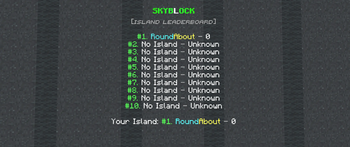
DecentDisplays is a completely painless way to add beautiful holograms and text displays to your Minecraft server. Instead of wrestling with confusing setups, you can easily create, edit, and animate displays with multiple pages directly in the game. It handles the complicated technical details behind the scenes so you can focus on making your world look amazing.
Features
- Multiple Pages: If you have a lot to say, you can break your text up into multiple pages that cycle and keep your players engaged.
- Custom Animations: Bring your server to life by applying custom animations directly to your displays.
- High Performance: Built carefully under the hood to ensure your holograms render incredibly fast with zero server lag, even with hundreds of displays.
- PlaceholderAPI Integration: We fully support PlaceholderAPI, allowing you to show player specific stats, server info, and anything else you might need.
- Floating Items and Blocks: You can display actual items (like
<item:DIAMOND_SWORD>) or blocks (like<block:GRASS_BLOCK>) floating in the air. - Player Heads: Display the custom skull of any player using
<head:PLAYER_NAME>. You can even use placeholders to show the head of whoever is looking at the display. - Rainbow Text: Type
&ubefore any text to make it cycle through rainbow colors automatically without needing animation files. - Backup Text for Placeholders: If a placeholder is empty or broken, you can set a fallback message so it does not look messy. Example:
<fallback:%player_rank%>Player<fallback/>will show "Player" if the rank is not found. - Custom Design Settings: Change the size of your displays, hide the default gray backgrounds, make text see-through, add shadows, or control how they rotate to face players.
- Smooth Movement: Set your displays to move smoothly between locations or grow and shrink gently over time.
Config:
Here's an example of a display you can add to spawn.
location:
  world: world
  x: X_COORDINATE
  y: Y_COORDINATE
  z: Z_COORDINATE
  yaw: 0
  pitch: 0
visibility-range: 48.0
visible-by-default: true
settings:
  billboard: VERTICAL
  scale: 1.0
  line-width: 200.0
  shadowed: false
  see-through: false
  background-visible: true
  background-color:
    alpha: 0
    red: 0
    green: 0
    blue: 0
  text-opacity: 1.0
  shadow-radius: 0.0
  shadow-strength: 1.0
  text-alignment: CENTER
  view-range: 1.0
  interpolation-duration: 0
  teleport-duration: 50
pages:
  '0':
    ticks-per-page: 0
    lines:
      '0':
        content: '&f&lsᴋʏʙʟᴏᴄᴋ'
        type: ANIMATION
        y-offset: 0.3
        update-interval: 20
        has-background: true
      '1':
        content: '&fWelcome to the &lsᴋʏʙʟᴏᴄᴋ&r realm!'
        type: TEXT
        y-offset: 0.5
        update-interval: 20
        has-background: true
      '2':
        content: ''
        type: TEXT
        y-offset: 0.3
        update-interval: 20
        has-background: true
      '3':
        content: To begin your &amarvelous&f adventure, create your very first &aisland&f!
        type: TEXT
        y-offset: 0.3
        update-interval: 20
        has-background: true
      '4':
        content: '&8(&o/ɪsʟᴀɴᴅ ᴄʀᴇᴀᴛᴇ <ɴᴀᴍᴇ>&r&8)'
        type: TEXT
        y-offset: 0.3
        update-interval: 20
        has-background: true
      '5':
        content: ''
        type: TEXT
        y-offset: 0.3
        update-interval: 20
        has-background: true
      '6':
        content: '&fWell, goodluck on your journey, &a%player_name%&r!'
        type: TEXT
        y-offset: 0.3
        update-interval: 20
        has-background: true
      '7':
        content: <head:%player_name%>
        type: HEAD
        y-offset: 0.2
        update-interval: 20
        has-background: true
- Edition: Minecraft Java
- File type: .jar
- Minecraft versions listed: 1.19.4, 1.20, 1.20.1
- How to install: Install the matching mod loader (Forge, Fabric or NeoForge) for your Minecraft version. → Download the .jar. → Put it in the .minecraft/mods folder and launch that loader profile.
- Where to get it: Opens on Modrinth — not every file is mirrored on our own servers.
Install steps are the general flow for this file type — How to install Minecraft Java mods & modpacks walks through it step by step.
- Ships as DecentDisplays-1.0.0.jar — drop this file into the mods folder
- Download size: 181 KB
- Download link checked 23 Oct 2026 — working
These come from our own check of the pack file, not from the source page.