
Redeem Code
A lightweight, highly customizable plugin that allows server owners to generate single-use or multi-use reward codes for items, currency, and ranks.
⬇ Download on Modrinth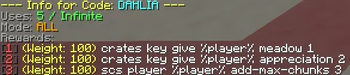
RedeemCode is the ultimate utility for server events, Discord giveaways, and content creator partnerships. It allows server administrators to create custom, alphanumeric codes that players can claim in-game to receive rewards.
Because the plugin distributes rewards by executing console commands, it is compatible with virtually every economy, crate, or permissions plugin on the market. Whether you want to give a player $5,000 in-game currency, an Epic Crate Key, or a 30-day VIP rank, if it can be typed in the console, RedeemCode can deliver it. It is built to be fast, secure, and completely customizable to fit your server's theme.
🔧 Features
- 📝 Flexible Code Types: Create single-use codes (perfect for specific players) or multi-use/global codes (perfect for YouTube videos or Discord announcements).
- 💎 Advanced Reward Pools: Attach multiple commands to a single code. Set the code to give all rewards at once, or roll a random reward based on percentage chances.
- 🌐 Universal Compatibility: Rewards are given via console commands, meaning you can hook it into EssentialsX, LuckPerms, ExcellentCrates, or any other plugin.
- ⛔ Usage Limits: Set an exact number of times a global code can be claimed before it automatically expires.
- 🔁 Player Resets: Easily reset a specific player's claim history so they can use a one-time code again.
- 💬 Fully Custom Messages: Every single chat output can be modified in the
lang.ymlto match your server's branding. - 🔒 Secure Storage: Prevents players from claiming the same multi-use code twice.
⌨️ Commands & Permissions
Player Commands:
(redeemcode.use - Given to all players by default)/redeem <code> - Claims a reward code.
Admin Commands:
(Permission: redeemcode.admin is required for all commands below)
| COMMAND | DESCRIPTION |
|---|---|
| /redeemcode create [code] | Creates a new, blank code. |
| /redeemcode addcmd [code] [command] | Adds a command to the code's reward pool. |
| /redeemcode reset [player] [code] | Clears a player's claim history for a specific code, allowing them to use it again. |
| /redeemcode info [code] | Displays all details about a code, including its mode, remaining uses, and its list of commands/chances. |
| /redeemcode reload | Reloads the config.yml and lang.yml without restarting the server. |
💬 Fully Customizable Messages
RedeemCode comes with a dedicated lang.yml file. You have 100% control over the plugin's prefix and all output text. It fully supports modern MiniMessage tags (e.g., , ) for full hex color support and includes variables like %player%, %code%, and %reward% so you can create dynamic broadcast messages when someone claims a rare code!
prefix: "<dark_gray>[<gold>RedeemCode<dark_gray>] <reset>"

messages:
  redeem_success: "<green>Code redeemed successfully!"
  no_rewards: "<yellow>Code redeemed, but there were no rewards attached to it."
  invalid_code: "<red>Invalid code."
  max_uses_reached: "<red>This code has reached its maximum global uses."
  already_used: "<red>You have already used this code!"
  cooldown: "<red>Please wait %time% seconds before redeeming another code."
  reload_success: "<green>Config and Language files reloaded successfully!"
  error: "<red>An error occurred. Check console or make sure your syntax is correct."
  only_players: "<red>Only players can use this command."
  no_permission_code: "<red>You don't have permission to use this specific code."
  mode_set: "<green>Mode for code %code% set to %mode%."
  invalid_number: "<red>Please enter a valid number."
  reset_success: "<green>Successfully reset code <aqua>%code% <green>for player <yellow>%player%<green>!"
  reset_not_used: "<red>It looks like <yellow>%player% <red>hasn't used that code yet."
  player_not_found: "<red>Could not find that player in the server records."
🖥️ Server Requirements
To run RedeemCode, your server must meet the following minimum requirements:
- Server Software: Paper or Purpur
- Minecraft Version: 26.1.x
- Java Version: Java 25
- Edition: Minecraft Java
- File type: .jar
- Minecraft versions listed: 26.1, 26.1.1, 26.1.2
- How to install: Install the matching mod loader (Forge, Fabric or NeoForge) for your Minecraft version. → Download the .jar. → Put it in the .minecraft/mods folder and launch that loader profile.
- Where to get it: Opens on Modrinth — not every file is mirrored on our own servers.
Install steps are the general flow for this file type — How to install Minecraft Java mods & modpacks walks through it step by step.
- Ships as RedeemCode-1.1.jar — drop this file into the mods folder
- Download size: 1.3 MB
- Download link checked 21 Aug 2026 — working
These come from our own check of the pack file, not from the source page.