
Custom Recipe Creator
Take full control of your server’s crafting system with a clean, admin-friendly GUI. CustomRecipe lets you create custom recipes directly in game, manage…
⬇ Download on Modrinth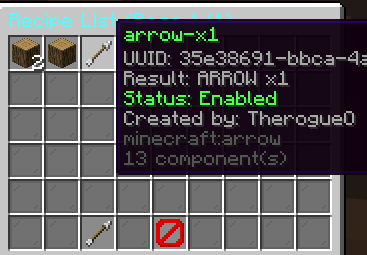
CustomRecipe - Create, Manage & Control Crafting In-Game
Take full control of your server’s crafting system with a clean, admin-friendly GUI.
CustomRecipe lets you create custom recipes directly in game, manage them with one command, and keep a full audit trail of all actions. Built for Paper servers with a focus on reliability, permission safety, and easy recipe administration.
✨ Features
In-Game Recipe Creator
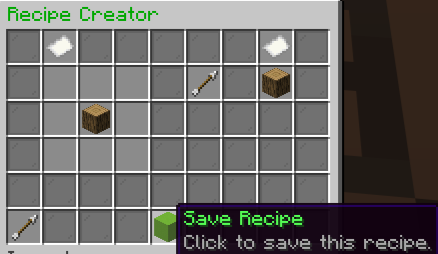
- Full 3x3 crafting grid editor
- Separate output slot for result item
- Save new recipes without editing files manually
- Slug/id generation from item display name
- Automatic duplicate handling with -xN suffixes
GUI-Based Management
- Main menu with clear navigation
- Recipe list with pagination (45 recipes per page)
- Recipe detail view
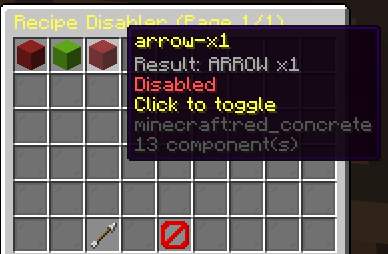
- Enable/disable existing recipes
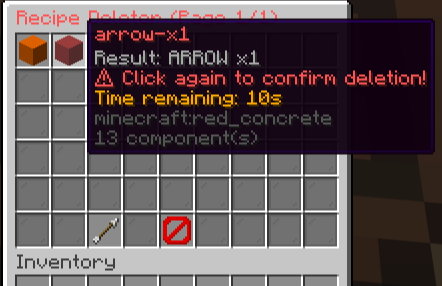
- Delete recipes with safety confirmation countdown (10s)
Strong Safety & Data Handling
- Recipes stored in recipes.yml
- Automatic migration support
- Automatic backup creation with .bak files
- Backup retention limit (50 backups)
- JSONL audit logging in audit.log
- Permission snapshot logging for traceability
Craft Blocking Logic
- Disabled recipes are blocked from crafting
- Dual protection strategy: -recipe registry handling -crafting event fallback protection
Clean Permission Model
- Separate permission for basic usage vs management actions
- Denied actions are logged to audit
📦 Commands
/customrecipe Opens the main custom recipe GUI.
/cr Alias for /customrecipe.
🔐 Permissions
customrecipe.use Allows player to use the command and open the GUI.
customrecipe.manage Allows management actions (such as creating, enabling/disabling, deleting recipes).
🧭 GUI Overview
Main Menu Central hub for all recipe actions.
Creator Place ingredients in the 3x3 grid, place result in output slot, then save.
Recipe List Browse all saved recipes page by page.
Disabler Toggle recipes on/off without deleting them.
Deleter Safely remove recipes with confirmation timer to prevent mistakes.
⚙️ Configuration Highlights
- strict-sanitize option for stricter slug sanitizing
- Automatic file migration and backup behavior
- Structured audit trail for moderation/admin review
✅ Why Use CustomRecipe?
- No manual crafting JSON editing
- Faster admin workflow with GUI
- Safer operations with backups and audit logs
- Production-friendly management for live servers
If you want powerful in-game recipe control with minimal friction, CustomRecipe is built for exactly that.
Plugin Hub: https://discord.gg/yRgDfGf4r7
Rogue Industry
- Edition: Minecraft Java
- File type: .jar
- Minecraft versions listed: 1.21, 1.21.1, 1.21.2
- How to install: Install the matching mod loader (Forge, Fabric or NeoForge) for your Minecraft version. → Download the .jar. → Put it in the .minecraft/mods folder and launch that loader profile.
- Where to get it: Opens on Modrinth — not every file is mirrored on our own servers.
Install steps are the general flow for this file type — How to install Minecraft Java mods & modpacks walks through it step by step.
- Ships as custom-recipe-1.0.0.jar — drop this file into the mods folder
- Download size: 39 KB
- Download link checked 11 Sept 2026 — working
These come from our own check of the pack file, not from the source page.