
BsruEnderChest
Java mod listed for Minecraft 1.20–26.x. Downloads from the MC Java Mods app on Android.
BsruEnderchest is a high-performance Ender Chest plugin for Spigot, Paper, and Folia servers. It enhances the vanilla Ender Chest with more storage…
⬇ Download on Modrinth
📦 BsruEnderchest



English | ภาษาไทย
BsruEnderchest is a premium, high-performance Ender Chest plugin for Spigot, Paper, and Folia servers. It enhances the vanilla Ender Chest with more storage, multiple pages, cross-server synchronization via MySQL, and a powerful suite of admin tools, all designed to be lag-free.
🌟 Modern Support
Minecraft 1.20, 1.21, and 26.1.x (2026 Drops)
Java 21 to Java 25+
Native Folia Support
Adventure Component API Integration
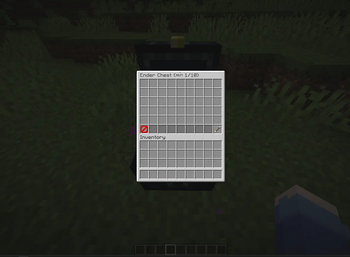
Expanded Storage: Expands the default Ender Chest to a full 6 rows (54 slots).
Paged System: Grant players access to multiple pages of storage based on permissions.
Folia Compatible: The plugin is designed to run natively on both Paper/Spigot and Folia servers with a single JAR file.
Two Storage Modes:
- File: Simple, no-setup-required local file storage (
playerdata/*.yml). - MySQL: Centralized database storage for full cross-server inventory synchronization.
- File: Simple, no-setup-required local file storage (
Asynchronous Operations: All data operations (load/save) run on a background thread to prevent any server lag or freezes.
Data Compression: Item data is compressed using GZIP before being saved to the database, significantly reducing storage space and network traffic.
Smart Data Migration: Automatically and safely migrates a player's items from the single-page mode to the multi-page mode when their permissions are upgraded, preventing any data loss.
Admin Error Notifications: Critical database errors are sent directly to online admins with the correct permission, not to regular players.
WorldGuard Integration: Prevents players from dropping items from the Ender Chest GUI in regions where the
item-dropflag is denied.Highly Configurable: Customize UI elements, messages, titles, and sounds via a clean
config.yml.
🚀 Installation
- Download the latest
.jarfile from the Releases page. - Place the
BsruEnderchest-X.X.jarfile into your server's/pluginsdirectory. - Optional: For full functionality, install LuckPerms and WorldGuard.
- Start or restart your server. The default configuration files will be generated.
- Edit
config.ymlto your liking (e.g., enable the database). - Start the server again or use
/bsruenderchest reload. - Configure permissions for your players and groups.
⚙️ Commands
| Command | Alias | Permission | Description |
|---|---|---|---|
/enderchest |
/ec |
bsruenderchest.command.use |
Opens your personal Ender Chest. |
/bsruenderchest |
/bec |
(none) | Displays plugin information. |
/bsruenderchest reload |
/bec reload |
bsruenderchest.admin.reload |
Reloads the plugin's configuration file. |
/bsruenderchest chestsee <player> |
/bec chestsee <player> |
bsruenderchest.admin.chestsee |
Opens another player's Ender Chest. |
🔑 Permissions
| Permission | Description | Default |
|---|---|---|
bsruenderchest.use |
Allows opening the Ender Chest by clicking the block. | true (everyone) |
bsruenderchest.command.use |
Allows using the /enderchest command. |
true (everyone) |
bsruenderchest.plus.<number> |
Grants access to <number> pages of storage (up to 10). |
op |
bsruenderchest.admin.reload |
Allows use of the /bec reload command. |
op |
bsruenderchest.admin.chestsee |
Allows use of the /bec chestsee <player> command. |
op |
bsruenderchest.admin.notify |
Receives in-game alerts for database connection errors. | op |
📝 Configuration (config.yml)
# BsruEnderchest Final Version Configuration

# ---------------------------------
# Database Settings
# ---------------------------------
# Set to true to enable the MySQL database system (for cross-server data)
# If false, the plugin will store data in local files under the playerdata folder.
database:
  enable: false
  host: "localhost"
  port: 3306
  database: "bsru_enderchest"
  username: "user"
  password: "password"

# ---------------------------------
# Inventory Titles
# ---------------------------------
# Title format for the paged inventory. Placeholders: {current_page}, {max_pages}
inventory-title-format: "&5&lEnder Chest &8(&fPage {current_page}/{max_pages}&8)"
# Title for players who only have the .use permission (full 6-row mode)
single-page-title: "&5&lEnder Chest (6 Rows)"
# Title format for the admin view. Placeholders: {player_name}, {current_page}, {max_pages}
admin-inventory-title-format: "&c&lAdmin View: {player_name} &8(&fPage {current_page}/{max_pages}&8)"
# Title format for the admin view when viewing a single-page user. Placeholder: {player_name}
admin-single-page-title: "&c&lAdmin View: &e{player_name} &8(6 Rows)"

# ---------------------------------
# Messages
# ---------------------------------
# Message sent when a player lacks permission for a command.
no-permission-command-message: "&cYou don't have permission to use this command."
# Message sent to a player when the database fails to load their data.
player-database-error-message: "&c[Enderchest] The system is temporarily unavailable. Please try again later."
# Alert sent to online admins when a database error occurs.
admin-database-error-message: "&c&l[BSRU Enderchest] &cCRITICAL: Database connection failed! Please check the console immediately."
# Message sent when a player tries to drop an item in a protected WorldGuard region.
worldguard-drop-deny-message: "&cYou cannot drop items in this area."

# ---------------------------------
# Control Panel Items (for paged mode)
# ---------------------------------
control-panel:
  previous-page:
    enabled:
      material: "MAGMA_CREAM"
      name: "&a&lPrevious Page"
      lore:
        - "&7Click to go to page &e{previous_page}"
    disabled:
      material: "BARRIER"
      name: "&c&lFirst Page"
      lore:
        - "&7You are on the first page."
  next-page:
    enabled:
      material: "ARROW"
      name: "&a&lNext Page"
      lore:
        - "&7Click to go to page &e{next_page}"
    disabled:
      material: "BARRIER"
      name: "&c&lLast Page"
      lore:
        - "&7You are on the last page."
  filler:
    material: "GRAY_STAINED_GLASS_PANE"
    name: " "

# ---------------------------------
# Sounds
# ---------------------------------
# name: Sound key from Minecraft (e.g., ui.button.click)
# volume: How loud the sound is (e.g., 1.0)
# pitch: How high or low the sound is (e.g., 1.0)
sounds:
  navigate:
    name: "ui.button.click"
    volume: 0.8
    pitch: 1.2
  fail:
    name: "block.anvil.place"
    volume: 1.0
    pitch: 1.0
  worldguard-deny:
    name: "entity.villager.no"
    volume: 1.0
    pitch: 0.8
📄 License
This project is licensed under the MIT License. See the LICENSE file for details.
- Edition: Minecraft Java
- File type: .jar
- Minecraft versions listed: 1.20, 1.20.1, 1.20.2
- How to install: Install the matching mod loader (Forge, Fabric or NeoForge) for your Minecraft version. → Download the .jar. → Put it in the .minecraft/mods folder and launch that loader profile.
- Where to get it: Opens on Modrinth — not every file is mirrored on our own servers.
Install steps are the general flow for this file type — How to install Minecraft Java mods & modpacks walks through it step by step.
- Ships as BsruEnderchest-1.1.jar — drop this file into the mods folder
- Download size: 4.5 MB
- Download link checked 22 Oct 2026 — working
These come from our own check of the pack file, not from the source page.