
UltClearLagg
Advanced lag reduction, automatic cleanup systems, mob optimization, TPS monitoring, smart entity management, redstone lag prevention, Bedrock GUI…
⬇ Download on Modrinth



Ultimate Performance Optimization Engine for Minecraft Servers
Advanced lag reduction, automatic cleanup systems, mob optimization, TPS monitoring, smart entity management, redstone lag prevention, Bedrock GUI support, and real-time server performance tools.
Overview
UltClearLagg is a complete server optimization plugin built for modern Minecraft servers running Paper/Purpur 1.21+.
Unlike basic clear lag plugins that only remove ground items, UltClearLagg provides a modular optimization system that includes:
- Automatic item cleanup
- Projectile cleanup
- Mob culling systems
- Mob stacking
- TPS and MSPT monitoring
- Chunk unloading
- Physics optimization
- Anti-redstone-lag detection
- Illegal/crash item protection
- Bedrock GUI compatibility
- ActionBar + BossBar notifications
- Performance dashboards
- AI freezing during low TPS situations
- Configurable world filtering
- Advanced MiniMessage formatting support
The plugin protects important entities such as:
- Named mobs
- Villagers
- Tamed pets
- Valuable items
- Important worlds
Features
Smart Automatic Cleanup
Automatically clears:
- Ground items
- Stuck projectiles
- Excess mobs
- Idle entities
Supports scheduled warnings before cleanup using:
- Chat messages
- ActionBars
- BossBars
Warnings are fully customizable inside messages.yml.
TPS & MSPT Monitoring
Real-time performance monitoring system.
Displays:
- 1m TPS
- 5m TPS
- 15m TPS
- MSPT
- RAM usage
- Max memory
Useful for detecting:
- Lag spikes
- Entity overload
- Memory pressure
- Redstone abuse
- Chunk problems
Entity Management System
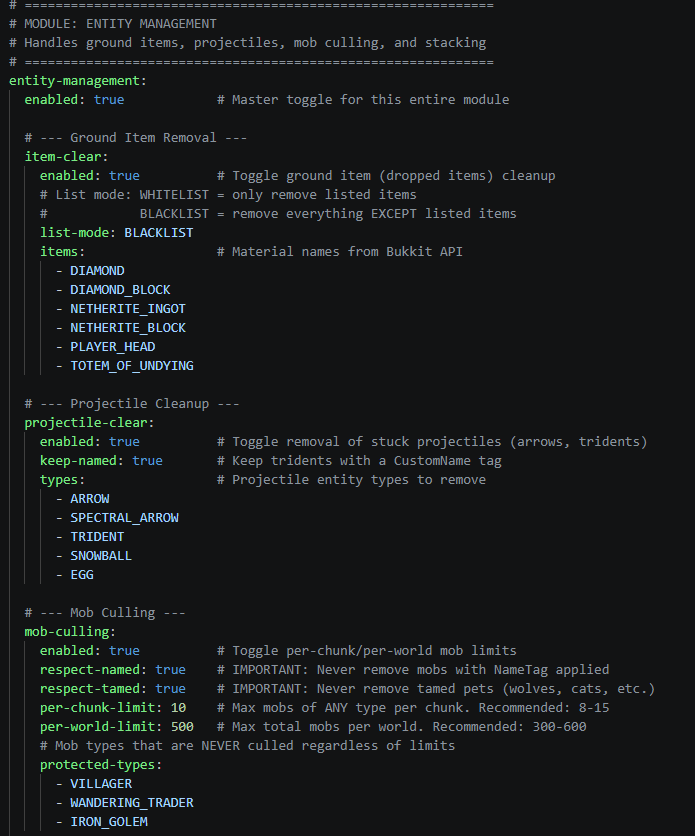
Ground Item Cleanup
Supports:
- Whitelist mode
- Blacklist mode
- Valuable item protection
- Permission bypasses
Example protected items:
- Diamonds
- Netherite
- Totems
- Player heads
Projectile Cleanup
Removes lag-causing projectiles such as:
- Arrows
- Tridents
- Snowballs
- Eggs
- Spectral arrows
Supports preserving named tridents.
Mob Culling
Prevents mob overload by enforcing:
- Per-chunk limits
- Per-world limits
Can protect:
- Named mobs
- Tamed pets
- Villagers
- Iron golems
- Traders
Mob Stacking
Combines nearby mobs into optimized stacks.
Benefits:
- Lower entity count
- Better TPS
- Reduced CPU load
- Cleaner farms
Fully configurable stack radius and stack sizes.
Physics Optimization
Includes systems to reduce:
- Falling block lag
- Physics spam
- Excessive updates
- Redstone lag machines
Useful for:
- SMP servers
- Survival servers
- Factions
- Skyblock
- Large public servers
Anti-Lag Module
Advanced lag protection systems.
Includes:
- AI freezing during low TPS
- Garbage collection hints
- Chunk unloading
- Redstone clock detection
- Crash item protection
Bedrock Edition GUI Support
Integrated Floodgate compatibility.
Bedrock players can interact with menus and dashboards through forms.
Optional dependencies:
- Floodgate
- ProtocolLib
MiniMessage Support
All plugin messages support MiniMessage formatting.
Examples:
<gradient:#FF6B35:#FFD700>UltClearLagg</gradient>
<click:run_command:'/ucl tps'>Check TPS</click>
<hover:show_text:'Server TPS'>TPS</hover>
Supports:
- RGB colors
- Gradients
- Hover text
- Click events
- Formatting
- Animations
Commands
Main Command
/ucl
Aliases:
/clearlagg
/cl
Available Subcommands
TPS Monitor
/ucl tps
Displays:
- TPS
- MSPT
- RAM usage
- Performance statistics
Manual Cleanup
/ucl clear
Forces an immediate cleanup cycle.
Reload Configuration
/ucl reload
Reloads:
- config.yml
- messages.yml
Without restarting the server.
Kill Mobs
/ucl killmobs
Kills excessive mobs instantly.
Admin Dashboard
/ucl admin
Opens the administrative optimization dashboard.
Permissions
| Permission | Description | Default |
|---|---|---|
ultclearlagg.use |
Basic plugin usage | true |
ultclearlagg.admin |
Full admin access | op |
ultclearlagg.notify |
Receive cleanup warnings | true |
ultclearlagg.bypass.items |
Prevent dropped items from being cleared | false |
ultclearlagg.bypass.mobs |
Protect player tamed mobs | false |
Installation
Requirements
- Java 21+
- Paper 1.21+
- Purpur 1.21+
Recommended:
- Floodgate
- ProtocolLib
Setup Steps
- Download
UltClearLagg.jar - Place it inside your server
plugins/folder - Start the server
- Configure files inside:
/plugins/UltClearLagg/
- Restart or reload using:
/ucl reload
Configuration
World Filter
world-filter:
  mode: BLACKLIST
  worlds:
    - creative_world
    - minigames
Modes:
BLACKLIST= plugin works everywhere except listed worldsWHITELIST= plugin only works in listed worlds
Cleanup Schedule
cleanup-schedule:
  enabled: true
  interval: 300
  warnings:
    - 60
    - 30
    - 10
    - 5
This example:
- Runs cleanup every 5 minutes
- Warns players before cleanup
Item Protection
item-clear:
  list-mode: BLACKLIST
  items:
    - DIAMOND
    - NETHERITE_INGOT
BLACKLIST mode:
- Keeps listed items
- Removes everything else
WHITELIST mode:
- Removes only listed items
Mob Culling
mob-culling:
  per-chunk-limit: 10
  per-world-limit: 500
Prevents entity overload automatically.
Mob Stacking
mob-stacking:
  enabled: true
  stack-radius: 5
  max-stack-size: 50
Combines nearby identical mobs.
Messages Configuration
All plugin messages are stored inside:
messages.yml
Features:
- MiniMessage support
- RGB colors
- Gradients
- Hover events
- Click events
- Placeholder support
Example:
warning: "<yellow>⚠ Cleanup in <red>{0}</red> seconds!"
Performance Recommendations
Small Servers (1-20 players)
cleanup-schedule:
  interval: 600
mob-culling:
  per-world-limit: 300
Medium Servers (20-80 players)
cleanup-schedule:
  interval: 300
mob-culling:
  per-world-limit: 500
Large Servers (80+ players)
cleanup-schedule:
  interval: 180
mob-culling:
  per-world-limit: 800
Enable:
- Mob stacking
- AI freezing
- Chunk unloading
- Projectile cleanup
Included Systems
Core Systems
- CleanupTask
- TPSMonitor
- ModuleManager
- NotificationManager
- ConfigManager
- GUIManager
Modules
EntityModule
Handles:
- Item cleanup
- Projectile cleanup
- Mob culling
- Mob stacking
PhysicsModule
Handles:
- Physics lag reduction
- Falling block control
- Redstone optimization
WorldModule
Handles:
- Chunk management
- World cleanup
- Entity scans
AntiLagModule
Handles:
- AI freezing
- Emergency optimization
- Lag spike response
Safety Notes
Some settings can be aggressive.
Be careful when modifying:
- Hopper tick systems
- Mob limits
- Physics controls
- AI freezing
- Chunk unloading
Always:
- Backup your worlds
- Test on a local server first
- Increase limits slowly
- Monitor TPS after changes
Compatibility
Fully Supported
- Paper
- Purpur
- Pufferfish
Soft Dependencies
| Plugin | Purpose |
|---|---|
| Floodgate | Bedrock GUI support |
| ProtocolLib | Packet optimization features |
Technical Information
Built With
- Java
- Paper API
- Adventure API
- MiniMessage
API Version
api-version: '1.21'
Example Use Cases
Survival SMP
- Reduce farm lag
- Clear projectiles
- Prevent mob overflow
- Monitor TPS
Factions
- Stop cannon lag
- Reduce redstone abuse
- Clear entity spam
- Improve combat performance
Skyblock
- Limit mob grinders
- Stack entities
- Reduce hopper lag
- Control chunk overload
Minigames
- Fast cleanup cycles
- Projectile removal
- Better arena performance
Troubleshooting
Plugin Not Working
Check:
- Server version is 1.21+
- Java version is correct
- Plugin loaded successfully
- Config syntax is valid
TPS Still Low
Possible causes:
- Too many plugins
- Massive redstone systems
- Large mob farms
- World corruption
- Insufficient RAM
Try:
- Lowering entity limits
- Enabling mob stacking
- Reducing view distance
- Using Paper/Purpur
Bedrock GUI Not Opening
Install:
- Floodgate
Then restart the server.
Developer Information
Main Package
com.ultclearlagg
Important Classes
| Class | Purpose |
|---|---|
UltClearLagg |
Main plugin bootstrap |
CleanupTask |
Cleanup scheduler |
TPSMonitor |
Performance monitor |
CommandHandler |
Command system |
NotificationManager |
Warning notifications |
GUIManager |
Inventory GUIs |
AdminDashboard |
Admin GUI |
BedrockFormHandler |
Bedrock forms |
Credits
Created by:
geturplugins
Discord:
https://discord.gg/xctckUQukB
Support
Need help?
Join the Discord server for:
- Bug reports
- Support
- Suggestions
- Updates
- Feature requests
Discord:
https://discord.gg/xctckUQukB
Showcase video :-
Final Notes
UltClearLagg is designed for server owners who want a modern, configurable, and aggressive optimization solution without sacrificing important gameplay systems.
Whether you're running:
- SMPs
- Factions
- Skyblock
- Lifesteal
- Minigames
- Public networks
UltClearLagg provides the tools needed to keep your server smooth and stable under heavy load.
- Edition: Minecraft Java
- File type: .jar
- Minecraft versions listed: 1.21, 1.21.1, 1.21.2
- How to install: Install the matching mod loader (Forge, Fabric or NeoForge) for your Minecraft version. → Download the .jar. → Put it in the .minecraft/mods folder and launch that loader profile.
- Where to get it: Opens on Modrinth — not every file is mirrored on our own servers.
Install steps are the general flow for this file type — How to install Minecraft Java mods & modpacks walks through it step by step.
- Ships as UltClearLagg.jar — drop this file into the mods folder
- Download size: 202 KB
- Download link checked 20 Aug 2026 — working
These come from our own check of the pack file, not from the source page.