
Discord Vote Rewards
A powerful Minecraft plugin that connects your server with Discord voting rewards. Players can vote using your Discord bot and instantly receive in-game…
⬇ Download on Modrinth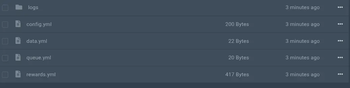
🤖 Discord Vote Rewards
A powerful Minecraft plugin that connects your server with Discord voting rewards system.
Players can vote using your Discord bot and instantly receive in-game rewards like items, commands, keys, money, ranks, and more.
✨ Features
- 🤖 Discord Bot Integration (JDA)
- 🎁 Custom Vote Rewards System
- ⚔️ Save Held Item as Reward
- 📂 Auto Config Folder Generation
- 🛠️ Easy Setup & Lightweight Design
- ⚡ Async & Performance Optimized
- 📦 Works on Modern Minecraft Versions (1.21+)
- 💬 Fully Customizable Messages
- 🔐 Secure Vote Validation System
- 📊 Offline Reward Support
📜 Commands
Minecraft
/votebot additem <id>
Save the item in your hand as a vote reward.
/votebot reload
Reload plugin configuration.
/votebot give <player>
Give rewards manually.
Discord
/vote
Claim vote reward via Discord bot (channel restricted).
🚀 Setup
Install
- Put plugin
.jarin/plugins - Start server once
Config
Open:
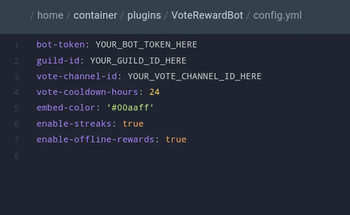
/plugins/VoteRewardBot/config.yml
Fill:
bot-token: "YOUR_DISCORD_BOT_TOKEN"
guild-id: "YOUR_SERVER_ID"
vote-channel-id: "DISCORD_CHANNEL_ID"
vote-cooldown-hours: 24
Bot
Go to Discord Developer Portal
https://discord.com/developers/applicationsCreate application
Add bot → copy token
Enable intents:
- MESSAGE CONTENT INTENT
- SERVER MEMBERS INTENT (optional)
Invite
OAuth2:
- Scopes:
bot,applications.commands - Permissions:
- Send Messages
- Embed Links
- Use Slash Commands
Start
- Restart server
- Bot connects automatically
/voteworks
🎮 Flow
- Player runs
/vote - Bot asks Minecraft name
- Plugin checks cooldown
- Reward given or queued
- Delivered in-game
🎯 Use
- Survival
- Lifesteal
- SMP
- PvP
- Economy
- Crates
💎 Info
Automates Discord voting and reward delivery with a fast, secure, and fully customizable system.
- Edition: Minecraft Java
- File type: .jar
- Minecraft versions listed: 1.21, 1.21.1, 1.21.2
- How to install: Install the matching mod loader (Forge, Fabric or NeoForge) for your Minecraft version. → Download the .jar. → Put it in the .minecraft/mods folder and launch that loader profile.
- Where to get it: Opens on Modrinth — not every file is mirrored on our own servers.
Install steps are the general flow for this file type — How to install Minecraft Java mods & modpacks walks through it step by step.
- Ships as VoteRewardBot-1.0.0.jar — drop this file into the mods folder
- Download size: 19.7 MB
- Download link checked 13 Sept 2026 — working
These come from our own check of the pack file, not from the source page.