
 Invisible jukeboxes with custom musics to enhance your lobby/spawn experience.
🎶 AstralMusic
With AstralMusic, you can place invisible jukeboxes in specific areas such as lobbies, spawns, hubs, or waiting zones. These jukeboxes automatically play custom music tracks in a loop, creating a polished and atmospheric environment for players.
All music is loaded via a resource pack (an example resource pack is included with the plugin), allowing full customization of sounds and playlists.
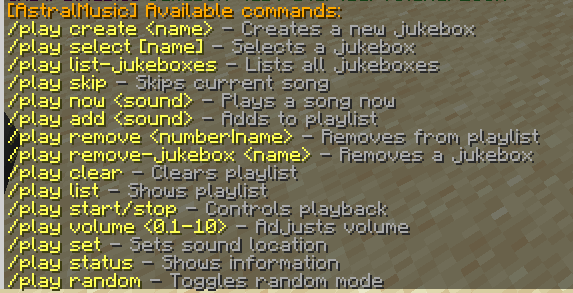
Commands:
Tutorial:
✨ Features:
- Invisible jukeboxes placed anywhere in the world
- Custom music playback using resource packs
- Looping playlists for continuous background music
- Per-jukebox volume control
- Random and sequential playback modes
- Commands to start, stop, skip, and manage songs
- Perfect for lobbies, spawns, hubs, and waiting areas
AstralMusic requires a resource pack to play custom sounds. An example resource pack is included with the plugin (witch contain copyrights), showing the correct structure and configuration for custom music.
Note: A free license key from our Discord is required to use this plugin. https://discord.gg/edzKrjZ8hf
Support Need our help? Join our Discord: byebye's Community
- Edition: Minecraft Java
- File type: .jar
- Minecraft versions listed: 1.16.5, 1.17, 1.17.1
- How to install: Install the matching mod loader (Forge, Fabric or NeoForge) for your Minecraft version. → Download the .jar. → Put it in the .minecraft/mods folder and launch that loader profile.
- Where to get it: Opens on Modrinth — not every file is mirrored on our own servers.
Install steps are the general flow for this file type — How to install Minecraft Java mods & modpacks walks through it step by step.
- Ships as AstralMusic-1.2-SNAPSHOT.jar — drop this file into the mods folder
- Download size: 36 KB
- Download link checked 12 Sept 2026 — working
These come from our own check of the pack file, not from the source page.