
ModsJava
FurnaceUpgrades
Java mod listed for Minecraft 1.20–1.21. Downloads from the MC Java Mods app on Android.
Upgrade furnaces with materials to boost smelting speed. Features holograms, particle effects, and 12 languages.
⬇ Download on Modrinth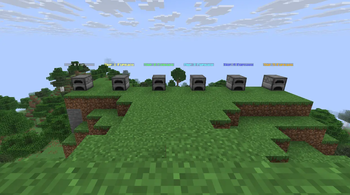
FurnaceUpgrades
Tired of slow smelting? Transform your ordinary furnaces into powerful, self-improving machines!
Features
- Speed Up Smelting - Upgrade furnaces by clicking with materials. Each tier increases speed up to 1.8x at max level!
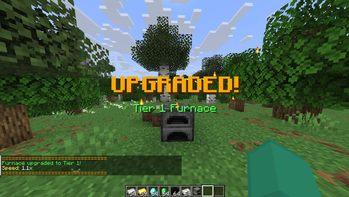
- Hologram Display - Every upgraded furnace shows a floating hologram with tier, speed, and requirements.
- Particle Effects - Stunning fireworks and particles on every upgrade.
- 12 Languages - English, Czech, German, French, Spanish, Italian, Portuguese, Polish, Russian, Japanese, Korean, Chinese.
- Persistent Data - Break and pick up upgraded furnaces with SHIFT + PICKAXE - tiers are preserved!
- Works Everywhere - Perfect for Skyblock, survival, or any server type.
How to Use
- Left-click furnace with materials to upgrade
- SHIFT + Left-click to break upgraded furnace (pickaxe required)
- Tier and speed are saved in the item
Commands
- /fu reload - Reload configuration
Permissions
  - furnaceupgrades.upgrade (all players) - Upgrade furnaces
  - furnaceupgrades.reload (op only) - Reload config
  - furnaceupgrades.see (all players) - View holograms
Upgrade Tiers
- Tier 1: 5x Iron Ingot -> 1.1x speed
- Tier 2: 5x Gold Ingot -> 1.2x speed
- Tier 3: 5x Diamond -> 1.4x speed
- Tier 4: 5x Emerald -> 1.6x speed
- Tier 5: 5x Obsidian -> 1.8x speed
Requirements
- Paper or Spigot server
- Minecraft 1.20.4+
- Java 21+
All settings fully customizable in config.yml.
Quick facts
- Edition: Minecraft Java
- File type: .jar
- Minecraft versions listed: 1.20.1, 1.20.2, 1.20.3
- How to install: Install the matching mod loader (Forge, Fabric or NeoForge) for your Minecraft version. → Download the .jar. → Put it in the .minecraft/mods folder and launch that loader profile.
- Where to get it: Opens on Modrinth — not every file is mirrored on our own servers.
Install steps are the general flow for this file type — How to install Minecraft Java mods & modpacks walks through it step by step.
File checked by MCModsHub
- Ships as FurnaceUpgrades-1.0.jar — drop this file into the mods folder
- Download size: 26 KB
- Download link checked 13 Nov 2026 — working
These come from our own check of the pack file, not from the source page.