About
This plugin automatically logs every message written on any sign in-game, including all standard signs and hanging signs across supported Minecraft versions. Whenever a player places, edits, or updates a sign, the plugin captures the full text and logs it directly to the server console in real time.
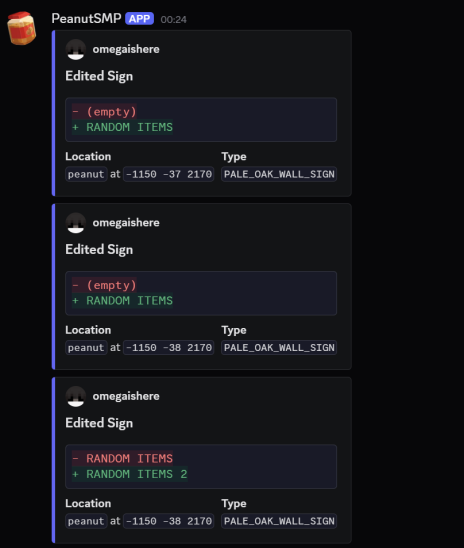
It also includes built-in Discord webhook support, allowing all sign activity to be mirrored to a Discord channel for moderation and monitoring purposes. Webhook logs can include useful information such as;
- Player Name,
- World Name,
- Coords of the sign,
- Sign type (oak sign, hanging sign, etc.),
- Full sign text/content
- Timestamp of the action
The plugin is designed for moderation, staff logging, and anti-abuse purposes, making it easy to track inappropriate sign usage, advertisements, hidden messages, or player activity across the server.
Features
- Supports all sign variants, including hanging signs.
- Real-time console logging.
- Discord webhook integration.
- Clean and configurable message formatting.
- Lightweight and optimized performance.
- Compatible with modern Minecraft versions. (1.21.x+)
- Detailed logging with location and player information.
Default Configuration
# Messages format in console
console:
  edited: "<player> edited <sign> in <world> at X=<x> Y=<y> Z=<z>: [<old>] -> [<new>]"
  removed: "<player> removed <sign> in <world> at X=<x> Y=<y> Z=<z>: [<front>] [<back>]"

webhook:
  enabled: false
  url: https://discord.com/api/webhooks/...
  edited:
    embeds:
      - title: Edited Sign
        description: |-
          ```diff
          - <old>
          + <new>
          ```
        fields:
          - name: Location
            value: "`<world>` at `<x> <y> <z>`"
            inline: true
          - name: Type
            value: "`<sign>`"
            inline: true
        author:
          name: <player>
          icon_url: https://mc-heads.net/avatar/<player>
        color: 6514417
  removed:
    embeds:
      - title: Removed Sign
        fields:
          - name: Front
            value: <front>
            inline: true
          - name: Back
            value: <back>
            inline: true
          - name: Location
            value: "`<world>` at `<x> <y> <z>`"
            inline: false
          - name: Type
            value: "`<sign>`"
            inline: false
        author:
          name: <player>
          icon_url: https://mc-heads.net/avatar/<player>
        color: 15680580

empty:
  text: (empty)
  player: (Unknown)
Commands
- /peanut-sign-logs reload - Reloads config and messages.
- /peanut-sign-logs version - Shows plugin version.
Permissions
peanutsignlogs.admin - Access to reload the plugin, and view the plugin version.
Support
If you encounter any issues, bugs, or need assistance while using the plugin, feel free to join our Discord server. Support is available for setup help, configuration questions, troubleshooting, and general plugin assistance.
- Edition: Minecraft Java
- File type: .jar
- Minecraft version listed: 26.1.2
- How to install: Install the matching mod loader (Forge, Fabric or NeoForge) for your Minecraft version. → Download the .jar. → Put it in the .minecraft/mods folder and launch that loader profile.
- Where to get it: Opens on Modrinth — not every file is mirrored on our own servers.
Install steps are the general flow for this file type — How to install Minecraft Java mods & modpacks walks through it step by step.
- Ships as peanut-sign-logs-v3-26.1.2.jar — drop this file into the mods folder
- Download size: 23 KB
- Download link checked 21 Aug 2026 — working
These come from our own check of the pack file, not from the source page.