
SweetInventory
A Minecraft Menu Plugin
Default configurations are in Chinese. Check localization repository for English or other language.
And I am sorry about that the wiki is only Chinese available right now. In the future, we may translate it to English.
Introduction
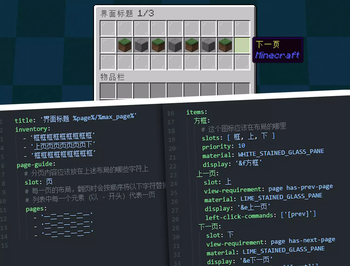
A menu plugin built based on the PluginBase menu module. It uses an intuitive layout format similar to the example below:
inventory:
- 'ooooooooo'
- 'upppppppd'
- 'ooooooooo'
# "o" means frame icon
# "u" means "up", aka previous-page button
# "d" means "down", aka next-page button
# "p" means page content
Icons can have "display conditions", "click conditions", "click actions", and more. It supports various click types such as Left Click, Right Click, Shift + Left Click, Shift + Right Click, Q, and Ctrl + Q.
For more details, see the documentation on MCIO Plugins.
Features
- Uses a more intuitive layout design
- Supports pagination, allowing a single menu to display multiple pages of content
- Supports registering custom commands for menus, effective immediately after reloading
- Supports detecting file save operations and automatically reloading menus upon saving
- Rich condition and display priority mechanisms to satisfy simple use cases
- Supports expressions in conditions such as
%vault_eco_balance% >= 100
Commands
The root command is /sweetinventory, with aliases /sinv, /si, or /menu
Parameters wrapped in <> are required, and parameters wrapped in [] are optional.
| Command | Description | Permission |
|---|---|---|
/menu open <menu> |
Opens the specified menu. Requires permission to open the menu | sweet.inventory.open |
/menu open <menu> - [..menu arguments] |
Opens the specified menu. Requires permission to open the menu | sweet.inventory.open |
/menu open <menu> <player> [..menu arguments] |
Opens the specified menu for a player. The target player does not need permission to open the menu | sweet.inventory.open.other |
/menu list |
View the list of menus | sweet.inventory.list |
/menu reload |
Reload the plugin configuration files | OP/Console |
Opening a menu requires the permission sweet.inventory.open.menu.<menu>
- Edition: Minecraft Java
- File type: .jar
- Minecraft versions listed: 1.8, 1.8.1, 1.8.2
- How to install: Install the matching mod loader (Forge, Fabric or NeoForge) for your Minecraft version. → Download the .jar. → Put it in the .minecraft/mods folder and launch that loader profile.
- Where to get it: Opens on Modrinth — not every file is mirrored on our own servers.
Install steps are the general flow for this file type — How to install Minecraft Java mods & modpacks walks through it step by step.
- Ships as SweetInventory-1.0.6.jar — drop this file into the mods folder
- Download size: 1.5 MB
- Download link checked 22 Aug 2026 — working
These come from our own check of the pack file, not from the source page.