
hEndermanFix
Java mod listed for Minecraft 1.16–26.x. Downloads from the MC Java Mods app on Android.
Automatic Enderman targeting fix for Paper servers that keeps Endermen focused on nearby Endermites with configurable radius, AI options and lightweight…
⬇ Download on Modrinth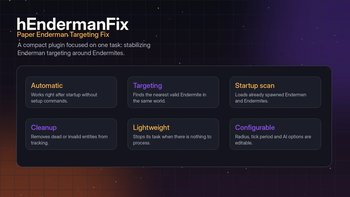
hEndermanFix
hEndermanFix is a lightweight Paper/Purpur plugin that fixes Enderman targeting behavior around Endermites.
The plugin automatically tracks Endermen and Endermites, finds the nearest valid Endermite within a configured radius, and keeps Endermen targeting it. It works automatically after startup and does not require commands, permissions, databases or external plugin dependencies.
Overview
hEndermanFix has one focused job: keeping Endermen properly locked on nearby Endermites.
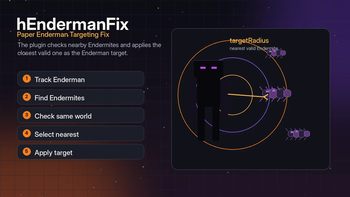
When an Endermite appears, the plugin registers it and checks nearby Endermen. When an Enderman appears, the plugin registers it and searches for the closest valid Endermite in the same world. If a valid Endermite is found, the plugin sets it as the Enderman target.
The plugin also scans already loaded entities on startup, so existing Endermen and Endermites can be handled after a server restart.
Features
- Automatic Enderman target fixing
- Endermite tracking
- Enderman tracking
- Startup entity loading
- Nearest Endermite selection
- Configurable target radius
- Configurable check interval
- Configurable missed-check limit
- Optional Endermite player-spawned marking
- Optional AI forcing for Endermen
- Optional aware-state forcing for Endermen
- Automatic cleanup of invalid entities
- No commands required
- No permissions required
- No database required
- No external plugin dependencies
Targeting
The plugin keeps a lightweight runtime list of tracked Endermen and Endermites.
During each check cycle, hEndermanFix:
- Verifies that the Enderman is still valid.
- Searches for the nearest valid Endermite.
- Checks that the Endermite is in the same world.
- Checks the configured target radius.
- Forces AI and aware state if enabled.
- Sets the Endermite as the Enderman target.
- Removes the Enderman from tracking after too many missed checks.
The repeating task stops automatically when there are no tracked Endermen left.
Config
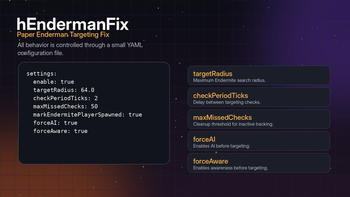
Default configuration:
settings:
  enable: true
  targetRadius: 64.0
  checkPeriodTicks: 2
  maxMissedChecks: 50
  markEndermitePlayerSpawned: true
  forceAI: true
  forceAware: true
Options
| Option | Description |
|---|---|
settings.enable |
Enables or disables the plugin logic |
settings.targetRadius |
Maximum search radius for nearby Endermites |
settings.checkPeriodTicks |
How often tracked Endermen are checked |
settings.maxMissedChecks |
How many missed checks are allowed before an Enderman is removed from tracking |
settings.markEndermitePlayerSpawned |
Marks tracked Endermites as player-spawned |
settings.forceAI |
Forces Enderman AI to enabled before targeting |
settings.forceAware |
Forces Enderman aware state to enabled before targeting |
Commands
hEndermanFix has no commands.
The plugin works automatically through entity tracking and configuration.
Permissions
hEndermanFix has no permissions.
No player or administrator permissions are required.
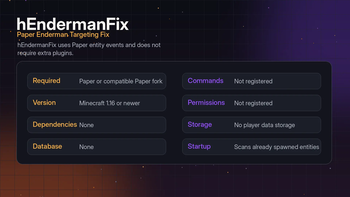
Requirements
| Requirement | Status |
|---|---|
| Paper or a compatible Paper fork | Required |
| Minecraft 1.16 or newer | Required |
| PlaceholderAPI | Not required |
| Vault | Not required |
| Database | Not required |
Paper or a compatible Paper fork is required because the plugin uses Paper entity add and remove events.
The plugin is compiled for Java 8 bytecode. Use the Java version required by your Minecraft server version.
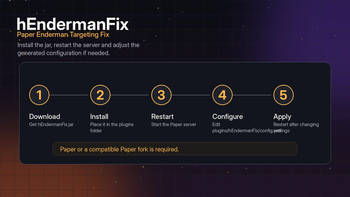
Install
- Place
hEndermanFix.jarinto thepluginsfolder. - Restart the server.
- Open the plugin folder:
plugins/hEndermanFix/
- Edit
config.ymlif needed. - Restart the server after changing the configuration.
Notes
- The plugin starts automatically when the server enables it.
- There is no reload command.
- A server restart is recommended after editing the configuration.
- Lower
checkPeriodTicksvalues make checks run more often. - Higher
targetRadiusvalues increase the search area. - The plugin does not change mob drops, mob caps, spawning rules or world generation.
- Edition: Minecraft Java
- File type: .jar
- Minecraft versions listed: 1.16, 1.16.1, 1.16.2
- How to install: Install the matching mod loader (Forge, Fabric or NeoForge) for your Minecraft version. → Download the .jar. → Put it in the .minecraft/mods folder and launch that loader profile.
- Where to get it: Opens on Modrinth — not every file is mirrored on our own servers.
Install steps are the general flow for this file type — How to install Minecraft Java mods & modpacks walks through it step by step.
- Ships as hEndermanFix.jar — drop this file into the mods folder
- Download size: 11 KB
- Download link checked 24 Oct 2026 — working
These come from our own check of the pack file, not from the source page.